Black plate (181,1)
qOperating tips for MP3
NOTE
Supply of this product only conveys a license
for private, non-commercial use and does not
convey a license nor imply any right to use this
product in any commercial (i.e. revenue-
generating) real time broadcasting (terrestrial,
satellite, cable and/or any other media),
broadcasting/streaming via the Internet,
intranets and/or other networks or in other
electronic content distribution systems, such as
pay-audio or audio-on-demand applications.
An independent license for such use is
required. For details, please visit
http://www.mp3licensing.com.
l
This audio system handles MP3 files
that have been recorded on CD-R/CD-
RW/CD -ROMs. Discs that have been
recorded using the following formats
can be played:
l
ISO 9660 level 1
l
ISO 9660 level 2
l
Joliet extended format
l
Romeo extended format
l
This unit handles MP3 files
conforming to the MP3 format
containing both header frames and data
frames.
l
This unit can play multi-session
recorded discs that have up to 40
sessions.
l
This unit can play MP3s with sampling
frequencies of 8/11.025/12/16/22.05/
24/32/44.1/48 kHz.
l
This unit can play MP3 files that have
been recorded in bit rates of 8 kbps to
320 kbps. Nonetheless, to insure
enjoyment of music with consistent
sound quality, it is recommended to use
discs that have been recorded at a bit
rate of 128 kbps or more.
l
If a disc has both music data (CD-DA)
and MP3 files, playback of the two file
types differs depending on how the
disc was recorded.
l
Packet written discs cannot be played
on this unit.
l
This unit does not play CDs recorded
using MP3i (MP3 interactive), MP3
PRO and RIFF MP3 formats.
About folders and files
l
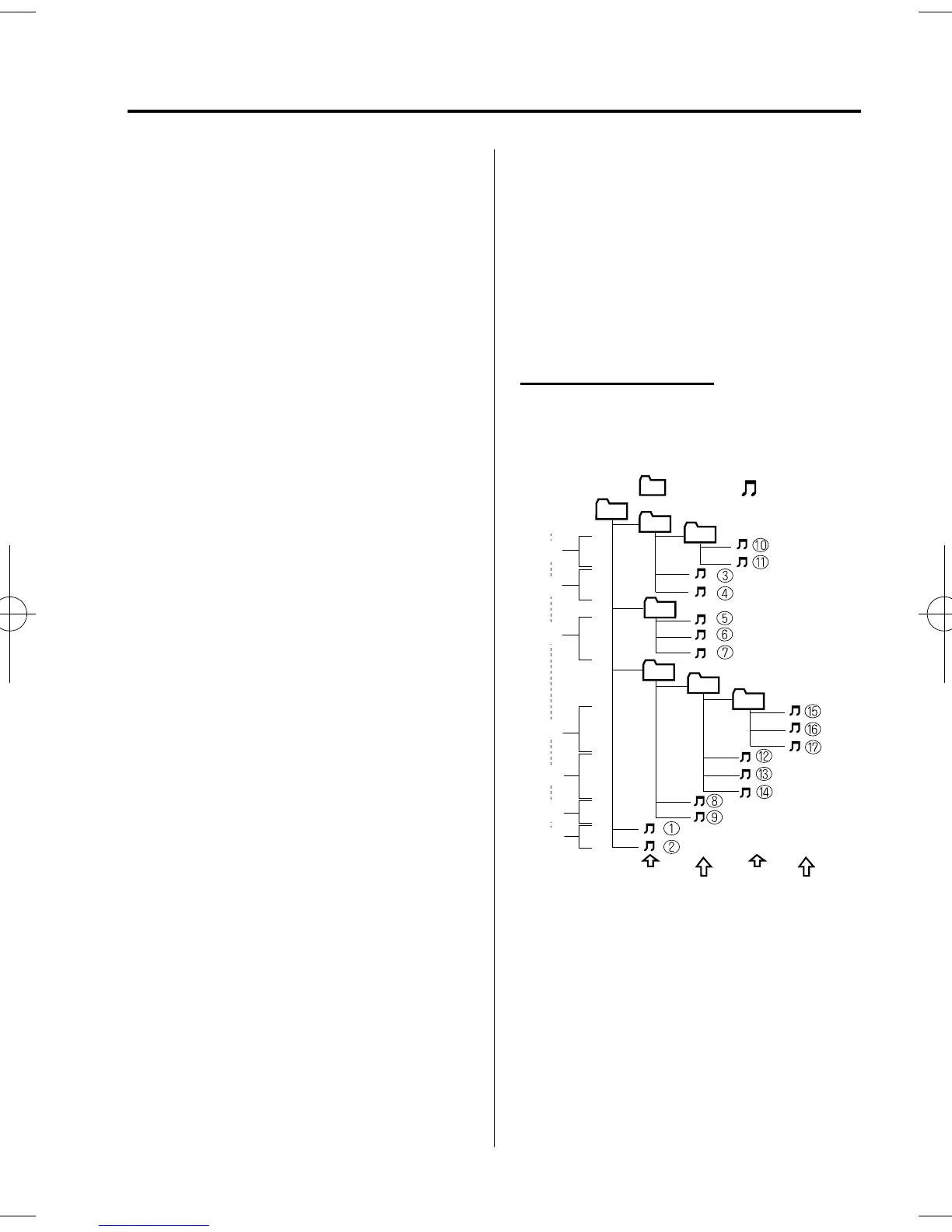
The arrangement and playing order of a
recorded disc containing MP3 files is
as follows:
05
01
02
04
03
07
06
1
7
5
2
3
6
4
Folder
No.
Level1
Level2
Level3
Playback may not occur in the above
hierarchy depending on the audio unit.
Level4
: Track (File)
: Folder
l
The folder order is automatically
assigned and this order cannot be
optionally set.
l
Any folder without an MP3 file will be
ignored. (It will be skipped and the
folder number will not be displayed.)
Interior Comfort
Audio System
6-15
Mazda2_8DB3-EC-13G_Edition4 Page181
Wednesday, June 4 2014 10:31 AM
Form No.8DB3-EC-13G



 To Next Page