Black plate (194,1)
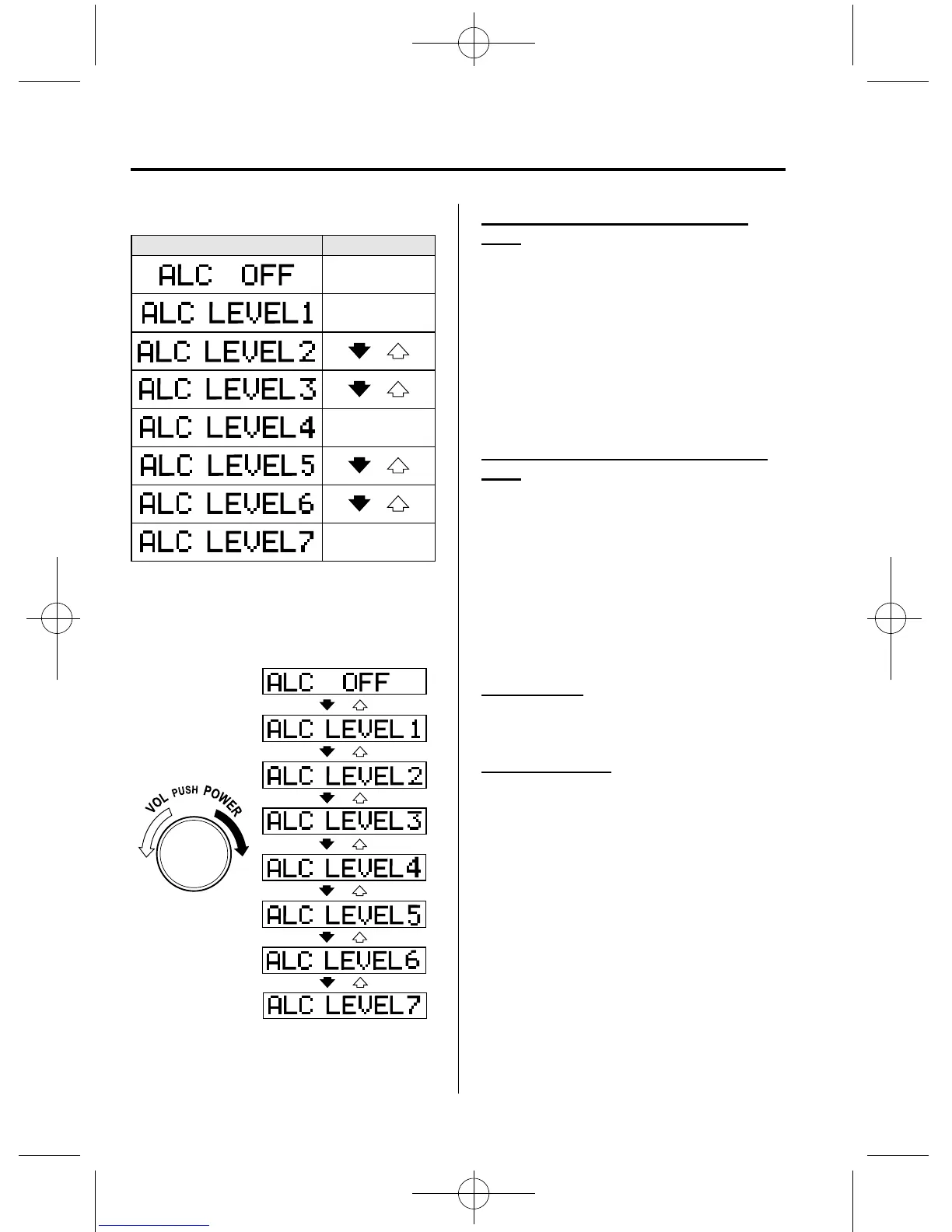
Select the desired ALC mode.
Mode Volume change
No change
Minimum
Medium
Maximum
Turn the audio control dial to select ALC
OFF or ALC LEVEL1―7 modes. The
selected mode will be indicated.
Setting RPT (CD/USB/iPod Repeat
Play)
Repeated playback of the track currently
being played can be set on or off during
playback of the CD/USB/iPod.
Refer to Operating the Compact Disc
(CD) Player on page 6-32.
Refer to How to use USB mode on page
6-42.
Refer to How to use iPod mode on page
6-46.
Setting RDM (CD/USB/iPod Random
Play)
Random playback of tracks on a CD/
USB/iPod can be set on or off during
playback of the CD/USB/iPod.
Refer to Operating the Compact Disc
(CD) Player on page 6-32.
Refer to How to use USB mode on page
6-42.
Refer to How to use iPod mode on page
6-46.
BEEP setting
The beep-sound when operating the audio
system can be set on or off.
Time adjustment
Rotating the audio control dial switches
the display between 12 and 24-hour clock
time (page 6-28).
6-26
Interior Comfort
Audio System
Mazda2_8CL7-EA-12H_Edition1 Page194
Monday, June 18 2012 1:49 PM
Form No.8CL7-EA-12H



 To Next Page