4
–
98
When Driving
i-ACTIVSENSE
How to Set the Speed
1. Adjust th-e vehicle speed to the desired
setting using the accelerator pedal.
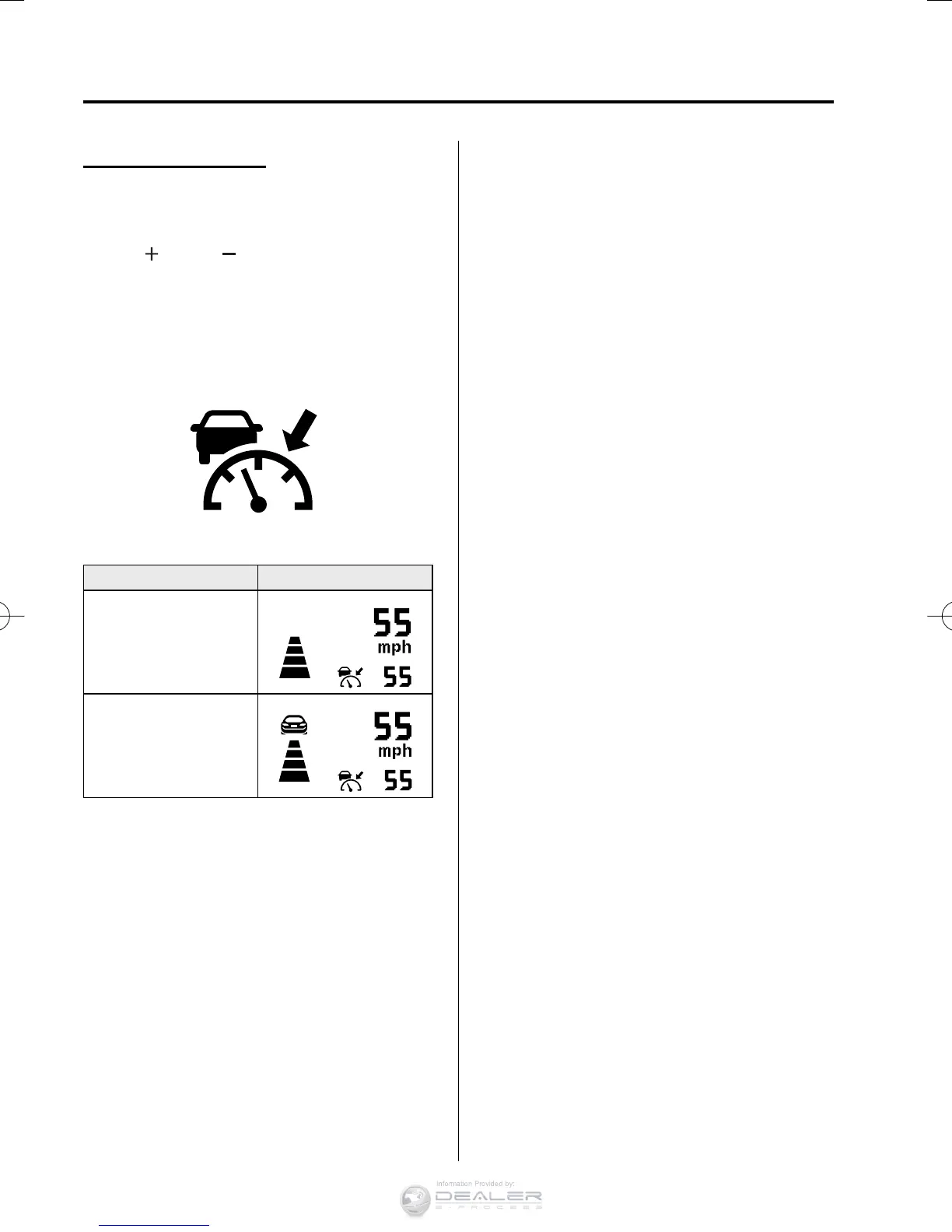
2. Headway control begins when the
SET
or SET switch is pressed. The
set speed and the inter-vehicle distance
display fi lled with white lines are
displayed. The Mazda Radar Cruise
Control (MRCC) indicator light (green)
is indicated simultaneously.
Travel status Display
During travel at constant
speed
During travel under
headway control
NOTE
y
If a vehicle ahead is detected while
traveling at a constant speed, the
vehicle-ahead indication is displayed
and headway control is performed.
Additionally, when a vehicle ahead is
no longer detected, the vehicle-ahead
indication turns off and the system
switches back to travel at constant
speed.
y
If you are driving the vehicle at a speed
faster than the set speed, headway
control on the vehicle ahead is not
possible Adjust the system to the desired
vehicle speed using the accelerator
pedal.
CX-38EH2-EA-15BEdition1.indb98CX-38EH2-EA-15BEdition1.indb98 2014/12/0910:51:022014/12/0910:51:02


 To Next Page