Black plate (198,1)
qOperating the In-Dash CD Changer
í
(Music CD player)
(Music CD/MP3 CD player)
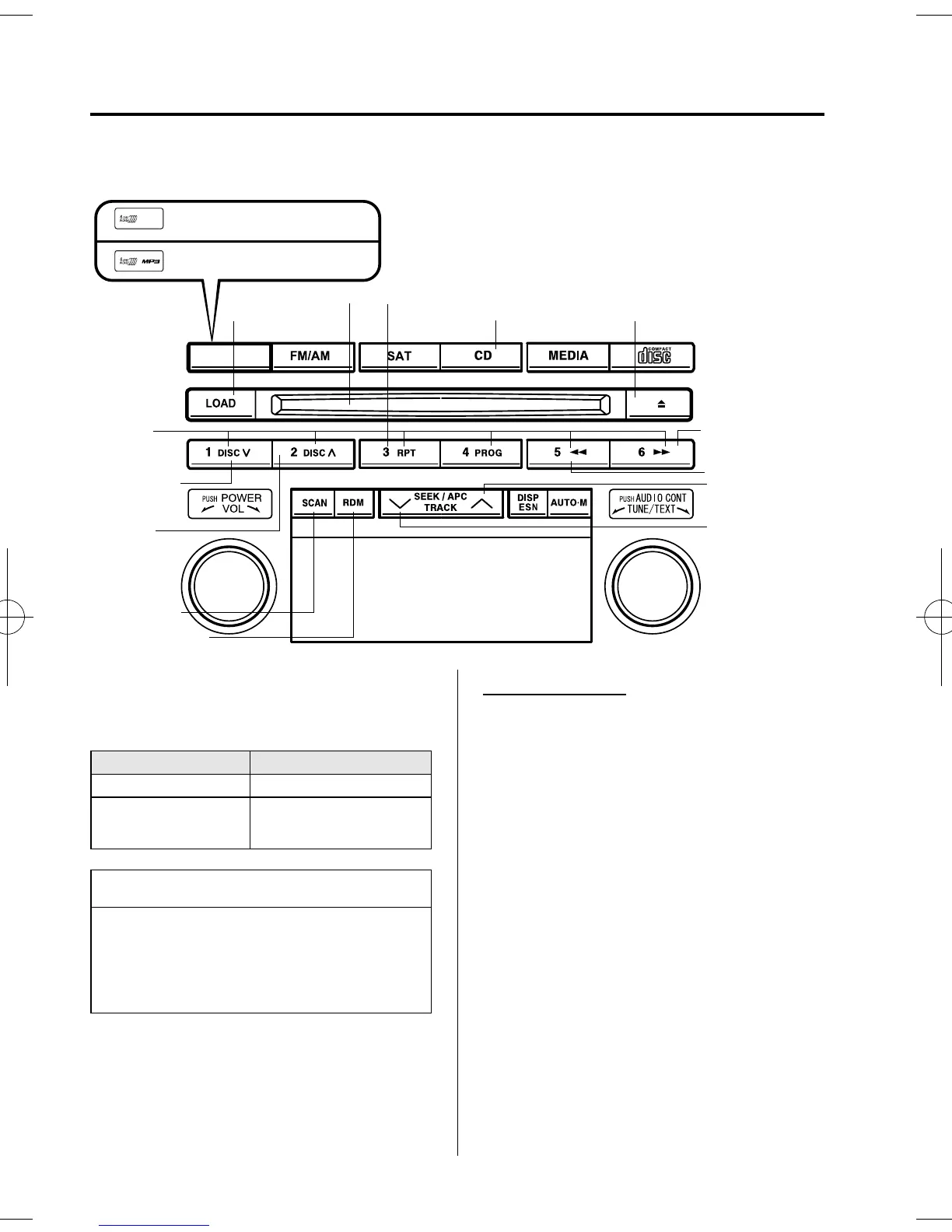
CD slot
CD play button CD eject button
Load button
Repeat button
Track up button
Reverse button
Disc up
button
Disc down
button
Fast-forward
button
Track down
button
Random button
Scan button
Channel
preset
buttons
There are two types of In-dash CD
changers. Check which In-dash CD
changer type you own.
Type Playable data
Music CD player · Music data (CD-DA)
Music CD/MP3 CD
player
· Music data (CD-DA)
· MP3 file
NOTE
If a disc has both music data (CD-DA)
and MP3 files, playback of the two file
types differs depending on how the disc
was record ed.
Inserting the CD
The CD must be label-side up when
inserting. The auto-loading mechanism
will set the CD and begin play. There wi ll
be a short lapse before play begins while
the player reads the digital signals on the
CD.
The disc number and the track number
will be displayed.
6-40
Interior Comfort
í
Some models.
Audio System
Mazda5_8U38-EA-05D_Edition1 Page198
Monday, March 28 2005 2:21 PM
Form No.8U38-EA-05D



 To Next Page