Black plate (366,1)
NOTE
Remove the battery cover before performing
battery maintenance.
CAUTION
Ø Do not use a tool which applies
excessive force such as a
screwdriver or pliers.
If excessive force is applied to the
clips, th ey could be damaged.
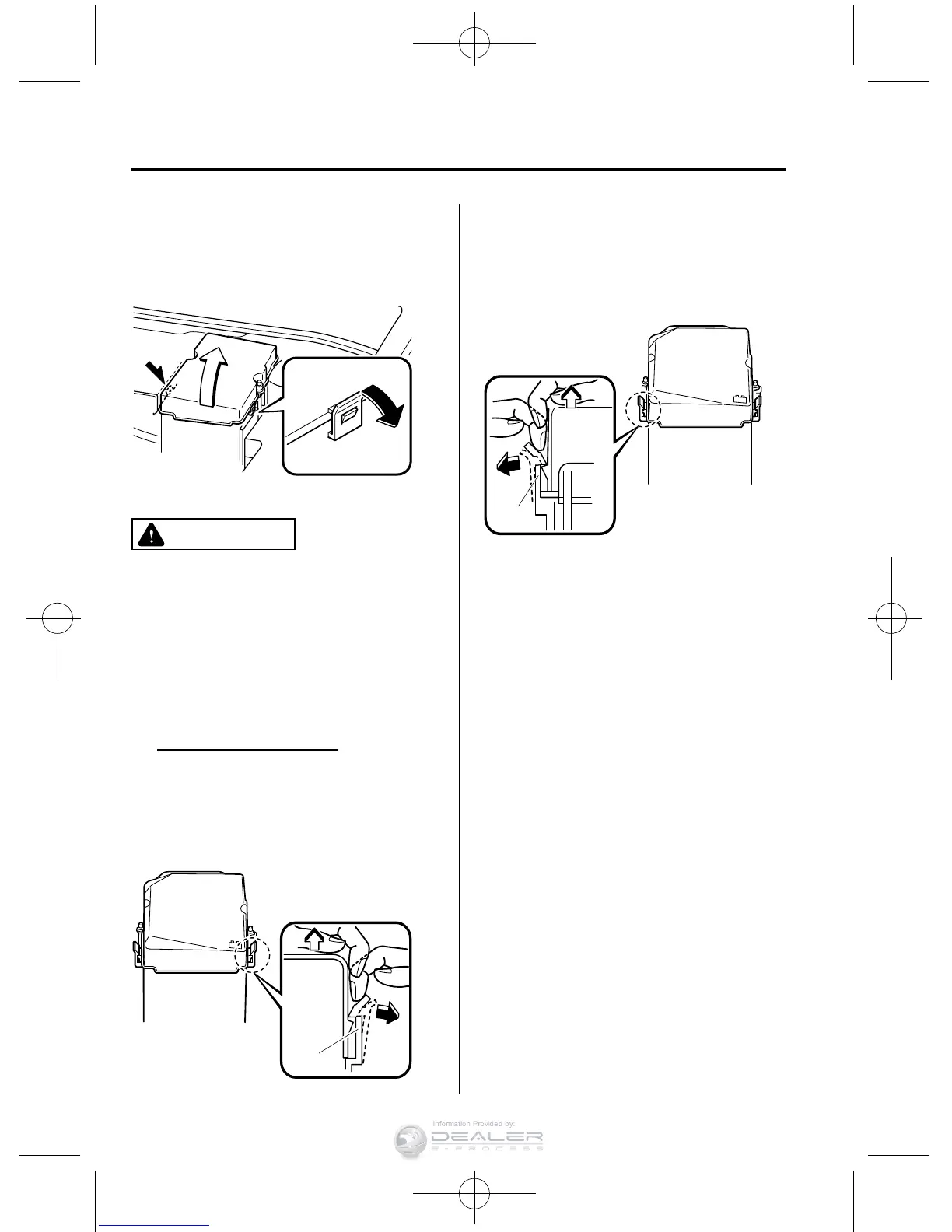
To prevent damaging the battery
cover, remove/install the battery
cover using the following
procedure.
Removing battery cover
1 Detach the clip facing the side of
the vehicle first and pull it outward
with your finger approx. 4 mm (0.2
in). Then, lift the cover slightly to
clear the lock.
Clip
2 Detach the clip facing the vehicle
interior first and pull it outward
with your finger approx. 4 mm (0.2
in). Then, lift the cover slightly to
clear the lock.
Clip
8-34
Maintenance and Care
Owner Maintenance
Mazda5_8DW4-EC-14H_Edition3 Page366
Friday, January 16 2015 4:27 PM
Form No.8DW4-EC-14H



 To Next Page