4
–
127
When Driving
i-ACTIVSENSE
Close Proximity Warning
If your vehicle rapidly closes in on the vehicle ahead because the vehicle applies the brakes
suddenly while you are travelling in headway control, the warning sound activates and
the brake warning is indicated in the display. Always verify the safety of the surrounding
area and depress the brake pedal while keeping a safer distance from the vehicle ahead.
Additionally, always keep a safer distance from the vehicles behind you.
Setting the System
To Activate
With adjustable speed limiter
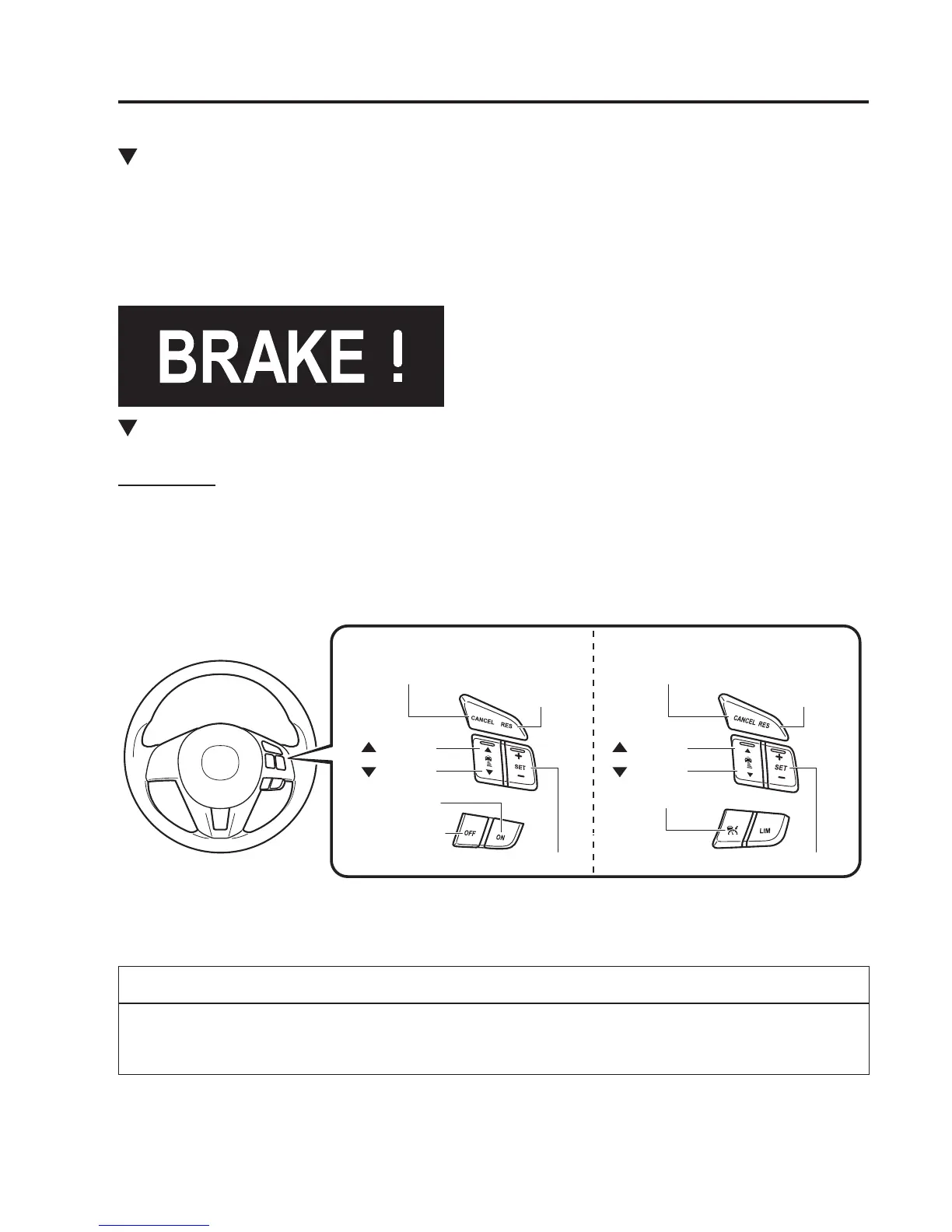
To activate the system, press the ON/OFF switch.
Without adjustable speed limiter
To activate the system, press the ON switch.
ON/OFF switch
OFF switch
ON switch
Without Adjustable Speed Limiter With Adjustable Speed Limiter
CANCEL switch CANCEL switch
Switch
Switch
RESUME
switch
RESUME
switch
Switch
Switch
SET+/SET- switch SET+/SET- switch
When the system is activated, the vehicle speed and the distance between vehicles while in
headway control can be set. The Mazda Radar Cruise Control (MRCC) indication is shown
in the active driving display.
NOTE
When the ignition is switched to ACC or OFF while the Mazda Radar Cruise Control
(MRCC) is ON, the Mazda Radar Cruise Control (MRCC) remains ON automatically.












 To Next Page