▼
Setting the System
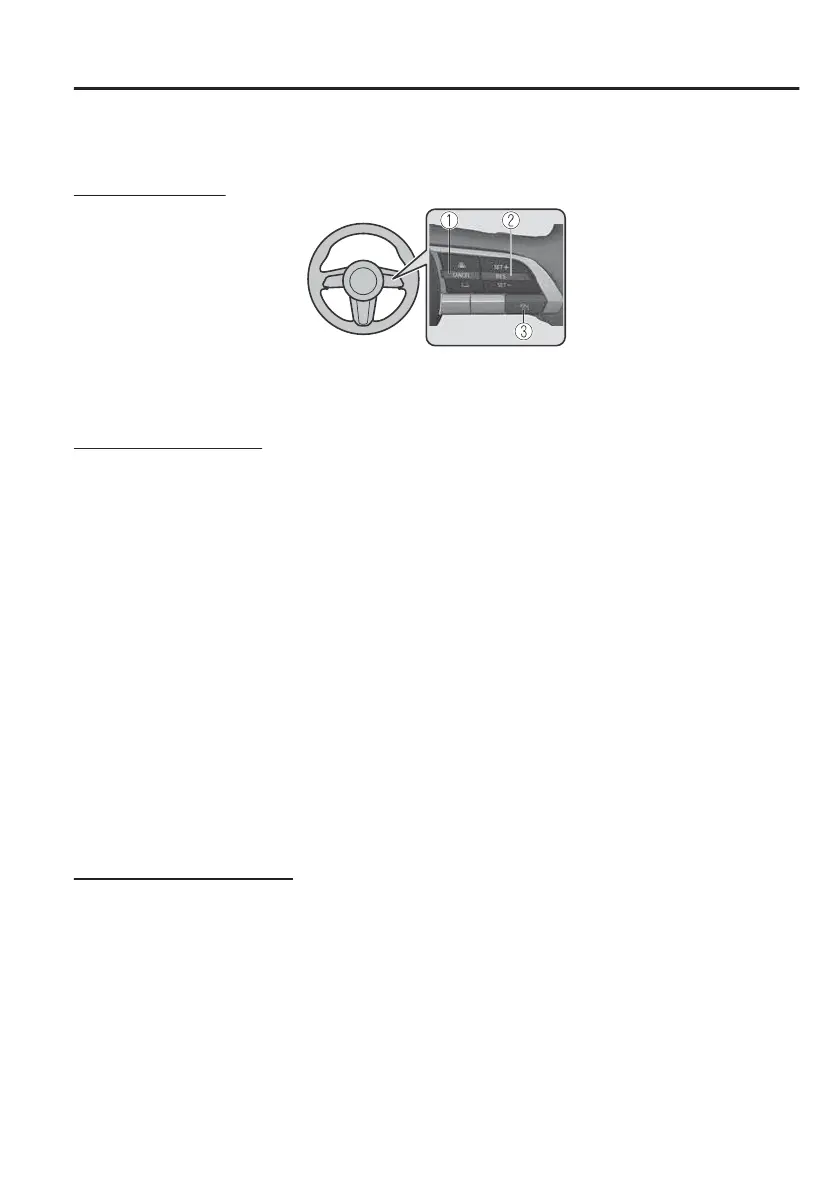
Operation switch
1. CANCEL switch
2. RES switch
3. MRCC switch
Operation conditions
The MRCC with Stop & Go function operates when all of the following conditions
are met.
x
The MRCC with Stop & Go function is on.
x
The selector lever is in the D position.
x
The parking brake is released.
x
All the doors are closed.
x
The driver's seat belt is fastened.
x
Vehicle speed is 0 to 140 km/h (0 to 87 mph)
NOTE
x
In the following cases, the MRCC with Stop & Go function system is cancelled
when the vehicle is travelling at 30 km/h (20 mph) or less and “Mazda Radar
Cruise Control Disabled Under 30 km/h” is displayed in the multi-information
display.
x
The Forward Sensing Camera (FSC) cannot detect target objects.
x
There is a problem with the stop hold control function.
x
There is a problem with the Electric Parking Brake (EPB).
Setting the vehicle speed
1. Press the MRCC switch to turn the system on.
2. Accelerate the vehicle until it reaches the desired speed using the accelerator
pedal and press the RES switch up (SET+) or down (SET) to set the speed.
NOTE
x
When the system is turned on, the MRCC standby indication (white) turns on and
the MRCC display indications are displayed on the multi-information display and
the active driving display.
When Driving
i-ACTIVSENSE
4-119



 To Next Page