x
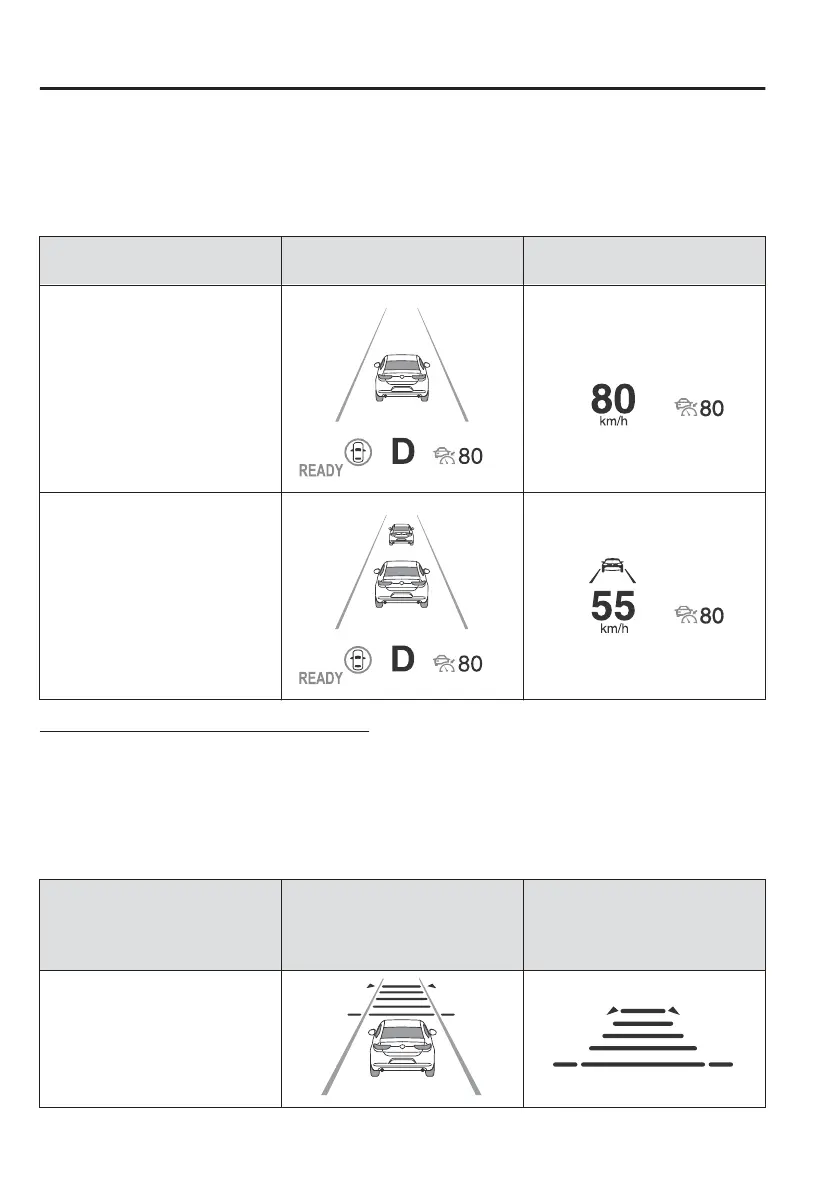
When the vehicle speed is set, the set vehicle speed is displayed on the displays
and the MRCC standby indication (white) changes to the MRCC set indication
(green).
x
The minimum speed setting is 30 km/h (19 mph).
Travel status
Indication on multi-information
display
Indication on active driving dis-
play
During travel at constant speed
During travel under headway
control
Setting the distance between vehicles
The distance between vehicles is set to a shorter distance by pressing the CANCEL
switch down, and to a longer distance by pressing the CANCEL switch up. The
distance between vehicles can be set to 4 levels: Long, medium, short, and
extremely short distance.
The distance between vehicles increases or decreases depending on the vehicle
speed.
Distance-between-vehicles
guideline
(at 80 km/h (50 mph) vehicle
speed)
Indication on multi-information
display
Indication on active driving dis-
play
*1
Long (about 50 m (164 ft))
When Driving
i-ACTIVSENSE
4-120



 To Next Page