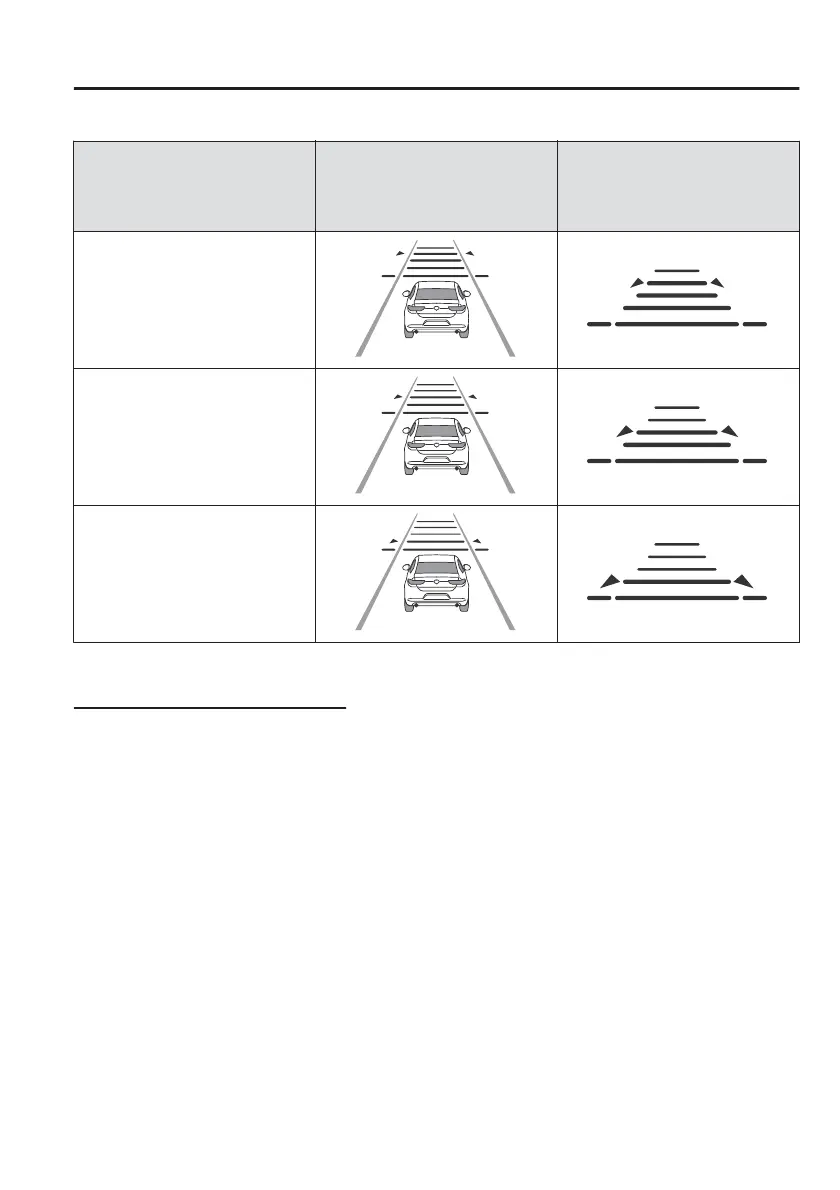
Distance-between-vehicles
guideline
(at 80 km/h (50 mph) vehicle
speed)
Indication on multi-information
display
Indication on active driving dis-
play
*1
Medium (about 40 m (131 ft))
Short (about 30 m (98 ft))
Extremely short (about 25 m (82
ft))
*
1 Displays a pop-up image in the active driving display only when the driver operates the switch.
Changing the set vehicle speed
NOTE
The system automatically provides more acceleration when operating the direction
indicator to switch to the passing lane. Drive with caution as your vehicle may be
too close to the vehicle ahead.
How to change the set vehicle speed using the RES switch
When the RES switch is pressed up (SET+), the vehicle accelerates, and when the
RES switch is pressed down (SET), the vehicle decelerates.
x
Press and release immediately: 1 km/h (1 mph)
x
Press and hold: 10 km/h (5 mph)
How to change the set vehicle speed using the accelerator pedal
Depress the accelerator pedal until the vehicle speed reaches the desired speed,
then press the RES switch up (SET+) or down
(SET)
and release the switch.
When Driving
i-ACTIVSENSE
4-121



 To Next Page