x
The brake lights turn on while the
brakes and stop hold control are
operating by the CTS control.
x
When any of the following
conditions is met, the CTS may not
be able to detect white (yellow) lane
lines or vehicles ahead correctly and
the CTS may not operate normally.
x
A condition under which the
Forward Sensing Camera (FSC)
cannot detect a target object is
met.
Refer to Forward Sensing Camera
(FSC) on page 4-74.
x
The Forward Sensing Camera (FSC)
cannot recognise the area in front
of the vehicle.
x
The visibility of white (yellow) lane
lines is poor.
x
There are multiple white (yellow)
lane lines.
x
There is a misleading line which
looks like a white (yellow) lane
line.
x
The distance to the vehicle ahead
is close.
x
The width of the vehicle lane is
narrow or wide.
x
A vehicle ahead is driving
erratically.
x
A vehicle ahead veers o course
from your vehicle's line of travel.
x
The vehicle is driven through an
intersection, a junction, or a fork in
the road.
▼
Cruising & Trac Support (CTS)
Display Indication
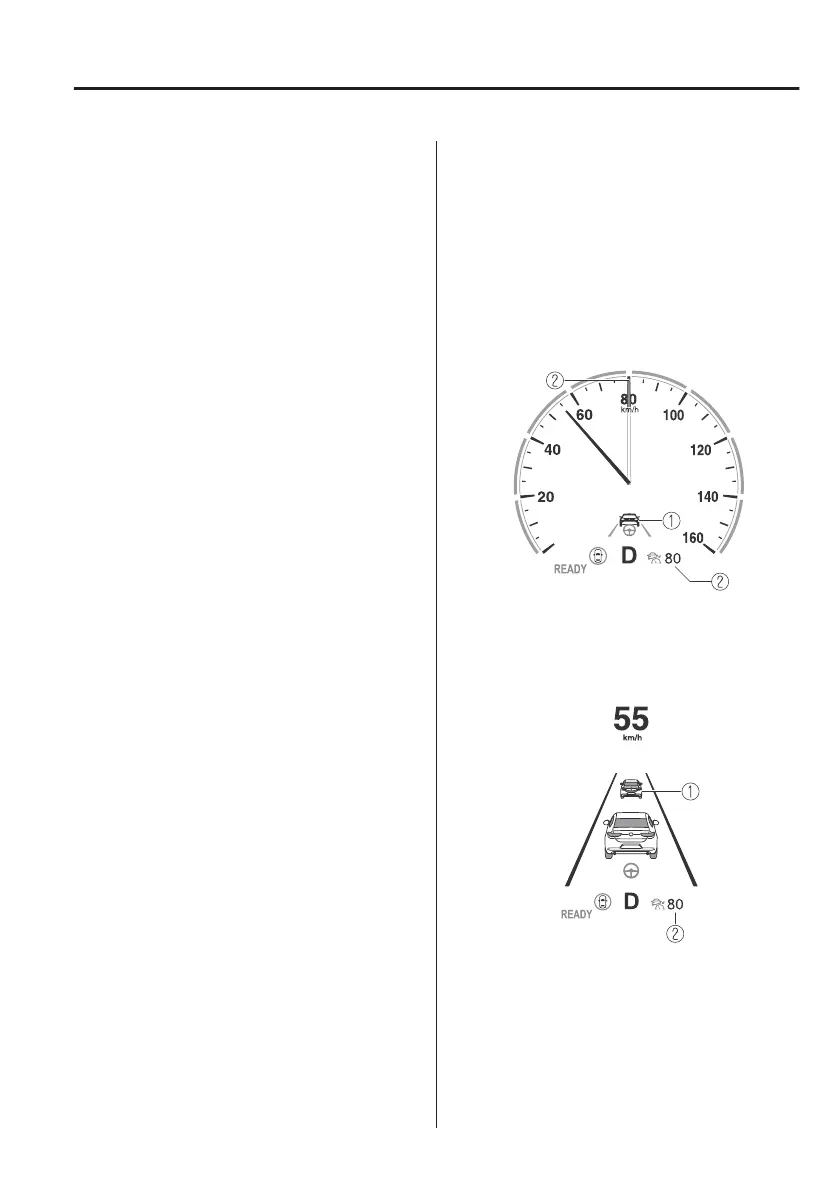
The CTS setting status and operation
conditions are indicated on the
multi-information display and the
active driving display.
Multi-information display (Basic
display)
1. Vehicle ahead display
2. CTS set vehicle speed
Multi-information display
(i-ACTIVSENSE display)
1. Vehicle ahead display
2. CTS set vehicle speed
When Driving
i-ACTIVSENSE
4-125



 To Next Page