NOTE
x
The top view/rear view and top view/rear wide view automatically display
whether or not the 360°View Monitor switch is turned on or o when shifting the
selector lever to R position.
x
The top view/rear view and top view/rear wide view displays the previously
displayed screen.
x
The setting can be changed to display the top view/front view when shifting from
reverse to a forward gear without operating the 360°View Monitor switch to check
the front of the vehicle while parallel parking.
Refer to the Settings section in the Mazda Connect Owner's Manual.
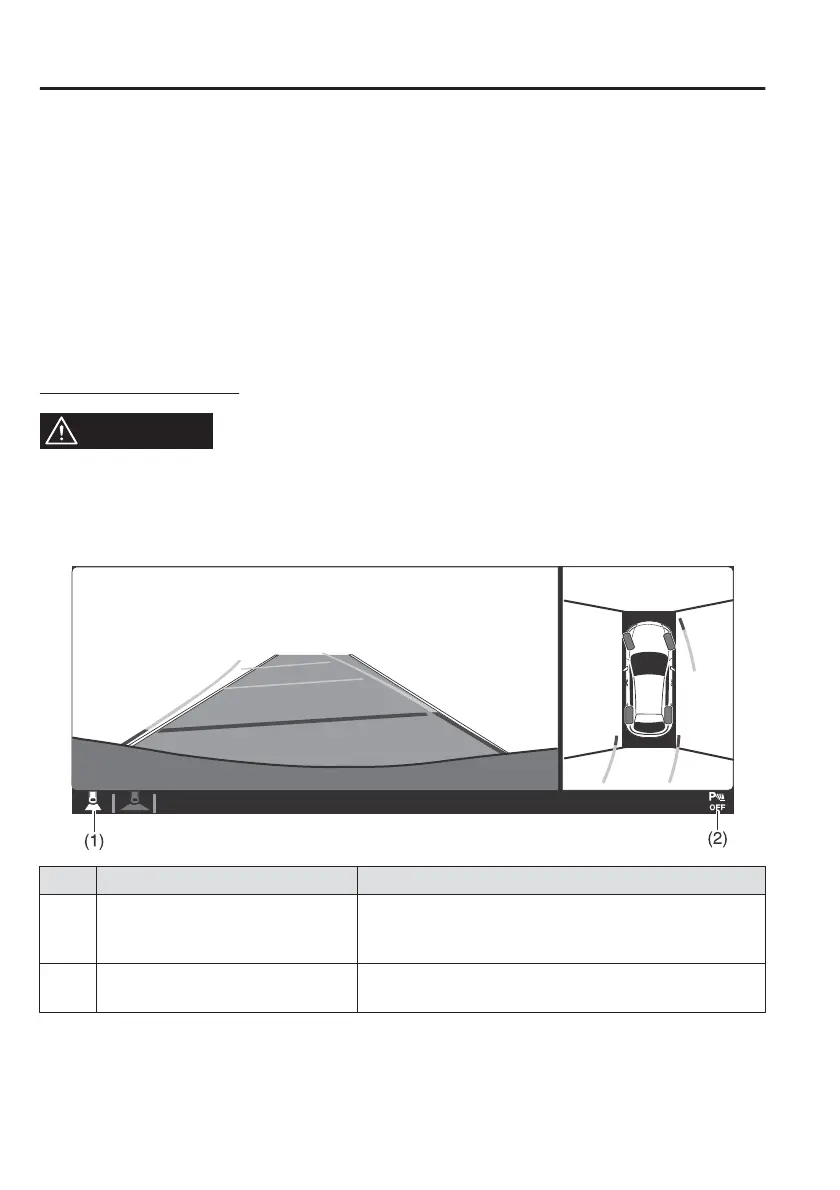
Screen operation/icon
WARNING
Always stop the vehicle when adjusting the 360°View Monitor image quality.
Do not adjust the 360°View Monitor image quality while driving. If you adjust the
360°View Monitor image quality (such as brightness, contrast, tone, and colour
density) while driving, it could lead to an unexpected accident.
Display/Icon Content
(1) View status icon Indicates which image is displayed among the front
view/front wide view/side view/rear view/rear wide
view.
(2) Parking sensor status icon Indicates that the parking sensor has a problem or it is
switched o.
When Driving
i-ACTIVSENSE
4-168



 To Next Page