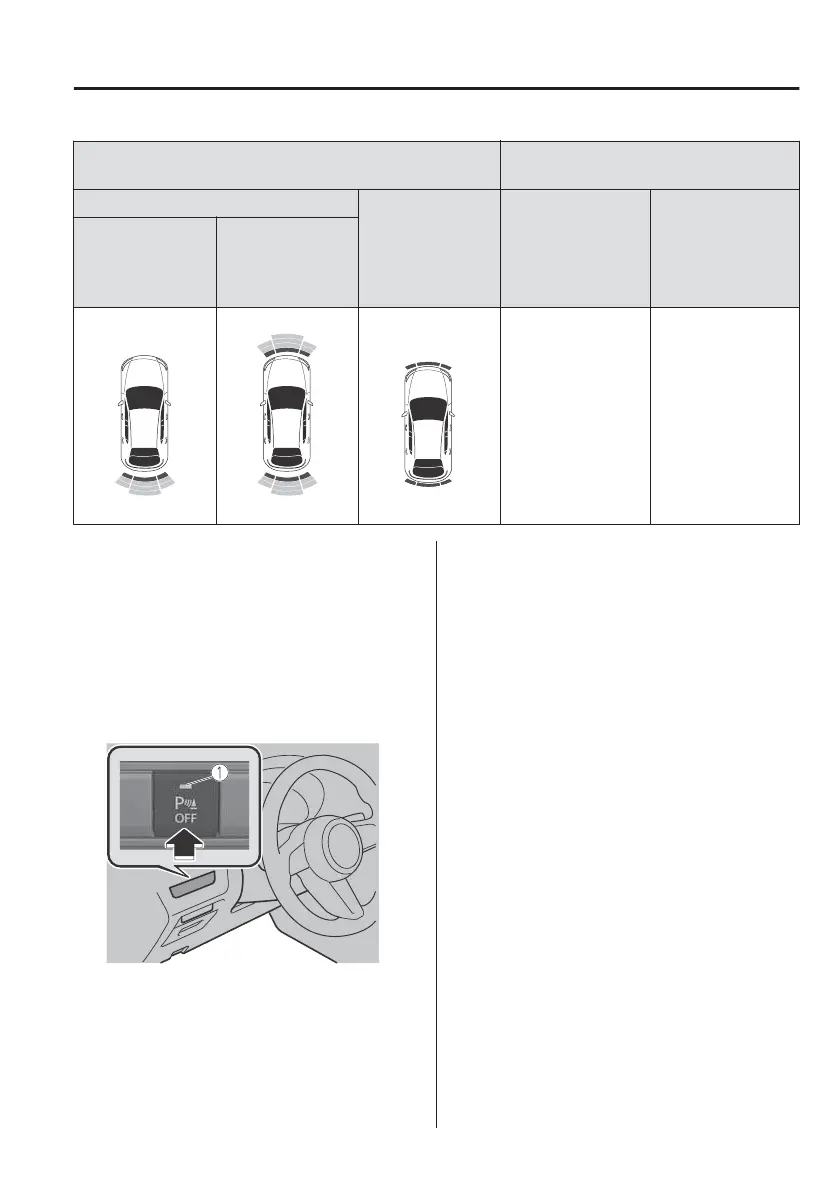
Display
Distance between vehicle and obstruc-
tion
Without 360° view monitor
With 360° view
monitor
Front ultrasonic
sensor
*
/Front cor-
ner ultrasonic sen-
sor
*
Rear ultrasonic sen-
sor/Rear corner ul-
trasonic sensor/
Rear side ultrasonic
sensor
*
Without front ul-
trasonic sensor
and front corner
ultrasonic sensor
With front ultra-
sonic sensor and
front corner ultra-
sonic sensor
Red
Front ultrasonic sen-
sor:
Within approx. 35.0
cm (13.7 in)
Front corner ultra-
sonic sensor:
Within approx. 25
cm (9.8 in)
Rear ultrasonic sen-
sor:
Within approx. 35.0
cm (13.7 in)
Rear corner ultra-
sonic sensor/Rear
side ultrasonic sen-
sor:
Within approx. 25
cm (9.8 in)
▼
Parking Sensor OFF Switch
When the parking sensor OFF switch is
pressed with the power switch
switched ON, the parking sensor is
stopped and the parking sensor OFF
switch indicator light turns on.
If the switch is pressed again, the
parking sensor becomes operational
and the indicator light turns o.
1. Indicator light
NOTE
In the following cases, the buzzer and
the detection indication do not
operate.
x
The selector lever is in the P position.
x
The parking brake is applied.
▼
Obstruction Detection Indication
The position of a sensor which has
detected an obstruction is indicated.
The gauge illuminates in
dierent
areas
depending on the distance to an
obstruction detected by the sensor.
As the vehicle approaches closer to an
obstruction, the zone in the gauge
closer to the vehicle illuminates.
When Driving
Parking Sensor System
*Some models.
4-217



 To Next Page