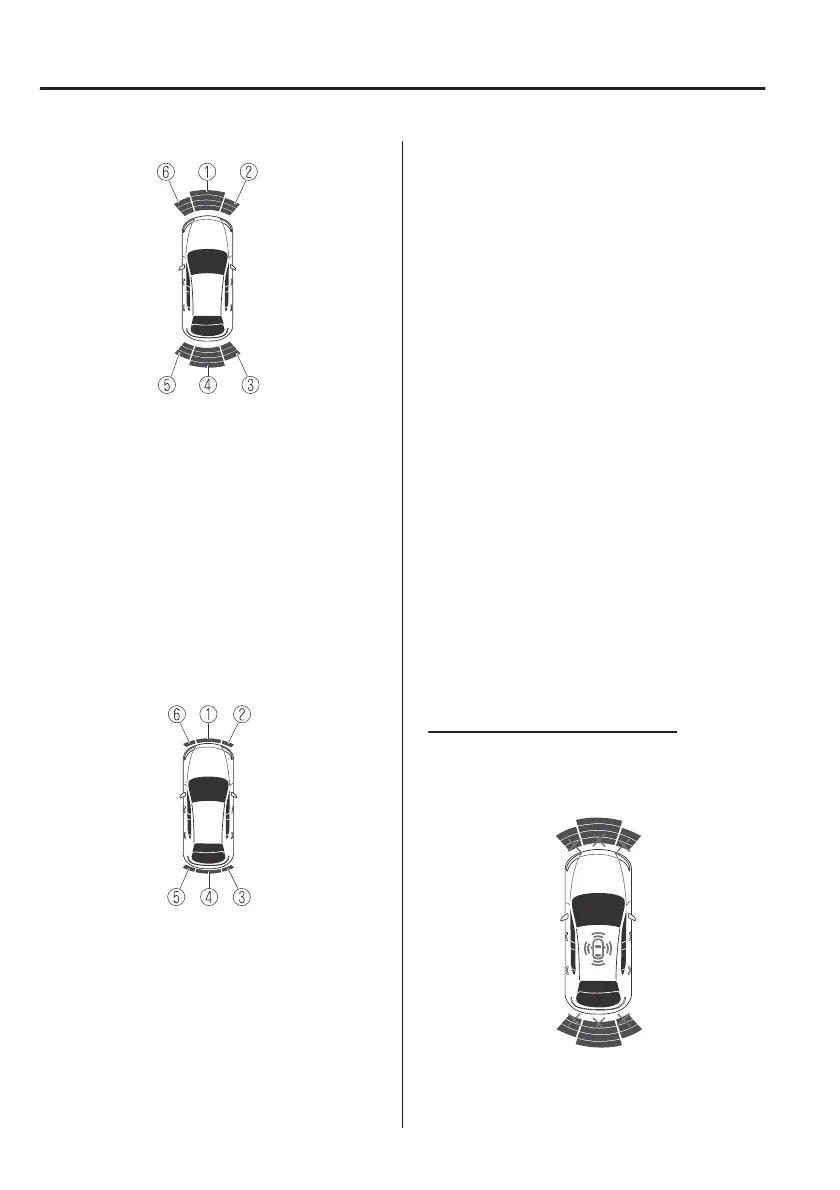
Without 360°view monitor
1. Front ultrasonic sensor gauge
*
2. Right front corner ultrasonic sensor
gauge
*
3. Right rear corner ultrasonic sensor
gauge/Right rear side ultrasonic
sensor gauge
*
4. Rear ultrasonic sensor gauge
5. Left rear corner ultrasonic sensor
gauge/Left rear side ultrasonic
sensor gauge
*
6. Left front corner ultrasonic sensor
gauge
*
With 360°view monitor
1. Front ultrasonic sensor gauge
2. Right front corner ultrasonic sensor
gauge
3. Right rear corner ultrasonic sensor
gauge/Right rear side ultrasonic
sensor gauge
*
4. Rear ultrasonic sensor gauge
5. Left rear corner ultrasonic sensor
gauge/Left rear side ultrasonic
sensor gauge
*
6. Left front corner ultrasonic sensor
gauge
NOTE
The detection indicator can be
switched between display and
non-display and the buzzer volume
can be changed.
Refer to the Settings section in the
Mazda Connect Owner's Manual.
(Vehicles with 360° View Monitor)
When the detection indicator is set to
“Display”, even with the 360° view
monitor not displayed, if a front sensor
or a front corner sensor detects an
obstruction, the 360° view monitor
switches automatically to display.
When an obstruction is no longer
detected, the display switches to the
display before the obstruction was
detected. However, while the 360°
view monitor is displayed, it continues
to display no matter if an obstruction is
detected or not.
System problem notification
The indication displays if the system
has a malfunction.
Without 360°view monitor
When Driving
Parking Sensor System
4-218
*Some models.



 To Next Page