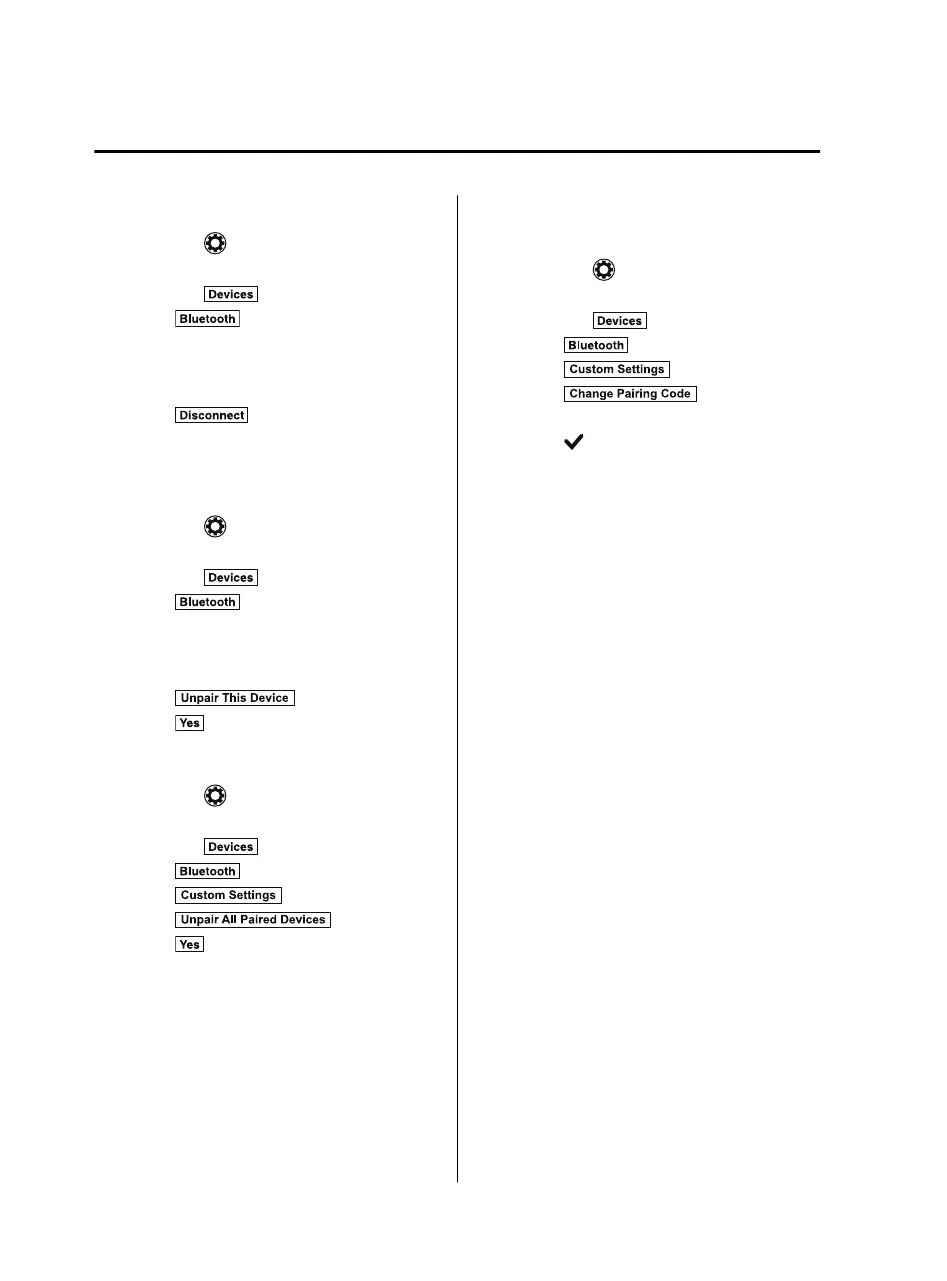
Disconnecting a device
1. Select the
icon on the home screen
to display the Settings screen.
2. Select the
tab.
3. Select
.
4. Turn the Bluetooth
®
setting on.
5. Select the device name which is
currently connected.
6. Select
.
▼
Deleting a device
Selecting and deleting devices
1. Select the
icon on the home screen
to display the Settings screen.
2. Select the
tab.
3. Select
.
4. Turn the Bluetooth
®
setting on.
5. Select the device name which you
would like to delete.
6. Select
.
7. Select
.
Deleting all devices
1. Select the
icon on the home screen
to display the Settings screen.
2. Select the
tab.
3. Select
.
4. Select
.
5. Select
.
6. Select
.
▼
Changing PIN code
PIN code (4 digits) can be changed.
1. Select the
icon on the home screen
to display the Settings screen.
2. Select the
tab.
3. Select
.
4. Select
.
5. Select
.
6. Input the new PIN code to be set.
7. Select
.
Interior Features
Audio Set
5-52
MX-5_8JA4-EA-19K_Edition1_old 2019-8-29 16:18:06












 To Next Page