11
Commander
COMMANDER SWITCH (if equipped)
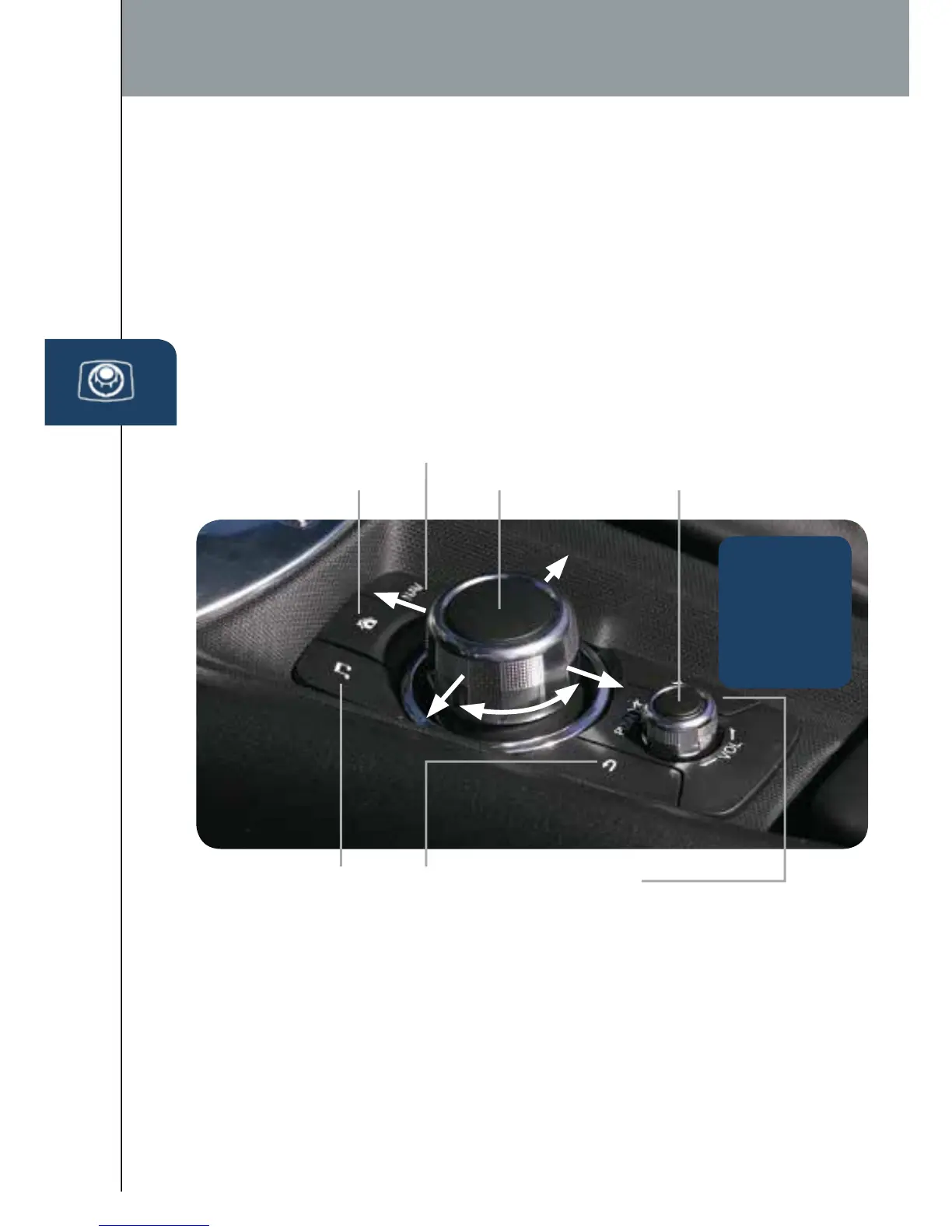
The commander is the primary means for operating Mazda Connect.
It allows you to keep your head up and eyes on the road.
The control places ve buttons naturally beneath the ve ngers and shows
ve matching icons on the home screen for touch-only operation. Select a
button around the commander knob to operate the desired system.
Select an item on the screen by:
1 Moving the knob up or down, left or right, and/or turn the dial to move the
cursor to the desired on-screen location (and get a description of the icon).
2 Pushing the knob down (ENTER) to select your choice on the screen.
ENTER
BACK
(to previous
screen)
AUDIO
HOME
NAVIGATION
MUTE (push down)
VOLUME (turn dial)
FAVORITES
The following can be stored in Favorites:
• 50 stations total for AM, FM, and XM.
• 50 contacts in the system phonebook.
• 50 points of interest in navigation.
(To edit or delete HOME, select
HOME and push and hold the
commander knob until the Edit/
Delete HOME screen appears.)
Push and
hold the
Favorites
(Star) button
to store your
favorites.
2665980 17b Mazda MX5 SSG 080116.indd 11 8/1/16 12:40 PM










 To Next Page