15
Navigation System
To plan a route on your Navigation system, do the following:
1 Push the NAV button on the commander switch.
2 Select NEW DESTINATION.
3 Select Find Address.
NOTE: By default, the navigation system detects the country and city/town you
are in. If needed, you can change the country or state setting by selecting Country
or a new city/town by selecting City or Zip code.
4 Enter the street name.
5 Enter the house number, then select the
.
6 The system transitions to a screen where the input location can be
checked. To transition to the next screen, select
Select or to transition
to the previous screen, select
.
NAVIGATION SYSTEM (if equipped)
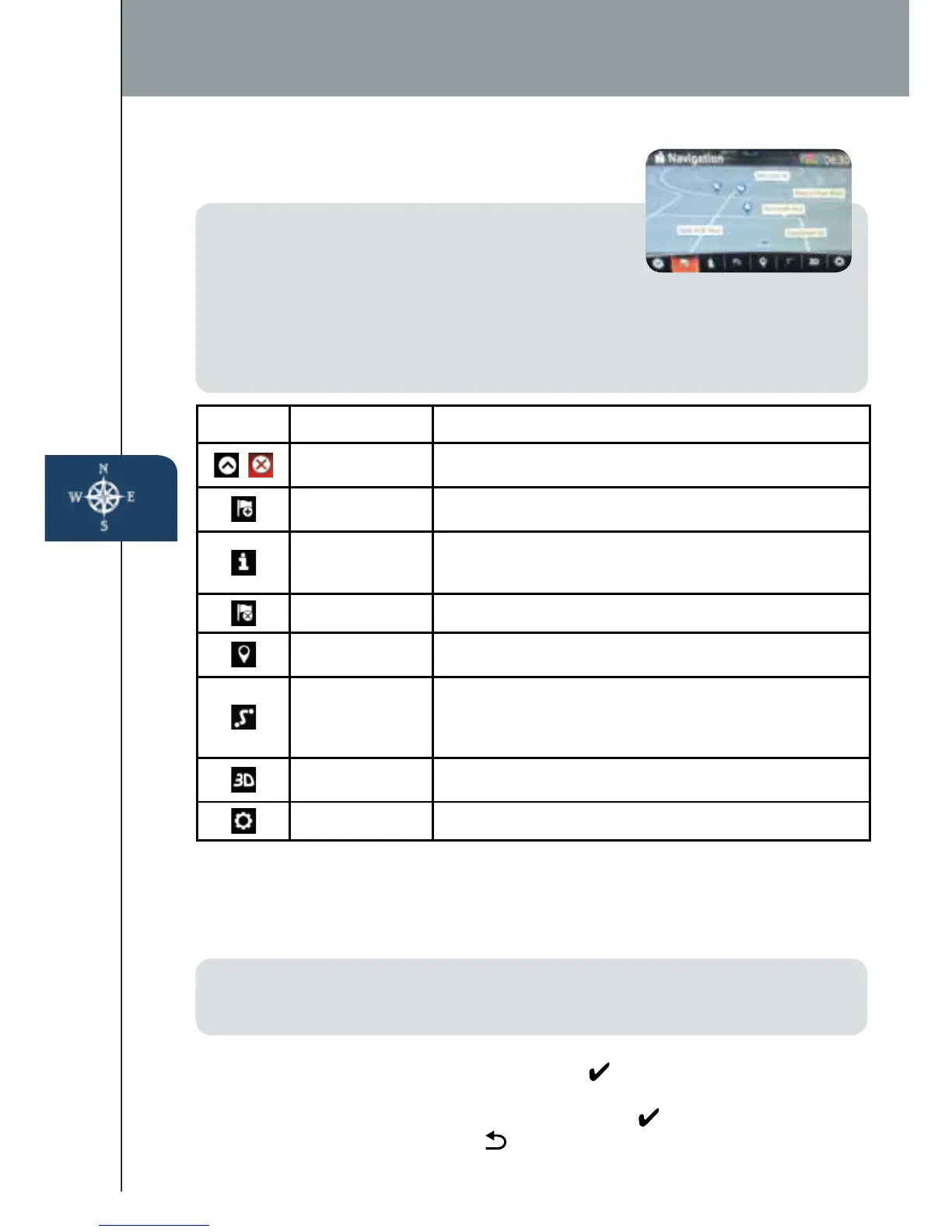
Planning A Route
ICON Voice Control Purpose
Hide/Show
Menu Bar
To open and close the Menu bar.
Enter
Destination
To enter an address or favorite destination, or select
a place of interest or a location on the map.
Navigation
Information
To switch to the navigation information screen on
which items such as trafc information and GPS
reception conditions.
Cancel To cancel an existing way point/route.
Point of
Interest
To nd places nearby.
Route Options
To display the route parameters and full length of
route. Perform route-related actions such as edit
or cancel, pick route alternatives, avoid parts, add
destination to Favorites.
View Mode
To change the map mode
(2D north up / 2D heading up / 3D).
Settings To adjust the navigation settings.
IMPORTANT:
•
In the interest of safety and to reduce distractions
while you are driving, you should always plan a
route before you start driving.
• To adjust the volume of the navigation system voice while driving, adjust the
volume by turning the VOL knob when voice guidance is being given. To prompt
voice guidance, push the NAVI button to repeat the last instruction.
• For issues with the navigation system, visit
www.mazdausa.com/mazdaconnect.
2665980 17b Mazda MX5 SSG 080116.indd 15 8/1/16 12:40 PM










 To Next Page