6
–
13
Maintenance and Care
Scheduled Maintenance
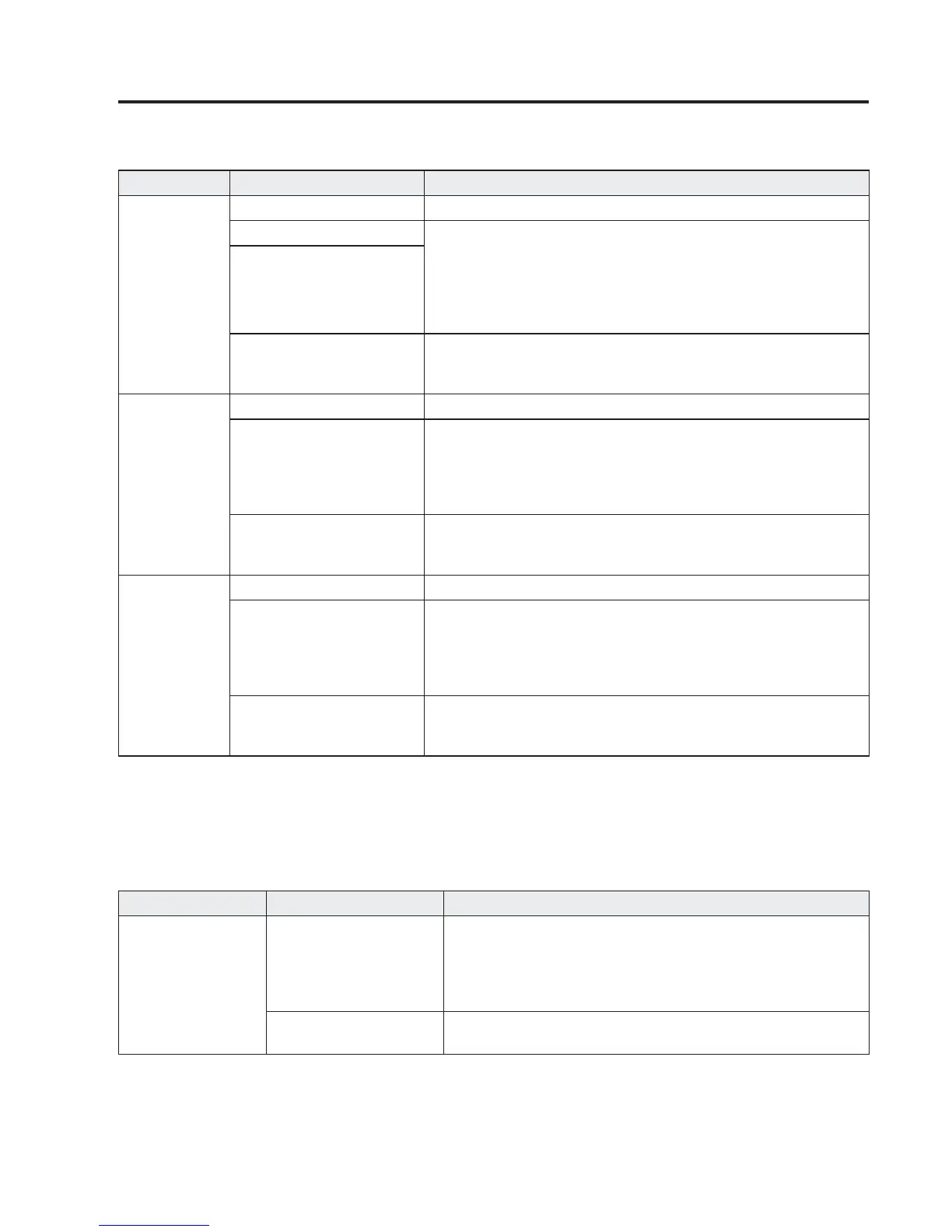
You can customize settings in the setup display as follows:
Tab Item Explanation
Scheduled
Setting Notifi cation can be switched on/off.
Time (months) Displays the time or distance until maintenance is due.
Select this item to set the maintenance period.
“Scheduled Due!” is displayed in red and the wrench indicator
light in the instrument cluster will be illuminated when the
remaining distance is less than 500 km or 250 mile, or the
remaining number of days is less than 15 (whichever comes fi rst).
Distance (mile or km)
Reset
Resets the time and distance to the initial values.
Once the system turns on, it needs to be reset whenever carrying
out maintenance.
Tyre Rotation
Setting Notifi cation can be switched on/off.
Distance (mile or km)
Displays the distance until tyre rotation is due.
Select this item to set the tyre rotation distance.
“Tyre Rotation Due!” is displayed in red and the wrench indicator
light in the instrument cluster will be illuminated when the
remaining distance is less than 500 km or 250 mile.
Reset
Resets the remaining distance to the initial value.
Once the system turns on, it needs to be reset whenever rotating
the tyres.
Oil Change
Setting
*1
Notifi cation can be switched on/off.
Distance (mile or km)
Displays the distance until the oil replacement is due.
Select this item to set the oil replacement distance.
“Oil Change Due!” is displayed in red and the wrench indicator
light in the instrument cluster will be illuminated when the
remaining distance is less than 500 km or 250 mile.
Reset
Resets the remaining distance to the initial value.
Once the system turns on, it needs to be reset whenever replacing
the engine oil.
*1 The engine oil fl exible maintenance setting is available (only some models). Consult an Authorised Mazda
Repairer for details.
When the engine oil fl exible maintenance setting is selected, you will see the following items in the display. The
vehicle calculates the remaining oil life based on the engine operating conditions and lets you know when an oil
change is due by illuminating the wrench indicator light in the instrument cluster.
Tab Item Explanation
Oil Change
Oil life (%)
Displays the engine oil life until the oil replacement is due.
“Oil Change Due!” is displayed in red and the wrench indicator
light in the instrument cluster will be illuminated when
remaining oil life distance is less than 500 km (300 mile), or
remaining days are less than 15 (whichever comes fi rst).
Reset
Resets the remaining oil life to 100 %.
The system must be reset whenever replacing the engine oil.



 To Next Page