GETTING STARTED
Always check the Owner’s Manual for more operating information and safety features
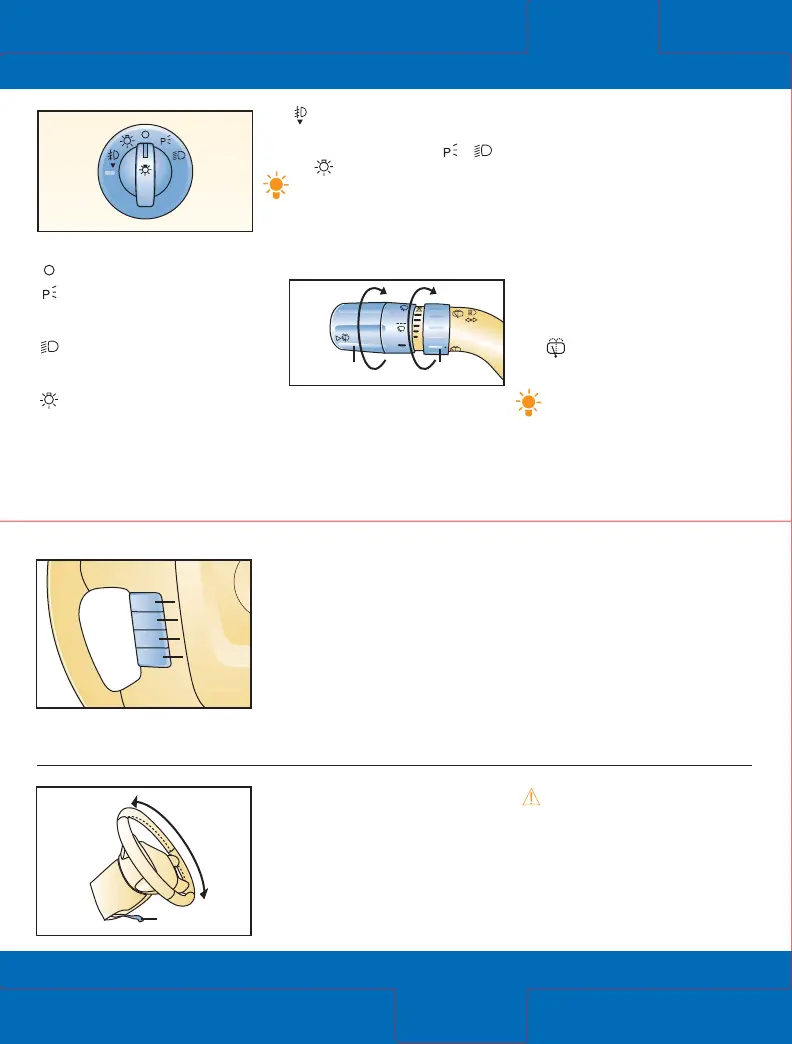
Lighting control knob
= Lights off
= Tail, parking and
dashboard lights on: Rotate
knob to first notch
= Tail, parking, dashboard
and headlights on: Rotate knob
to second notch
= Autolamp control*:
With ignition switch in ON position;
headlights and exterior lights
automatically turn ON/OFF
depending on surrounding
darkness/lightness
A
= Foglamp control:
Pull headlamp control knob
towards you while in
,
or position
Tip: Exterior lights turn on
automatically with ignition
on, headlamp control in
Autolamp position and
windshield wipers activated
for a fixed period of time.
Turn signals/headlight high
beams/wiper/washer lever
High beams on/off: Push lever
forward to detent/pull back.
To flash high beams: Pull lever
rearward and release.
A
Ignition switch must be in ACC
or ON position.
To turn on wipers: Rotate knob (1)
forward to increase; turn rearward
to decrease speed.
To activate washers: Push in end of
knob (1); will also operate wipers.
Rear wiper/washer
0 = OFF
1 = Intermittent: Rotate
knob (2) to first notch
2 = Normal speed: Rotate
knob (2) to second notch
= Rear wash/wiper cycle:
Rotate knob (2) to third notch,
hold as desired
Tip: Courtesy wipe feature
will give one extra wipe a few
seconds after wipers are turned
off, this will help clear off
any residual drops left from
using the washer fluid.
Cruise control*
Operates above 30 mph.
Press ON (1).
To set speed: Press and release
SET+ (2) at desired speed; hold
(2) to accelerate.
To decelerate: Press and hold
CST – (3), release at desired
speed; or tap brake pedal, press
and release (2) at desired speed.
Incremental deceleration:
Press and release (3), each
tap = minus 1 mph.
Incremental acceleration:
Press and release (2), each
tap = plus 1 mph.
To cancel: Tap brake/clutch*
pedal or press OFF button (1).
Return to preset speed
(after braking): Press and
release RESUME button (4).
Tilt steering-wheel
r
elease lever
Pull lever (5) down to unlock column
and pull up to lock column.
WARNING: Do not adjust
steering-wheel while driving
because you may lose contr
ol
of the vehicle.
Getting
Started
Getting
Started
RES
UME
SET +
CST –
OFF ON
1
3
2
4
5
*Denotes optional equipment









 To Next Page