7
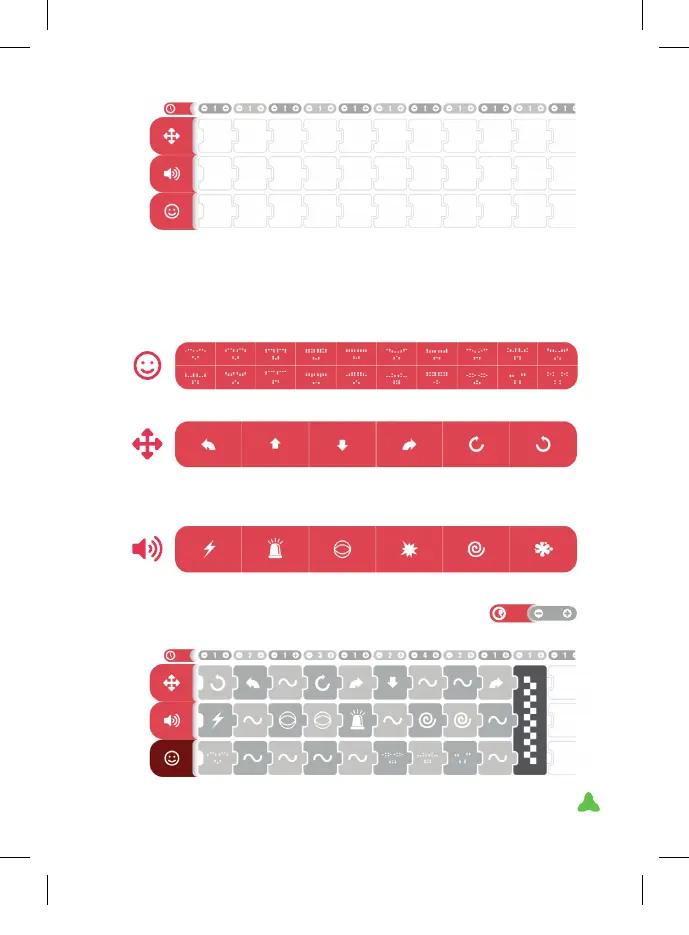
TO FILL IN THE PROGRAMME GRID:
By selecting the box you want to ll in, the possible options panel for
that timeline is displayed.
The options are as follows:
FACIAL EXPRESSIONS: 20 dierent facial expressions with animation:
MOVEMENTS: 6 dierent movements:
SOUNDS: 6 DIFFERENT SOUNDS:
REPETITIONS: with the + and -buttons you can
programme the number of times each grid action is
repeated. Up to a maximum of 8 repetitions.
5
Turn left 45º Forward right
12 cm approx.
Back 12 cm
approx.
Turn right 45º Turn right 180° Turn left 180º
XT380851_MAZZY-IMAPP-EN-v5.indd 7 29/5/20 10:54



 To Next Page