2-- 11
© 2012 Mobile Climate Control T-299 Rev. 08/2012
2.10 EnviroMATE Controller (Dual Zone)
1
2
3
4
5
6
7
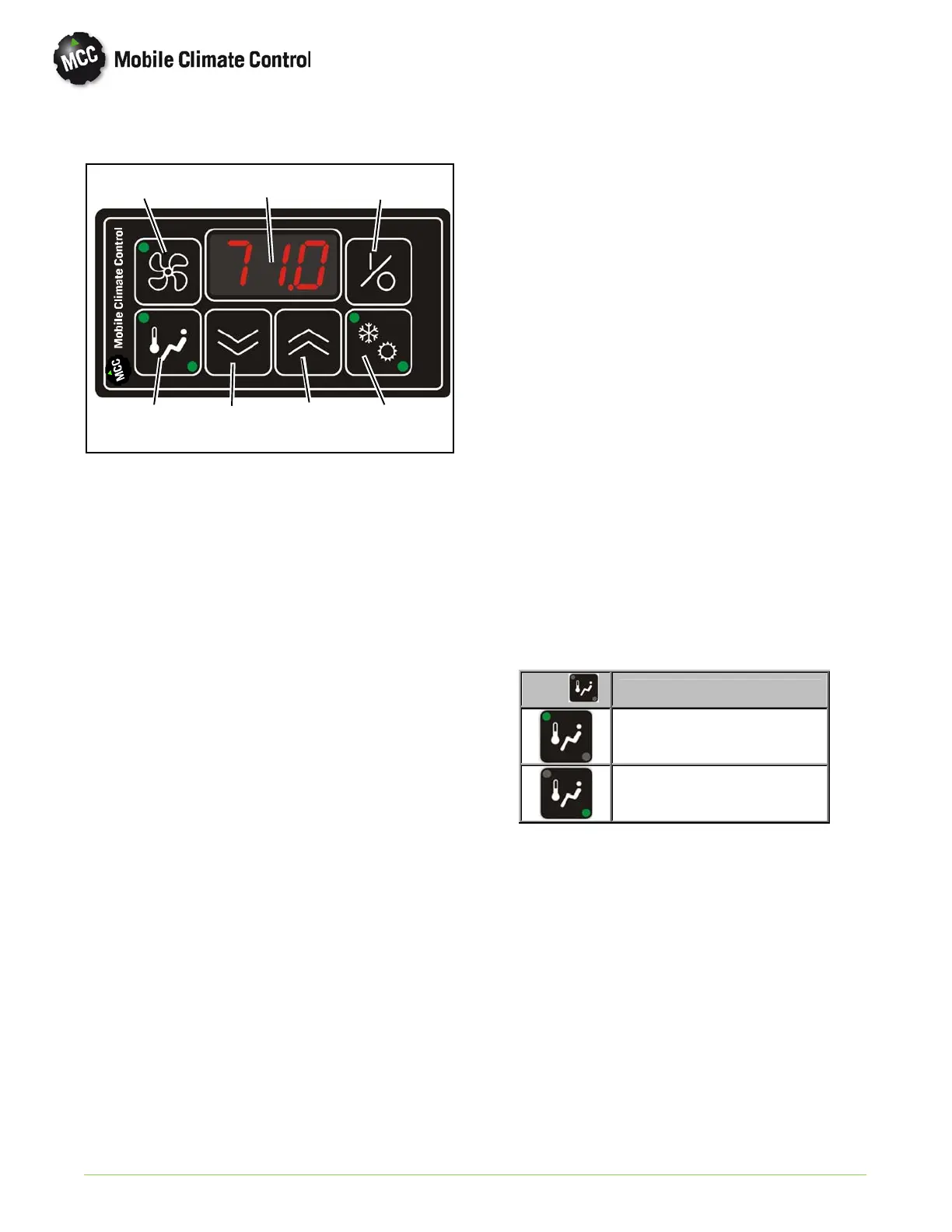
Figure 2-10 EnviroMATE Control Panel
1Display
2 Vent Key
3On/OffKey
4 Temperature Zone Key
5 Decrease Selection Key
6 Increase Selection Key
7 Cool/Heat Key
The Control Panel consist of the main CPU and
keypad to control the air conditioning system
operation. It is equipped with a numerical display to
view operation status, fan speed and tem peratures.
The Controller is designed to automatically operate
system components to maintain desired temperature
set point.
NOTE
Controller parameters are factory set, and
cannot be modified without factory au
thorization. If necessary, contact MCC's
Technical Service Hot Line for assist
ance (800-450-2211) .
2.10.1 Controller Operation
Once the EnviroMATE controller is powered with
12 VDC, supplied by the Bus OEM, the system can
be turn On or Off using the On/Off key (Item 3 in
Figure 2-8). When the display is powered On, the
controller will go through self test mode, and then
the current set point will be displayed. To adjust the
temperature set point up or down, use the
Increase/Decrease selection keys (Items 5 and 6 in
Figure 2-8). Temperature set point can b e set from
64°Fto82°F (17.8°C to 27.8°C).
The controller is equipped with two return air
temperature sensors, one in each zone to monitor
the evaporator return air temperature. To view the
return air temperature for Zone 1, press the
Temperature Zo n e Key o n ce (Item 4 in Figure 2-10).
The green LED light in upper left corner of Key will
light, indicating Zone 1 return air temperature.
Return air temperature will be shown on display.
To view the return air temperature for Zone 2, pr ess
the Temperature Zone Key again (Item 4 in
Figure 2-10). The green LED light in bottom right
corner of Key will light, indicating Zone 2 return air
temperature. Return air temperature will be shown
on display.
Led
Temperature shown
Zone 1
Zone 2
After a few seconds, the display will return to the set
point temperature.


 To Next Page
 Loading...