ATTACHING CARRY HANDLE
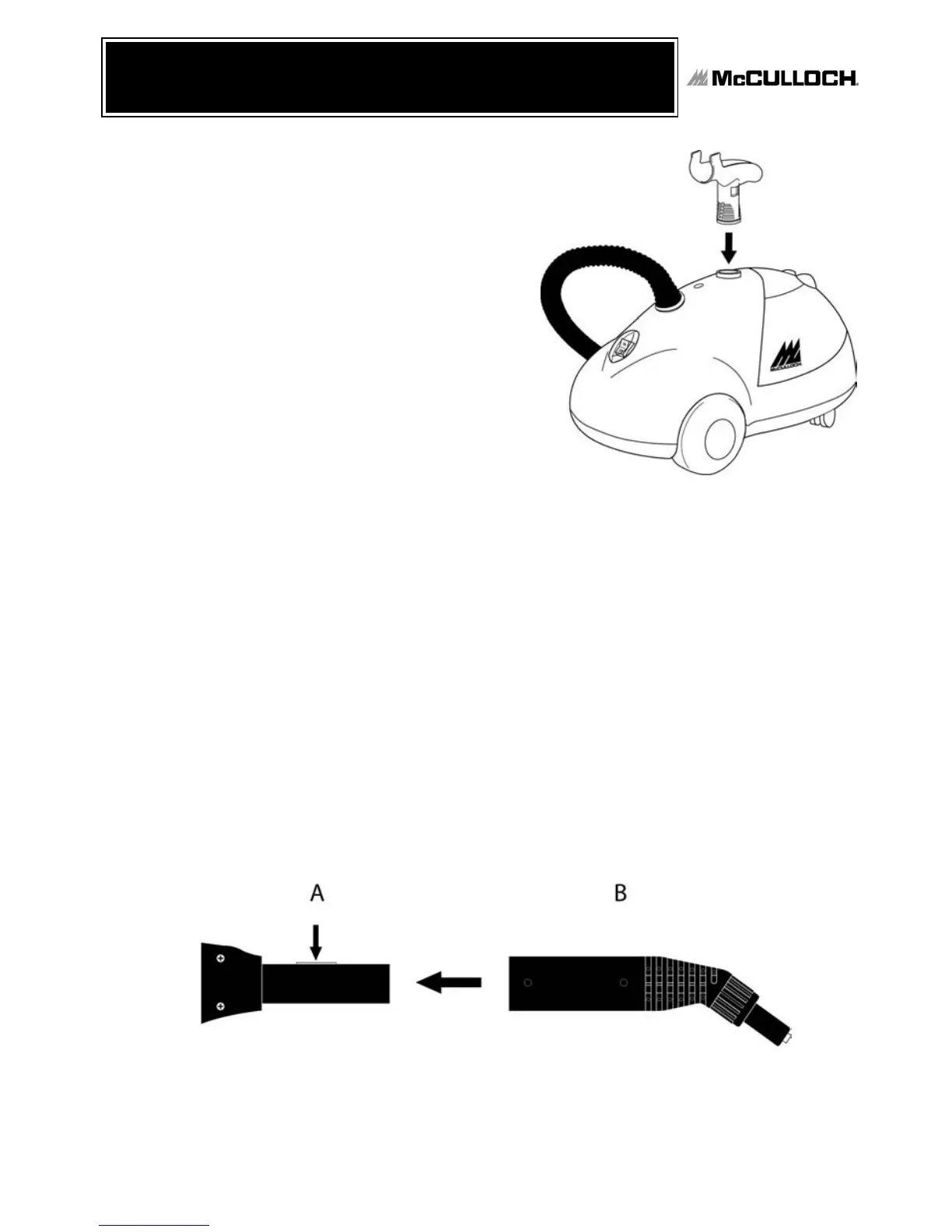
1. Insert Carry Handle into Carry Handle hole
on top of unit. Please refer to illustration
for assistance with proper alignment
(FIGURE 1).
2. Use enclosed magnetic screw driver and
screw to securely fasten Carry Handle to
unit.
ATTACHING MAIN ACCESSORIES
WARNING: Do not try to connect accessories while unit is emitting steam.
This section applies to the Steam Jet Nozzle, Squeegee, Floor Brush, Extension
Wands and Triangle Brush.
1. Depress red lock/release button on main steam nozzle (FIGURE 2-A).
2. While still depressing lock/release button, slide Steam Jet Nozzle or other accessory
over this button, so that rectangular hole in attachment aligns with lock/release button
(FIGURE 2-B).
3. Once lock/release button and rectangular hole are properly aligned, button should click
through hole and into place.
4. To remove Steam Jet Nozzle or other accessory, press in red lock/release button and
pull attachment off of main steam nozzle.
Top Innovations, Inc.
ASSEMBLING THE
HEAVY-DUTY STEAM CLEANER
7
FIGURE 2
FIGURE 1


 To Next Page