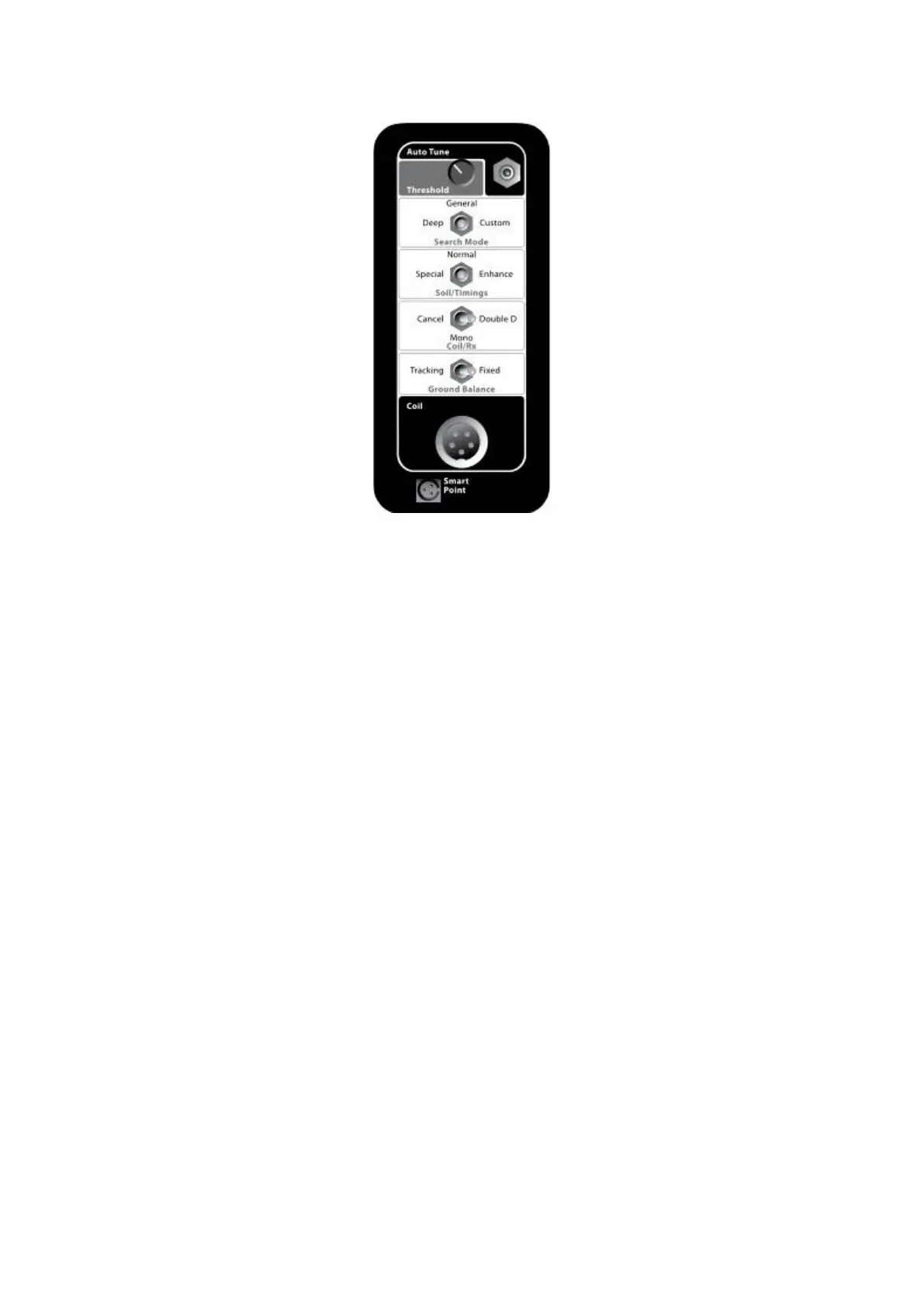
Rea r Control Panel
1.Auto Tune:Reducing electrical interferenc e
2.Threshold :Adjusting background audio leve l
3.Search Mode:Deep,Gene ral,C ustom(Usually General is used.)
4.Soil/Timings:Special,Normal,Enhance ( Usually Enhance is used.)
5.Coil/Rx:Ca ncel,Mono(this button is canceled),Double D(Under GND
Balance Work Mode, Ensure that Ca ncel is selecte d;Under Discr i Work
Mode,Double D is selected.)
Ground Ba lance :Fixed(Silence),Middle(A udio with
hea dphone), Tracking.
Det ecti ng Tips:
Follow th ese hints and techniques to help yo u to utilise the power of
yo u MCD Series detector,to ensure th at every trip is a success.
Id e ntifying Targe t Signals
*Metallic targets will usually give a “solid” sounding sign al when th e
coil is swept across the obje ct from any direction.A metallic target
ge nerally produces a short,s harp and mostly symmetrical


 To Next Page