Troubleshooting
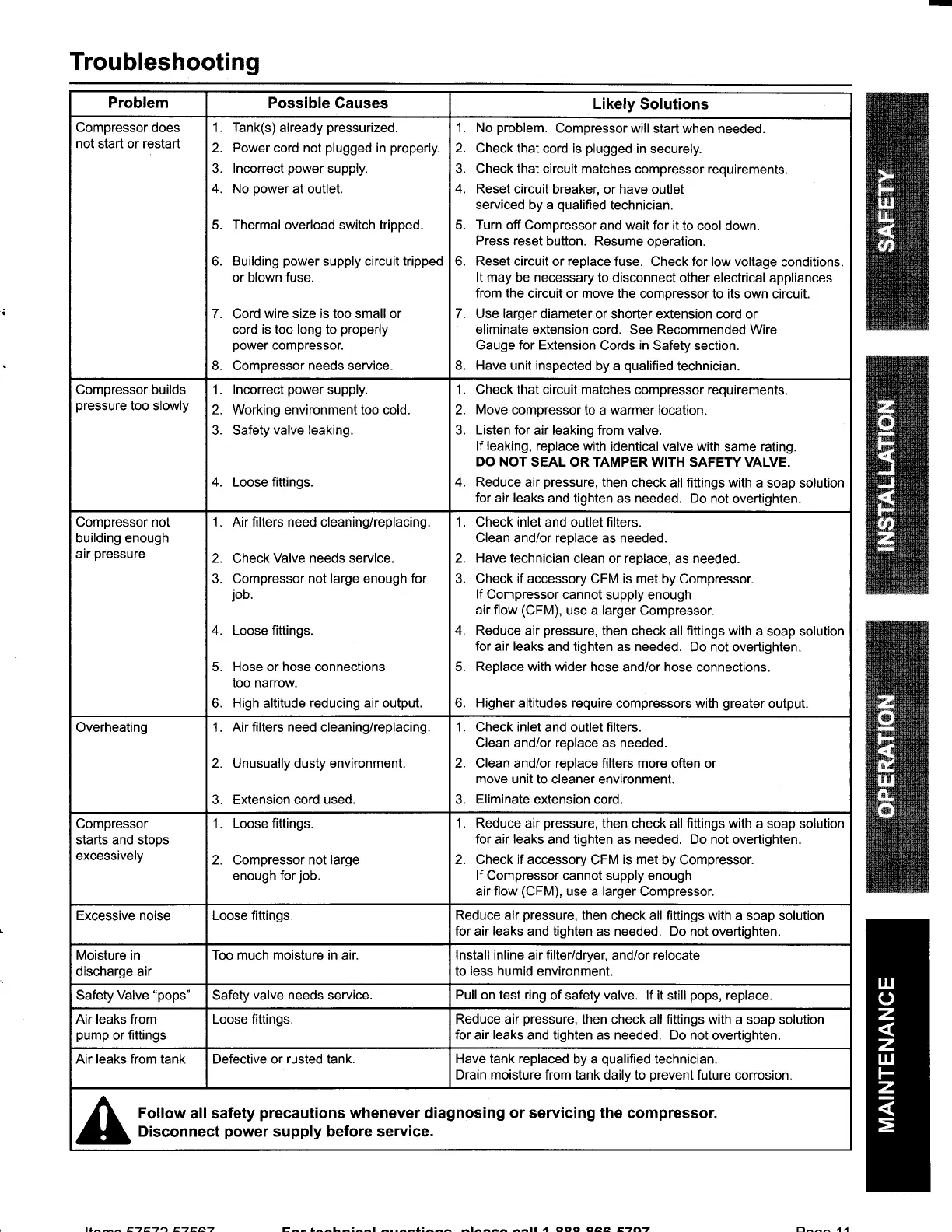
Problem
Possible Causes
Likely
Solutions
Compressor
does
not start or restart
1. Tank(s)
already
pressurized.
2. Power cord not
plugged
in
properly.
3.
lncorrect
power
supply.
4. No
power
at outlet.
Thermal overload switch tripped.
Building
power
supply
circuit tripped
or
blown fuse.
7.
Cord
wire size is too small or
cord is too
long
to
properly
power
compressor.
8. Compressor
needs
service.
6.
1. No
problem.
Compressor will
start when needed.
2.
Check that cord is
plugged
in securely.
3. Check that
circuit matches compressor
requirements.
4. Reset circuit
breaker, or have
outlet
serviced by a
qualified
technician.
5. Turn off Compressor
and wait for it
to cool down.
Press reset
button. Resume
operation.
6. Reset circuit
or
replace
fuse. Check for low voltage
conditions.
It may be necessary
to disconnect other
electrical appliances
from the
circuit or move the
compressor to its own circuit.
7. Use larger diameter
or shorter extension cord or
eliminate
extension cord. See Recommended
Wire
Gauge for Extension
Cords
in
Safety section.
8.
Have unit inspected
by a
qualified
technician.
Compressor builds
pressure
too slowly
1. lncorrect
power
supply.
2. Working environment too cold.
3. Safety
valve leaking.
4.
Loose
fittings.
1.
Check
that
circuit matches compressor requirements.
2. Move compressor
to a
warmer
location.
3.
Listen for
air leaking from valve.
lf leaking, replace
with identical valve with
same
rating.
DO NOT
SEAL OR TAMPER WITH
SAFETY VALVE.
4. Reduce
air
pressure,
then
check all fittings with
a soap solution
for air leaks
and tighten as needed. Do not
overtighten.
Compressor
nol
building enough
air
pressure
1. Air filters need
cleaning/replacing.
2.
Check
Valve needs service.
3. Compressor not large enough for
job.
4. Loose fittings.
5. Hose or hose connections
too narrow.
6.
High
altitude
reducing air output.
1. Check inlet
and outlet filters.
Clean and/or replace as needed.
2. Have technician
clean or replace, as needed.
3. Check
if
accessory
CFM
is met
by Compressor.
If
Compressor
cannot supply enough
air flow
(CFM),
use a larger Compressor.
4. Reduce
air
pressure,
then check all fittings with
a soap solution
for
air
leaks
and tighten as needed.
Do not overtighten.
5. Replace with wider hose
and/or hose connections.
6. Higher altitudes require
compressors with
greater
output.
Overheating 1. Air filters
need
cleaning/replacing
2.
Unusually
dusty environment.
3. Extension cord used.
1. Check inlet
and outlet filters.
Clean and/or replace as needed.
2. Clean and/or replace filters more often
or
move
unit to cleaner environment.
3. Eliminate extension cord.
Compressor
starts and stops
excessively
Loose
fittings.
Compressor not large
enough
forjob.
1.
2.
1. Reduce air
pressure,
then
check all
fittings with
a soap solution
for
air
leaks
and tighten as needed. Do not overtighten.
2. Check if accessory
CFM
is met
by Compressor.
lf
Compressor cannot supply enough
air flow
(CFM),
use
a
larger
Compressor.
Excessive noise Loose fittings.
Reduce air
pressure,
then check all fittings with a soap solution
for air
leaks
and tighten
as
needed. Do not
overtighten.
Moisture in
discharge air
Too much
moisture in
air.
lnstall inline air filter/dryer,
and/or
relocate
to less humid environment.
Safety Valve
"pops"
Safety
valve needs
service.
Pull on test ring
of safety valve. lf it still
pops,
replace.
Air leaks from
pump
or
fittings
Loose fittings.
Reduce air
pressure,
then check all fittings with a soap
solution
for
air
leaks
and tighten as needed. Do not
overtighten.
Air leaks from tank Defective or rusted tank. Have tank replaced
by a
qualified
technician.
Drain
moisture
from tank daily to
prevent
future
corrosion.
Follow all safety
precautions
whenever diagnosing
or servicing
the compressor.
Disconnect
power
supply before service.
t1^^^ EaETa EaEAa E^- .^^L-:^^l
-..^^1:^-^
-t^^^^
^^lt
a ooo oaa Etn? n^^^ 4 4


 To Next Page
 Loading...