14
Prepare
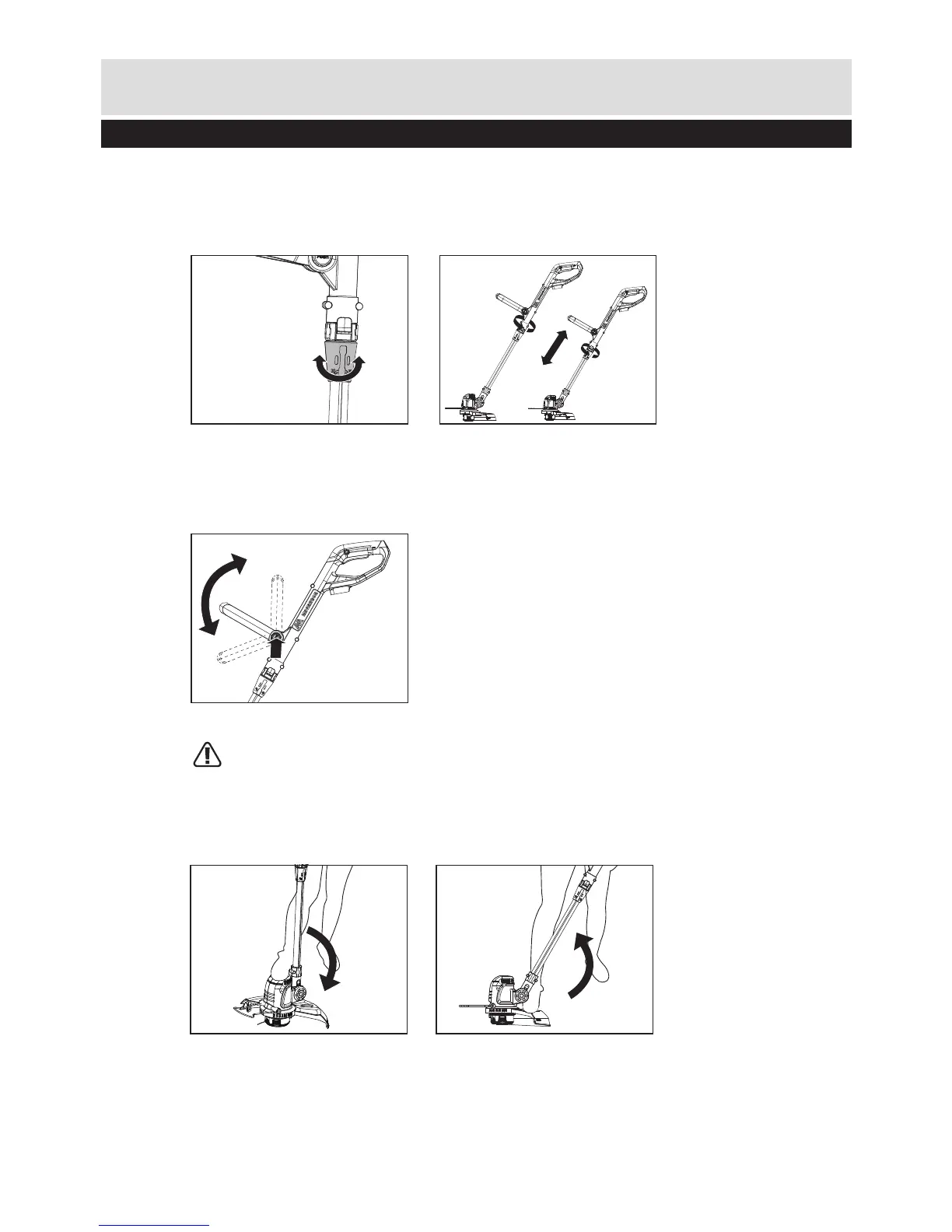
2. ADJUSTING THE FRONT HANDLE (See g. F)
1) Press the front handle locking knob .
2) Rotate the front handle to the most comfortable and balanced position.
3) Release the front handle locking knob.
F
1
2
1. ADJUST THE HEIGHT (See Fig. E1, E2)
1) Unscrew the height adjustment locking collar in the direction indicated to unlock, turn it counterclockwise.
2) Adjust the length of the Aluminum tube to the most comfortable length.
3) Tighten the locking collar in the direction indicated to lock, turn it clockwise.
E2
E1
3. ADJUSTING THE CUTTING ANGLE
WARNING: Always disconnect the trimmer before making adjustments!
1) Put one foot on the motor housing portion of the trimmer head, then grip the main handle and
apply adequate force on the main handle pushing it downwards, as shown in Fig. G1.
2) Adjust the main handle angle upwards, put one foot on the safety guard area of the trimmer head,
then grip the main handle, apply adequate force to adjust, as shown in Fig.G2.
G1 G2
Preparing instructions


 To Next Page