MDS 05-2806A01, Rev. F iNET Series User’s Guide 79
• HTTP Auth Mode—Selects the method of HTTP log-in authenti-
cation. This parameter functions only when
HTTP is selected in
the previous menu item. Although the
Basic Auth mode requests
a password, the actual password text is transmitted in the clear
(unencrypted). [
Basic Auth, MD5 Digest; Basic Auth]
3.7.2 Wireless Security
The features in the Wireless Security menu control the communication
of data across the wireless link. The radios can be authenticated locally
via a list of authorized radios, or remotely via a centralized RADIUS
server. RADIUS is a centralized authentication mechanism based on
standards.
Invisible place holder
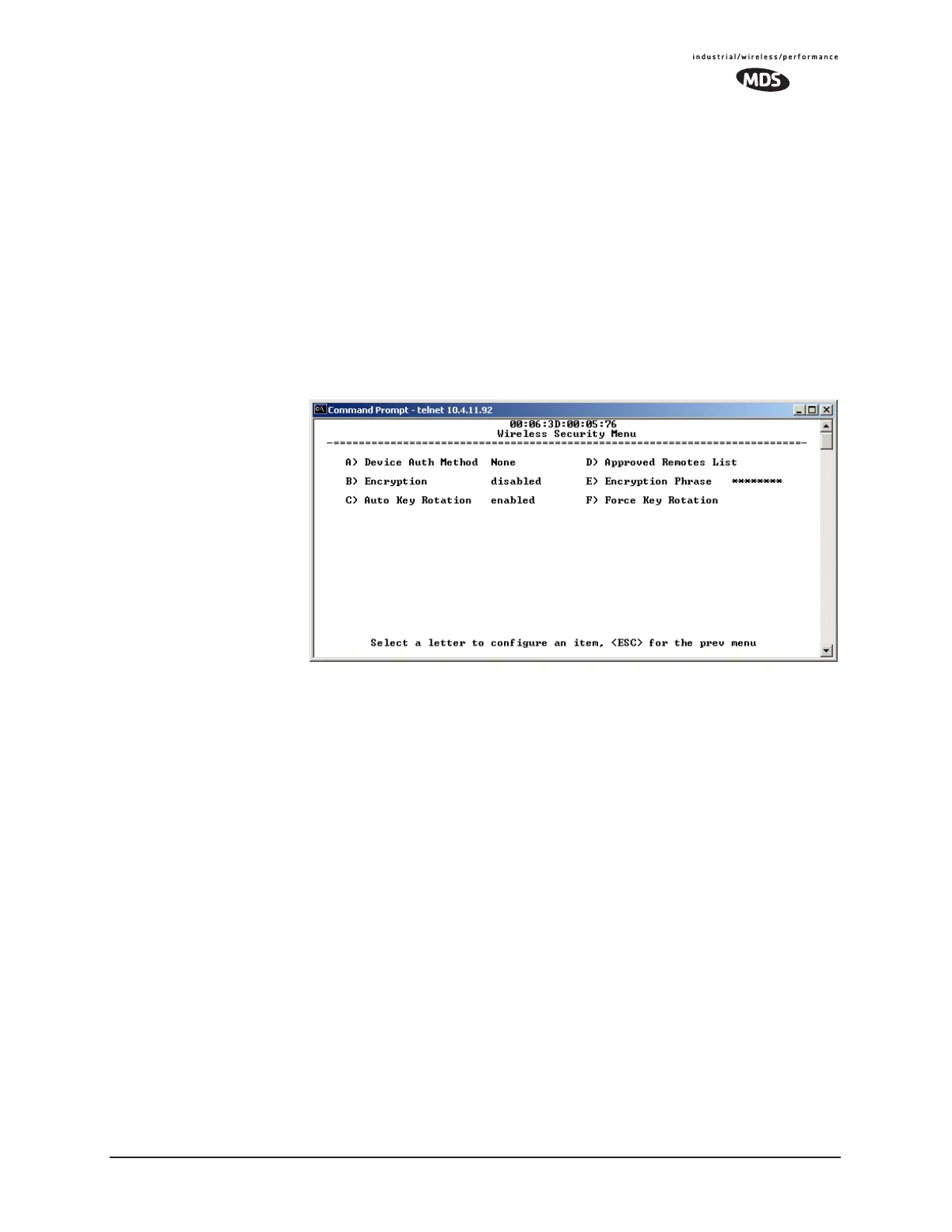
Figure 3-39. Wireless Security Menu
• Device Auth Method—Controls whether device authentication is
executed locally, via a central server, or not at all. Selecting
Local uses the Approved Remotes List described later in this
manual. [
None, Local, RADIUS; None]
• Encryption— When enabled, it forces the transceiver to use
AES-128 encryption (RC4-128 on iNET) on all over-the-air
messages. This option requires the Encryption Phrase to be pre-
viously configured. Both the AP and the Remote radios must
use the same encryption phrase. (Some units may not be autho-
rized to use encryption. “See “Authorization Keys Menu” on
Page 114” for additional details.) [
Enabled, Disabled; Disabled]
• Auto Key Rotation—When enabled, it forces the transceiver to use
the key rotation algorithm to generate a new encryption key
after 500 kilobytes of information has been transmitted, or one
hour has elapsed. [
Enabled, Disabled; Disabled]
• Approved Access Points/Remotes List —Displays a menu to man-
age the list of other radios with which this unit will be permitted
to communicate.


 To Next Page