EasyManua.ls Logo

Meade 1244 - User Manual

Meade 1244
3 pages
Print Icon
To Next Page IconTo Next Page
Loading...
The Meade #1244 Electric Focuser rapidly
focuses eyepiece images in all ETX-90 and ETX-
105 telescope models. The #1244 includes coarse
and microfine speeds. The standard-equipment
focuser 3-button hand controller accepts one user-
supplied 9-volt battery.
If used with an ETX-EC Astro Telescope, the
focuser functions are controlled directly with either
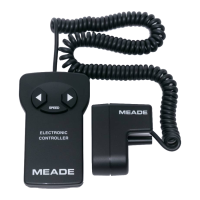
the Electronic Controller (standard with the ETX-
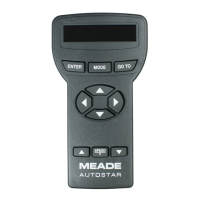
90EC or ETX-105EC) or with the optional #497
Autostar Computer Controller, rather than with the
Focuser 3-button hand controller.
PARTS LIST
When opening the packing box for the first time,
carefully note the following parts:
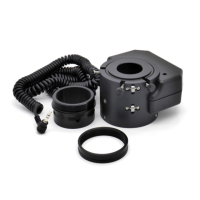
Electric focuser gearbox with attached coiled
cord
Electric focuser 3-button hand controller
Packed in a poly bag:
1.75”-long hex-head screw
1” diameter brass focusing gear
Mounting plate
Hex-wrench set (3 wrenches)
INSTALLATION
To attach the #1244 Focuser to the telescope:
1.
Use the medium hex-wrench to remove the
hex-head screw (1, Fig.
1
) from the rear cell of
the telescope. The screw is located above and
slightly to the left of the focus knob (
2, Fig. 1).
2.
Use the small hex-wrench to loosen the set
screw on the telescope’s focus knob (2, Fig.
1); remove the knob.
NOTE: Do not discard the hex-head
screw removed in step
1 or the focus knob
removed in step 2. If the #1244 Focuser is
ever removed, these items must be re-
installed on the telescope.
3. Slide the center hole of the mounting plate
(
2, Fig. 2) over the focus shaft, so that the
flat side faces the body of the telescope
and the upper hole is aligned with the hole
from which the hex-head screw was
removed in step 1.
4. Place the focusing gear (
1, Fig. 2) on the
focus shaft (
3, Fig. 2) so that the hub of the
gear faces the body of the telescope and the
gear is approximately flush with the rear of the
shaft. Tighten the set screw on the focusing
gear with the small hex-wrench.
5. Carefully place the electric focuser gearbox
(
4, Fig. 2) over the focusing gear. To orient the
gearbox, the attached coiled cord should be
on top. Slide the gearbox shaft into the hole
from which the hex-head screw was removed
in step 1. The focusing gear (
1, Fig. 2) fits into
the round slot in the gearbox.
Operating Instructions
Meade
®
#1244 Electric Focuser
For use with ETX-90 and ETX-105 Telescopes
Fig. 2: Installation of the #1244 Electric Focuser.
(1) Focusing gear;
(2) Mounting plate;
(
3) Focus shaft;
(4) Focuser gearbox; (5) Hex-head attachment screw.
4
Fig. 1: Rear Cell of Telescope.
(1) Hex-head screw; (2) Focus knob.
1
3
5
2
1
2
Question and Answer IconNeed help?

Do you have a question about the Meade 1244 and is the answer not in the manual?

Summary

Parts List

Installation

Operation

Electric Focuser Controller

Details on using the standard 3-button hand controller for coarse and microfine focus adjustments.

Electronic Controller Operation

Instructions for operating the focuser using the ETX-EC/ETX-105EC Electronic Controller.

Autostar Computer Controller Operation

Guide to using the #497 Autostar Computer Controller for focus control and speed selection.

Summary

Parts List

Installation

Operation

Electric Focuser Controller

Details on using the standard 3-button hand controller for coarse and microfine focus adjustments.

Electronic Controller Operation

Instructions for operating the focuser using the ETX-EC/ETX-105EC Electronic Controller.

Autostar Computer Controller Operation

Guide to using the #497 Autostar Computer Controller for focus control and speed selection.

Overview

The Meade #1244 Electric Focuser is an accessory designed to rapidly and precisely adjust the focus of Meade ETX-90 and ETX-105 telescope models. This device enhances the focusing experience by offering both coarse and microfine speed adjustments, providing users with greater control over image clarity.

Function Description:

The primary function of the #1244 Electric Focuser is to replace the manual focus knob on compatible ETX telescopes with an electronically controlled focusing mechanism. This allows for smoother and more precise focus adjustments, which is particularly beneficial for high-magnification observations and astrophotography where even slight vibrations from manual adjustments can blur the image. The focuser operates by driving a gear that engages with the telescope's existing focus shaft, effectively automating the focusing process.

Important Technical Specifications:

The #1244 Electric Focuser is specifically designed for use with Meade ETX-90 and ETX-105 telescope models. It includes a gearbox with an attached coiled cord, a 3-button hand controller, a 1.75"-long hex-head screw, a 1" diameter brass focusing gear, a mounting plate, and a set of three hex-wrenches for installation. The hand controller requires one user-supplied 9-volt battery for operation when used independently.

When integrated with ETX-EC Astro Telescopes, the focuser's functions can be controlled directly by the Electronic Controller (standard with ETX-90EC or ETX-105EC) or the optional #497 Autostar Computer Controller, bypassing the need for the focuser's own 3-button hand controller. This integration allows for a more streamlined control experience, especially for users already familiar with the Autostar system.

Usage Features:

Installation:

  1. Preparation: Begin by using the medium hex-wrench to remove the existing hex-head screw from the rear cell of the telescope, located above and slightly to the left of the manual focus knob. Then, use the small hex-wrench to loosen the set screw on the telescope's focus knob and remove the knob. It is crucial to retain both the removed hex-head screw and the focus knob, as they are necessary for re-installing the manual focuser if the electric focuser is ever removed.
  2. Mounting Plate Attachment: Slide the center hole of the mounting plate over the focus shaft. Ensure the flat side of the plate faces the telescope body and that the upper hole of the plate aligns with the hole from which the original hex-head screw was removed.
  3. Focusing Gear Placement: Position the brass focusing gear onto the focus shaft. The hub of the gear should face the telescope body, and the gear should be approximately flush with the rear of the shaft. Secure the gear by tightening its set screw with the small hex-wrench.
  4. Gearbox Installation: Carefully place the electric focuser gearbox over the focusing gear. The attached coiled cord should be oriented upwards. Slide the gearbox shaft into the hole from which the original hex-head screw was removed. The focusing gear should fit snugly into the round slot within the gearbox.
  5. Securing the Gearbox: Insert the provided 1.75"-long hex-head screw into the hole at the rear of the focuser gearbox. Tighten this screw firmly using the large hex-wrench.
  6. Controller Setup: Insert a 9-volt battery into the compartment on the rear of the focuser's hand controller. Plug the coiled cord from the gearbox into the hand controller. The focuser is then ready for operation.

Operation Modes:

Electric Focuser Controller (3-button hand controller):

  • Speed Control: The hand controller offers two operational speeds: coarse and microfine. Press the "SPEED" key to toggle between these two speeds.
  • Directional Control: Use the "Left Arrow" button to move the focus outwards and the "Right Arrow" button to move the focus inwards.

Electronic Controller (for ETX-EC models):

  • Activation: After power is applied to the telescope, the four LEDs on the Electronic Controller will flicker. Press any button to ensure only one light remains lit.
  • Speed Control: Press the "SPEED" key to cycle through the four available focus speeds. The top LED indicates the fastest speed, while the bottom LED indicates the slowest.
  • Directional Control: Use the "IN" button to move the focus inwards and the "OUT" button to move the focus outwards.
  • Note: When using the Electronic Controller, detach the coiled cord from the focuser's 3-button hand controller and plug it into one of the AUX ports on the telescope's Computer Control Panel. Ensure the telescope's power switch is set to "ON."

Autostar Computer Controller (optional #497 Autostar):

  • Accessing Focus Menu: After power is applied and the Autostar system has been initialized (refer to the Autostar instruction manual for initialization steps), press and hold the "MODE" button for two seconds. This will display the "Focus" menu.
  • Speed Selection: Within the "Focus" menu, press one of the number keys to select the desired focus speed:
    • "1, 2": Slow
    • "3, 4, 5": Moderate
    • "6, 7": Medium
    • "8, 9": Fast
  • Directional Control: Use the "Down Arrow" to move the focus outwards and the "Up Arrow" to move the focus inwards.
  • Exiting Menu: Press the "MODE" button to exit the "Focus" menu.
  • Note: Similar to the Electronic Controller, when using the Autostar Controller, detach the coiled cord from the focuser's 3-button hand controller and plug it into an AUX port on the telescope's Computer Control Panel. Ensure the telescope's power switch is set to "ON."

Maintenance Features:

The manual does not explicitly detail specific maintenance features for the #1244 Electric Focuser itself beyond proper installation and battery replacement for the hand controller. However, the instruction to retain the original hex-head screw and focus knob suggests a design that allows for easy removal and re-installation of the manual focuser, implying a degree of modularity and user-serviceability for switching between electric and manual focusing if needed. For any questions or issues regarding the use of the Meade #1244 Electric Focuser, customers are advised to contact the Meade Instruments Customer Service Department during their operating hours (8:30 AM to 4:30 PM Pacific Time, Monday through Friday).

Meade 1244 Specifications

General IconGeneral
BrandMeade
Model1244
CategoryAccessories
LanguageEnglish

Related product manuals