45
ENGLISH
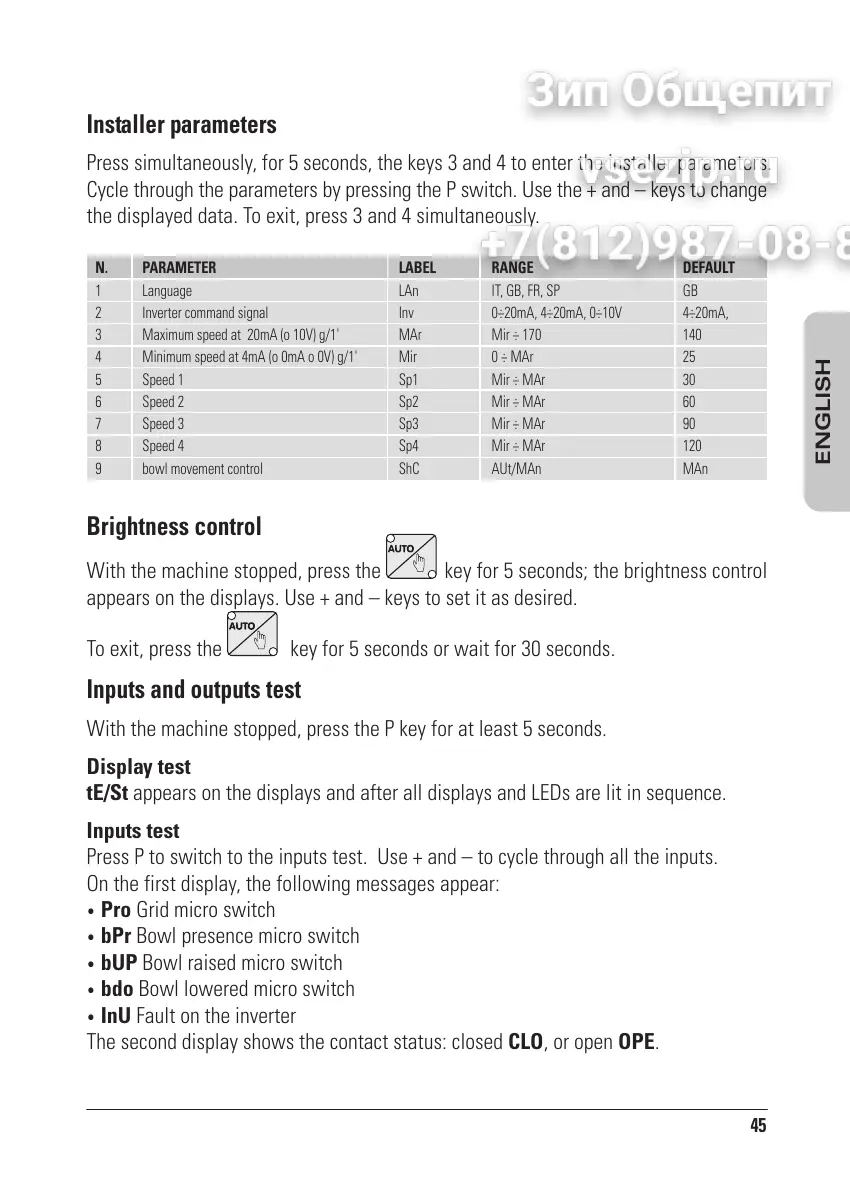
Installer parameters
Press simultaneously, for 5 seconds, the keys 3 and 4 to enter the installer parameters.
Cycle through the parameters by pressing the P switch. Use the + and keys to change
the displayed data. To exit, press 3 and 4 simultaneously.
N.
1
2
3
4
5
6
7
8
9
PARAMETER
Language
Inverter command signal
Maximum speed at 20mA (o 10V) g/1'
Minimum speed at 4mA (o 0mA o 0V) g/1'
Speed 1
Speed 2
Speed 3
Speed 4
bowl movement control
LABEL
LAn
Inv
MAr
Mir
Sp1
Sp2
Sp3
Sp4
ShC
RANGE
IT, GB, FR, SP
0÷20mA, 4÷20mA, 0÷10V
Mir ÷ 170
0 ÷ MAr
Mir ÷ MAr
Mir ÷ MAr
Mir ÷ MAr
Mir ÷ MAr
AUt/MAn
DEFAULT
GB
4÷20mA,
140
25
30
60
90
120
MAn
Brightness control
With the machine stopped, press the key for 5 seconds; the brightness control
appears on the displays. Use + and keys to set it as desired.
To exit, press the
key for 5 seconds or wait for 30 seconds.
Inputs and outputs test
With the machine stopped, press the P key for at least 5 seconds.
Display test
tE/St appears on the displays and after all displays and LEDs are lit in sequence.
Inputs test
Press P to switch to the inputs test. Use + and to cycle through all the inputs.
On the first display, the following messages appear:
Pro Grid micro switch
bPr Bowl presence micro switch
bUP Bowl raised micro switch
bdo Bowl lowered micro switch
InU Fault on the inverter
The second display shows the contact status: closed CLO, or open OPE.


 To Next Page
 Loading...