SONNET 23
Sensitivity
Input Selection
Processor Selection
(For Bilateral Users)
and Keypad Lock
Feature
Program
Selection
Indicator Lights
Default Volume
and Sensitivity
2
Volume
1
3
4
5
6
FineTuner
Volume
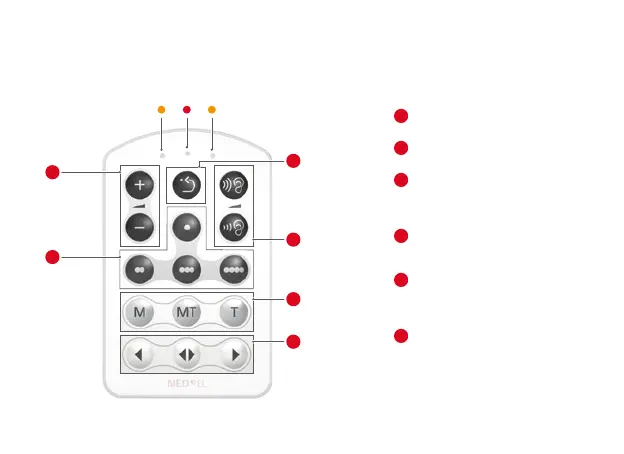
Increase or decrease the volume
Program Selection
Choose a program
Default Volume and Sensitivity
Set volume and audio sensitivity to
default setting as determined by
your audiologist
Sensitivity
Increase or decrease the audio
sensitivity
Input Selection
M: Selects the microphone
MT: Selects microphone and telecoil
T: Selects the telecoil
Processor Selection
(For Bilateral Users)
Select the left processor, both
processors, or the right processor;
activates and deactivates the
Keypad Lock
1
2
3
4
5
6


 To Next Page