SONNET 25
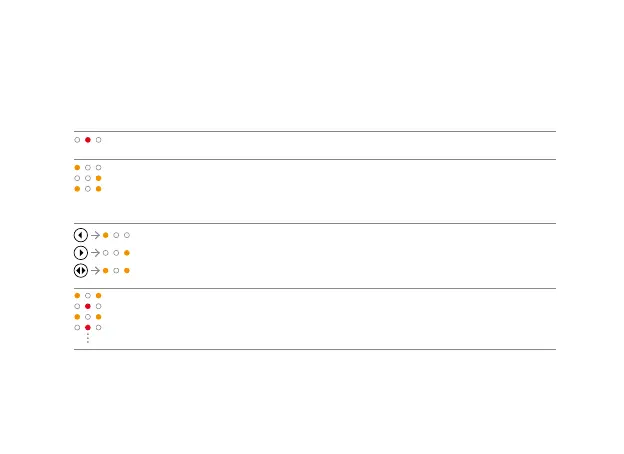
FineTuner Light Patterns
Pattern Meaning Explanation
Keypad is locked If you press any key while the FineTuner is locked,
the red indicator lights will turn on.
Information is being
transmitted
The indicator lights blink when signals are being
transmitted. The left light blinks if the left audio
processor is activated. The right light blinks if the right
audio processor is activated. Both blink if both audio
processors (for bilateral users) are activated.
Input side change Press the left key to send commands to the left side.
Press the right key to send commands to the right side.
The corresponding amber light will turn on. To send
commands to both sides (for bilateral users), press the
center key. Both amber lights will turn on.
Programming mode Press for more than 5 seconds to activate programming
mode. The 3 indicator lights will ash alternately.


 To Next Page