WAN interface setup
Method 1: Automatic obtain (Internet provider DHCP)
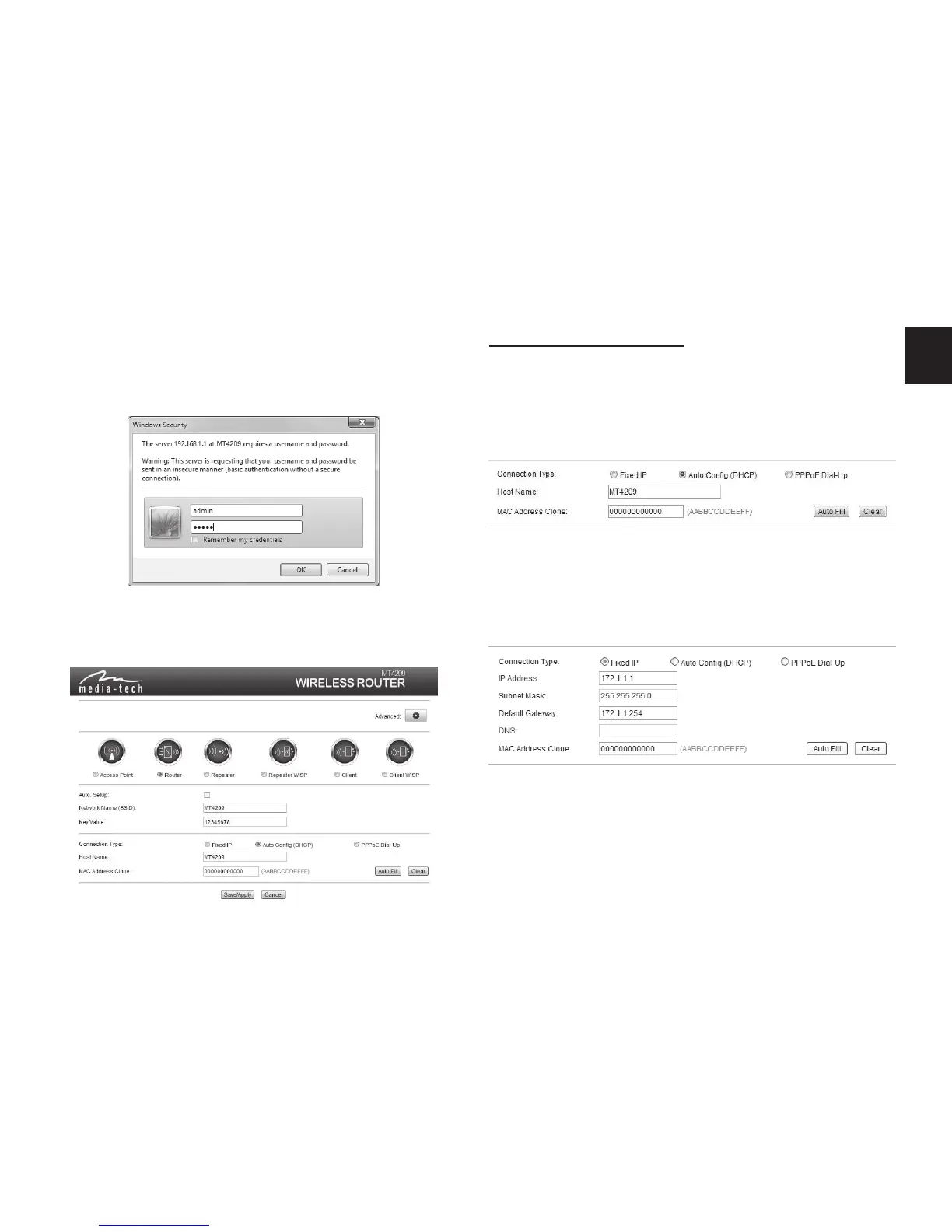
If you’re using the DHCP (auto cong) connection, the
router will receive IP parameters from your ISP. Entering
any special parameters is not neccesary.
3. Launch web browser and enter default address
http://192.168.1.1, when password message box
appears enter default name “admin” and password
“admin”.
4. Router Management screen will appear (device is set
initially to Router mode). Set password for your net-
work (Key Value).
Method 2: Fixed IP (for semi-advanced users)
When Fixed IP connection will be marked, you’ll be
asked to enter static IP data such as local IP addres,
Subnet mask, Gateway and DNS.
Method 3: PPPoE Connection
You can initiate internet connection by connected
ADSL modem to the router when the option “PPPoE
Dial-up” will be marked. Enter User name and Password
provided by your ISP.


 To Next Page
 Loading...