Using Your Remote
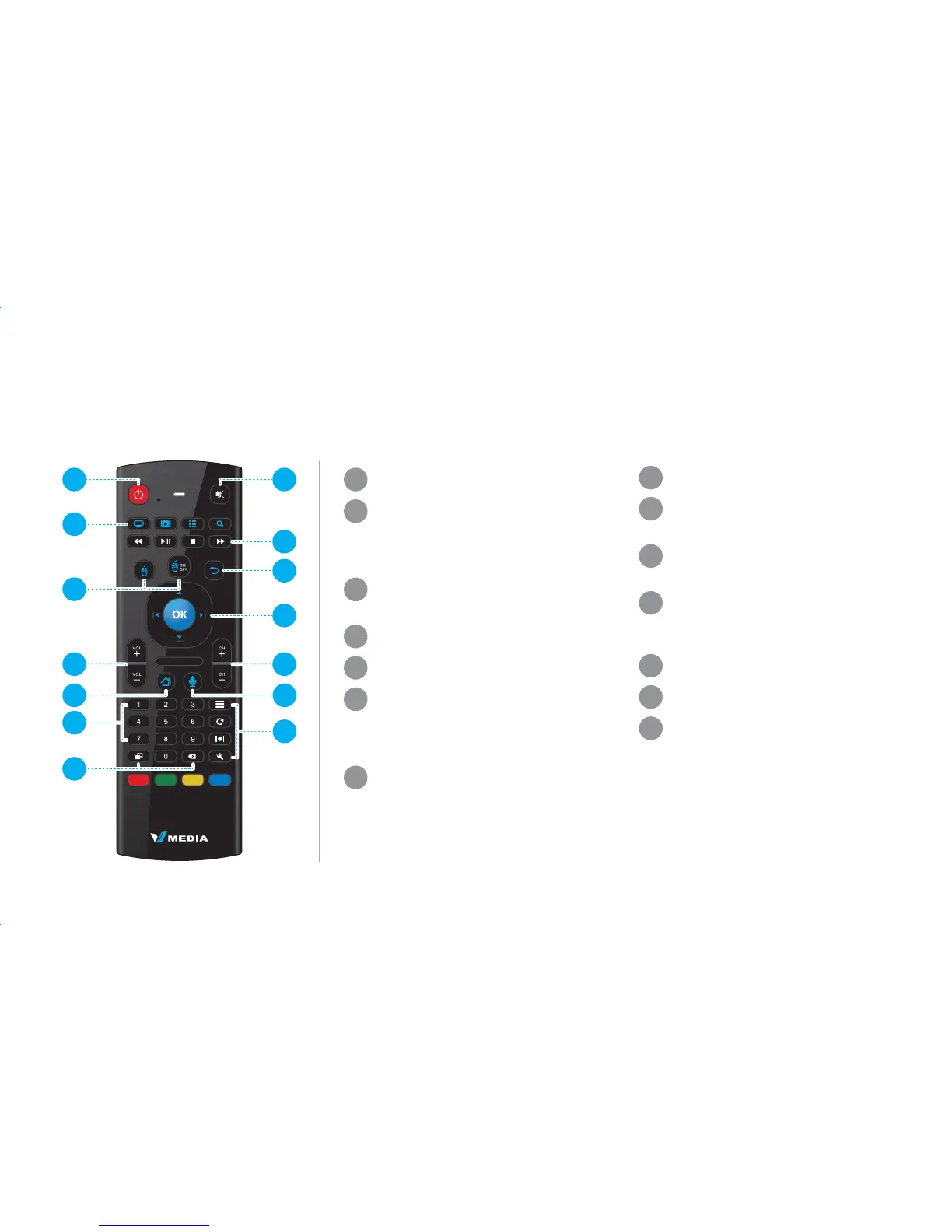
Power
TV - Opens TV Guide
Video - Opens VOD screen
Apps - Opens Apps screen
Search - Opens Search screen
Pointer Click
Mouse Pointer On/Off
Vol - Volume control
Home - Main Menu
Digital buttons used to select a
channel number in TV Guide or
to enter your username and
password
Display - Shows, hides and
switches different on-screen
overlays
Backspace - Allows toggling
between last viewed content
MIC
1
2
3
4
5
6
7
13
14
12
8
9
10
11
1
2
3
4
5
6
7
Mute
Rewind, Play, Pause, Stop, Fast
Forward
Back- Back to previous
menu/screen
Navigation - Move Up, Down,
Left and Right
OK - Confirm selection
Ch - Channel selection
Voice Activation
Search
Refresh - Refresh screen
information
Wide - Aspect ratio
Settings - Additional VBox
settings
8
9
10
11
12
13
14


 To Next Page