RX1 - Quick Start Guide - P/N S16955 RC
4/4
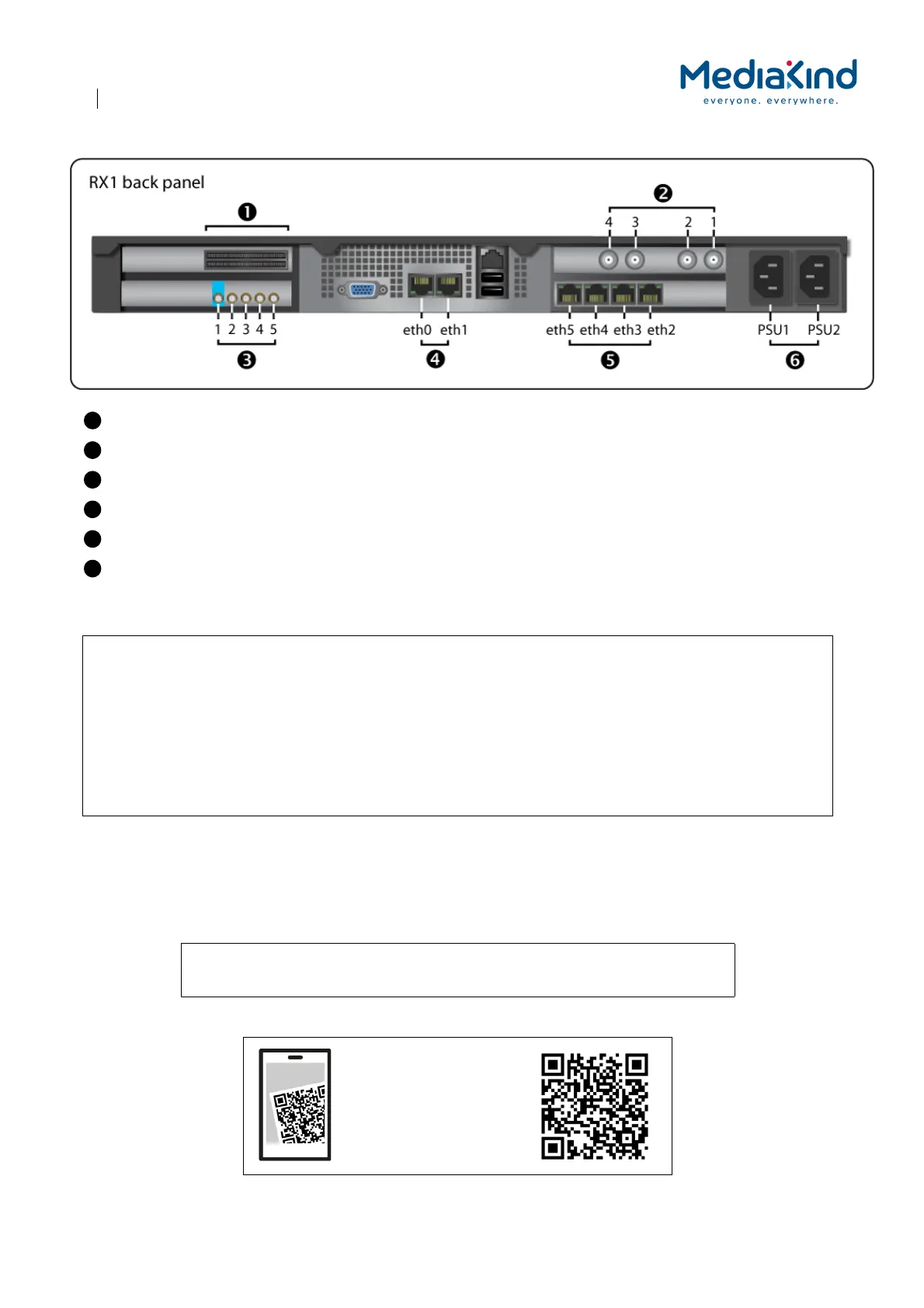
Dual Common Interface
Quad Satellite input
ASI output
1 GbE – eth0 for management
Quad 1 GbE output – eth2 for multicast
Power input
NOTE: The back panel components are SELV (Safety Extra Low Voltage) components.
CAUTION: CAMs supplied with the RX1 must be kept with the unit they were supplied with. Do not swap CAMs
between RX1 units. The CAMs are labeled with the serial number of the RX1 they belong with.
To keep the CAMs with the RX1, we recommend plugging the CAMs into the CI slots soon after
unboxing the RX1.
Where two CAMs are supplied, it does not matter which CI slot each CAM is fitted in.
Always unplug CAMs from the RX1 unit when it transported. Leaving a CAM in a CI slot risks damage
to the CAM or the RX1 CI slots.
An electronic copy of this document is available for download at:
https://www.mediakind.com/rx1-quick-start-guide
Scan to connect to
MediaKind website and
get this Quick Start
Guide.



 To Previous Page