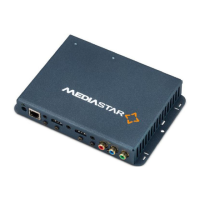
Quick Start Guide - 782-AV 4K UHD IPTV and Media Player
Browser based Configuration Menus
The 782’s web page configuration menus allow the full range
of operational parameters to be set. When using the web pages,
full contextual help is provided on the right side of the screen.
When changes have been made, press the APPLY button
at the bottom of the page to ensure these take effect.
Specification – The specification page includes details of the
capabilities of the product. Please note that this unit may not
have all the options mentioned. The Status page shows all the
optional features currently enabled.
Status – shows the current status of the 782, including its Part
number, Serial Number, Unit name, Playlist reference, Media
Files (stored locally), IP Address, Mac Address, Software version,
SIPI Command Set Version, Temperature, Preferred and Actual
Resolution, Media Storage (capacity and used), PoE status and
RS232 status.
Operating Mode – Set the name of the unit, whether to apply
a password to the mobile page here, and the local audio input
format.
Video Output – Set the preferred video output resolution here
(default auto via HDMI, or analogue YPbPr 720p60), the analogue
video output format, how long to show the media name on-
screen, and select the preferred audio, subtitle and closed caption
languages (individual channel selections can also be made via
on-screen menus).
Picture Control – This provides a web page interface to control
the media that is currently being shown on the display. Click on
a media icon to show it on screen (the current media is shown
highlighted). Volume and mute controls are also provided on the
top-right pull-down.
Media Files – This shows the Media files that are currently stored
in the on-board flash memory, and the state of any ongoing
media download.
Aux Port – Configure the external contact closures for open/
closed contact operation and external audio mute. This 3.5mm
jack connector is physically labelled IR blaster, and the electrical
pin-out is available on request.
Date/Time – Configure the local time to use a Network (NTP)
server if available. If not, set the date/time manually. Set the
local time zone and daylight saving.
RS232 Port – Configure the serial port settings for display
control, SIPI control interface or for IP to RS232 transparent
pass-through mode.
Network Setup – Allows specification of the Network
Connection; DHCP or static addressing, device hostname, IP
address, subnet mask, Gateway and DNS settings. Confirm
these with the network administrator before configuring.
Update Locations – Specify the URL of the MediaStar http server
and folder that the 782 will look at for software updates and
a central configuration file. The 782 will only upgrade to new
software that has been digitally signed by Cabletime. You can
check the settings are valid as long as the MediaManager server
is already running.
Enablement Code – Enter enablement codes here to reconfigure
or expand the capabilities of your unit. Details can be obtained
from your reseller or Cabletime.
Set Password – A password may be set to prevent the
unauthorised modification of the 782’s configuration. A password
consists of six digits from 0-9. If the password gets lost, contact
Cabletime for assistance, quoting the serial number of the unit
affected.
SNMP – Configure to send SNMP ‘event’ warning messages to
a corporate SNMP monitoring system (MIB files are available on
request).
Email Logs – Event logs can be periodically emailed to a
recipient. Specify the email server and recipient email address
here.
Event Log – This shows a full list of the errors or ‘events’ that the
782 has experienced. Significant error messages will also produce
an SNMP trap when enabled.
Playout Log – This shows list of the Media that the 782 has been
playing out.


 To Next Page
 Loading...