© 2015 mediola – connected living AG, Irrtümer und Änderungen vorbehalten | Version 6/2015 2
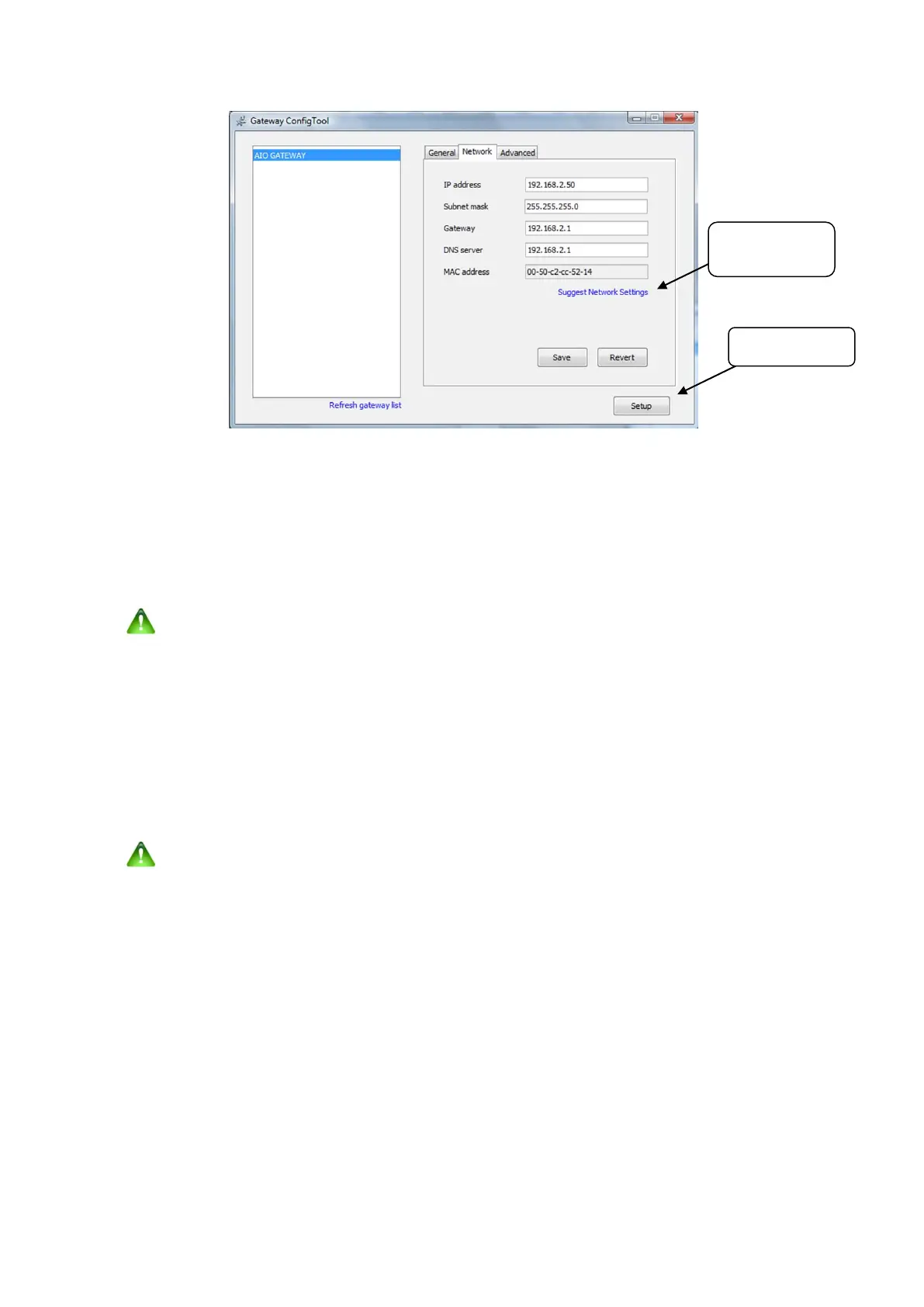
Now adapt the IP-Settings to your local network (Tab "Network"). Select the „Network“ Tab and click the Setup-
Button. Here a password is required. The original password in the factory settings is:
„admin“. Now you enter the
setup-mode and are able to change all settings (passwords, names, etc)
If you don't know how to set yout IP-Settings correctly , please use the „Suggest network settings“ functionality to
generate valid IP-Settings automatically. Click „Save“ to store the changes.
caution:
You should only use this feature if you are not familiar with the manual configuration of
network settings. An automatic setup may cause a non-compliant use of DHCP
functions.
Firmware Update:
Important:
Please check if a new firmware is available for your AIO GATEWAY and install it by clicking the „Update firmware“
button.
The ConfigTool always indicates the currently installed (current) and the latest available firmware (latest). From time to
time you should check with the ConfigTool whether a new firmware is available for your gateway.
caution:
Never disconnect the Gateway while a firmwareupdate is running.
to the setup-mode
automatically.


 To Next Page
 Loading...