EasyManua.ls Logo

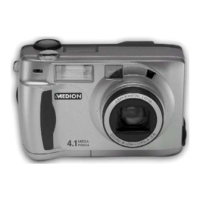
Medion 4.1 MEGAPIXEL - User Manual

Medion 4.1 MEGAPIXEL
156 pages
Print Icon
To Next Page IconTo Next Page
Loading...
Digital Camera
Digital Camera
4.1 MEGAPIXEL
4.1 MEGAPIXEL
User
User
s Manual
s Manual

Table of Contents

Questions and Answers

  • J
    Jessica SpencerAug 12, 2025
    What to do if the live view is not displayed on the LCD monitor of my Medion Digital Camera?
    • D
      daniel10Aug 12, 2025
      If the live view isn't showing on your Medion Digital Camera's LCD monitor, several things could be the cause. First, ensure the camera is powered on by rotating the function dial and sliding the power switch. Check if the batteries are exhausted and replace them, or use the AC adapter. Make sure the batteries are inserted correctly, following the +/- diagram in the battery chamber. Also, verify the LCD monitor isn't turned off by pressing the display button. Finally, the auto power off function might be activated, so slide the power switch to turn the camera on again.
  • M
    Mark ClarkAug 16, 2025
    Why is my Medion Digital Camera image too dark or bright?
    • P
      Peggy SaundersAug 16, 2025
      If your Medion Digital Camera images are consistently too dark or too bright, check the exposure compensation value. If a value other than 0 is set, specify 0 for the exposure compensation value.
  • M
    Ms. Jennifer HunterAug 20, 2025
    What to do if the focus cannot be adjusted in autofocus mode on my Medion Digital Camera?
    • C
      Christine MillerAug 20, 2025
      If you're having trouble focusing in autofocus mode on your Medion Digital Camera, and the focus lamp is blinking rapidly, it might be due to the subject being difficult to focus on. Try using the focus lock function or switch to manual focus mode. Also, check the distance to the subject. If it's closer than 40 cm, move farther away. If you are in close-up mode, ensure the subject is within 4 cm to 40 cm of the camera.
  • J
    jpetersonAug 23, 2025
    Why is my Medion Digital Camera image recorded in flash mode dark?
    • Z
      znealAug 25, 2025
      If your Medion Digital Camera images are dark when using the flash, ensure you are within the flash range of 0.4 to 3 meters when taking the picture.
  • M
    Michelle SchwartzAug 27, 2025
    What to do if the image cannot be played back on the LCD monitor of my Medion Digital Camera?
    • J
      Jessica TaylorAug 27, 2025
      If you can't play back images on your Medion Digital Camera's LCD monitor, first make sure the camera is turned on by rotating the function dial and sliding the power switch. Then, check if the batteries are exhausted and replace them or use the AC adapter. Also, verify that the batteries are inserted with the correct polarity, following the diagram in front of the battery-chamber door.
  • S
    Shane CastroAug 31, 2025
    What to do if the shutter-release button is not released on my Medion Digital Camera?
    • K
      Kara LesterAug 31, 2025
      If the shutter-release button on your Medion Digital Camera isn't working, make sure the camera is turned on by rotating the function dial and sliding the power switch.
  • Y
    youngkaraSep 4, 2025
    What to do if my Medion Digital Camera does not function correctly due to static electricity?
    • C
      Christopher GraySep 4, 2025
      If your Medion Digital Camera malfunctions due to static electricity, remove the batteries and reinsert them. If you're using an AC adapter, disconnect it from the outlet and reconnect it. Then, turn the camera on again. If the camera still won't turn off, the CF card might be damaged. Transfer the data from the CF card to a computer and format the card.
  • S
    Shane ShieldsSep 8, 2025
    What to do if the zoom play cannot be performed on my Medion Digital Camera?
    • T
      tiffany28Sep 8, 2025
      If you can't use zoom play on your Medion Digital Camera, it might be because the picture was taken with the digital zoom function. Pictures taken with digital zoom cannot be played back in zoom play mode.

Medion 4.1 MEGAPIXEL Specifications

General IconGeneral
BrandMedion
Model4.1 MEGAPIXEL
CategoryDigital Camera
LanguageEnglish

Related product manuals