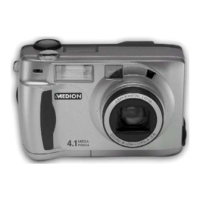
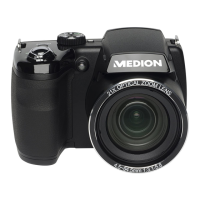
This document describes the MEDION MD 86929 digital camera, a device designed for capturing photos and videos in digital format. It is intended for private use and not for industrial or commercial purposes.
Function Description
The camera offers various modes for capturing images and videos. When powered on, it automatically enters recording mode, allowing users to take photos. In playback mode, users can view, edit, and delete photos, audio, and video clips.
Recording Modes:
The camera features a mode dial with 17 different shooting modes, including:
- Adapted Scene Mode: Automatically detects shooting conditions and selects optimal settings (e.g., Portrait, Landscape, Sunset, Macro, Backlit, Night Scene).
- SCN Record Mode: Provides preset shooting modes for specific situations or subjects.
- Panorama Mode: Allows users to create panoramic pictures with graphical support and an automatically controlled trigger, offering 120°, 180°, and 360° options.
- Art Effect Mode: Applies various artistic effects to photos, such as Stylish (supersaturated colors, uneven loading, blur), Soft Focus (light veil for soft focus), Light Coloring (calm or tensed atmosphere), Alive (more contrast and saturation), Miniature Effect (blurred parts for miniature model look), Astral (star-shaped light reflections), Poster, Impressive Art (dramatic contrast), S/W (black and white), Sepia, and various Tint options (Red, Orange, Yellow, Green, Blue, Mauve).
- Manual Exposure Mode: Allows manual control over aperture value and/or shutter settings.
- Aperture Setting Mode: Enables manual control of aperture values, with comparison circuit times calculated automatically.
- Lock Setting Mode: Suitable for recording moving subjects with fast shutter speeds to freeze motion or slower speeds for movement effects.
- Program Mode: Automatically sets appropriate recording settings like exposure time and aperture values.
- Continuous Shooting Mode: Offers Single Record (one recording), Sequence (continuous shooting until shutter release or memory card full), and Speed Burst (captures 30 images in a shot at 4:3 VGA).
Playback Features:
- Individual Playback: View recordings one by one, with options for fast forward/rewind during video playback.
- Thumbnail Playback: Display up to nine thumbnail images, with icons indicating file types (e.g., bad file, faulty file).
- Zoom into Photos: Zoom up to 12 times into individual image sections.
- Voice Memo: Record voice memos for each photo (up to 30 seconds).
- Filter Effects: Apply various artistic effects to photos (Soft, Color Gain, Alive, Miniature Effect, Astral, Impressive Art, Painting, Negative, S/W, Mosaic, Sepia).
- Crop: Crop photos to a different size.
- Change Size: Resize images to 640, 320, or 160 pixels.
- Start Screen: Choose a starting image (system image, selected photo, or no image) that appears when the camera is turned on.
- DPOF (Digital Print Order Format): Specify print settings for images, including the number of copies, for direct printing to DPOF-compatible printers.
- Copy Function: Copy pictures between internal memory and the memory card.
- Insert Movie Function: Combine two videos with the same specifications (size and resolution) into one.
- Face Retouch: Apply retouching functions like Smooth, Lighten, and Eye Zoom to images with face detection.
Important Technical Specifications
- Pixel: 20 Mega Pixel
- Sensor: 20 MP CMOS 1/2.3"
- Cover: F = 3.0 ~ 5.9
- Shutter Speed: 1/2000 ~ 15 sec
- Focal Length: f = 4.5 ~ 157.5 mm (equivalent to small format: 25 mm ~ 875 mm)
- Optical Zoom: 35 fold
- Digital Zoom: 8 fold
- LCD Monitor: 7.62 cm / 3" LCD - Display
- File Format: JPEG (EXIF 2.3), DPOF, AVI, WAV
- Max Resolutions (Camera Mode): 5152 x 3864 pixels
- Video Mode: 1280 x 720 (30 fps.)
- Image Storage (Internal): 128 MB (usable storage: around 72 MB)
- Image Storage (External): SD card (up to 4 GB), SDHC card (up to 32 GB)
- Connection: Micro-USB 2.0 AV OUT
- Dimensions: Approximately 128 x 86 x 91 mm (W x H x D)
- Mass: Approximately 490 g (excluding batteries)
- Ambient Temperature: 0° - 40° C at 0% - 90% rel. humidity
- USB Power Supply Model Number: KSAS0060500100VEU
- USB Power Supply Input Voltage: 100 - 240 VAC 50/60 Hz 180 mA
- USB Power Supply Output Voltage: 5.0 V 1.0 A
- Battery Pack Model Number: NP-120
- Battery Technical Specifications: 3.7 V / 1700 mAh / Wh 6.29
Usage Features
- Power On/Off: Press the QP1QHH key. The lens extends, power light turns green, and display turns on.
- Language and Date/Time Setting: Prompted on first use. Use navigation keys to select language, date, and time, then confirm with the QM button.
- Power Saving Function: Automatically turns off the camera after 60 seconds of inactivity (configurable to 3 or 5 minutes, or deactivated). Not active during recording or playback, or when connected via USB.
- Flash Settings: Multiple flash modes available (Auto, Red-eye reduction, Forced Flash, Slow Sync, Flash forced off).
- Zoom: Optical and digital zoom controlled via the zoom lever.
- Focus Modes: AF (Autofocus), Macro (1 cm to 50 cm for close-ups), Super Macro (1 cm to 30 cm for extreme close-ups), and Infinity (for distant objects).
- AE/AF Lock: Lock focus and exposure using the AE/AF LOCK button or by pressing the shutter button halfway.
- Self-Timer: Set a delay for image recording (10 seconds, 2 seconds, or Double Shot with 10 and 12 seconds).
- Video Recording: Record video clips with sound (microphone is active). Digital zoom and flash are not available during video recording.
- PIV Function (Picture in Video): Capture photos during video recording without stopping the video (available for 720p30 and VGAp30 video sizes).
- Connecting to TV: Play pictures on a TV using the AV cable.
- Printing Pictures: Print directly to PictBridge-compatible photo printers via USB.
- Data Transfer to Computer: Transfer recordings to a computer via USB cable. Supports Windows Vista SP1, Windows 7, Windows 8, and Windows 8.1. The camera can be recognized as a mass storage device (MASS STORAGE) or as a Picture Transfer Protocol (PTP) device.
- Memory Folder Structure: Automatically creates folders and names files (e.g., "DSCI0001") in ascending order.
Maintenance Features
- Cleaning:
- Camera body: Use a soft, dry cloth. Avoid thinners or oil-containing cleaning agents.
- Lens and display: Remove dust with a blower, then clean with a soft cloth. Avoid pressing on the display or using hard objects.
- Housing and lens: Do not use strong cleaning agents. For stubborn dirt, contact Medion Service or an authorized workshop.
- Battery Care:
- Keep batteries out of reach of children.
- Ensure clean contacts before inserting batteries.
- Store batteries in a cool, dry place, away from intense heat.
- Avoid contact with battery acid; rinse affected areas with clean water and seek medical attention.
- Do not throw batteries into fire, short-circuit, or disassemble.
- Remove batteries if the unit is not used for an extended period.
- Remove leaking batteries immediately and clean contacts.
- At low temperatures, battery capacity may decrease; keep a spare battery warm.
- Avoid shocks or impacts to the battery.
- Memory Card Care:
- Turn off the camera before inserting or removing memory cards to prevent instability.
- Handle memory cards cautiously.
- MicroSD cards are consumables and should be replaced after prolonged use. Regularly check recording performance.
- Do not change folder or file names from your PC, as this may render data unplayable.
- General Precautions:
- Store the camera dry; it is not waterproof.
- Keep away from moisture, salt, and dust.
- Keep away from strong magnetic fields.
- Avoid excessive heat and strong temperature fluctuations.
- Do not drop the device.
- Do not remove the battery during data processing to prevent data loss.
- Handle the lens and moving parts carefully.
- Repair: Do not attempt to open or repair the device yourself due to the risk of electric shock. Contact the Medion Service Center or a suitable specialist workshop for repairs.

 Need help?
 General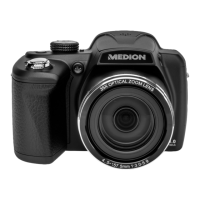

 To Next Page