33
10.2.2. Installing a 2.5” SSD drive in a 2.5”/3.5” mobile rack
When installing an SSD drive, follow the first four steps in the previous instructions
and then proceed as follows:
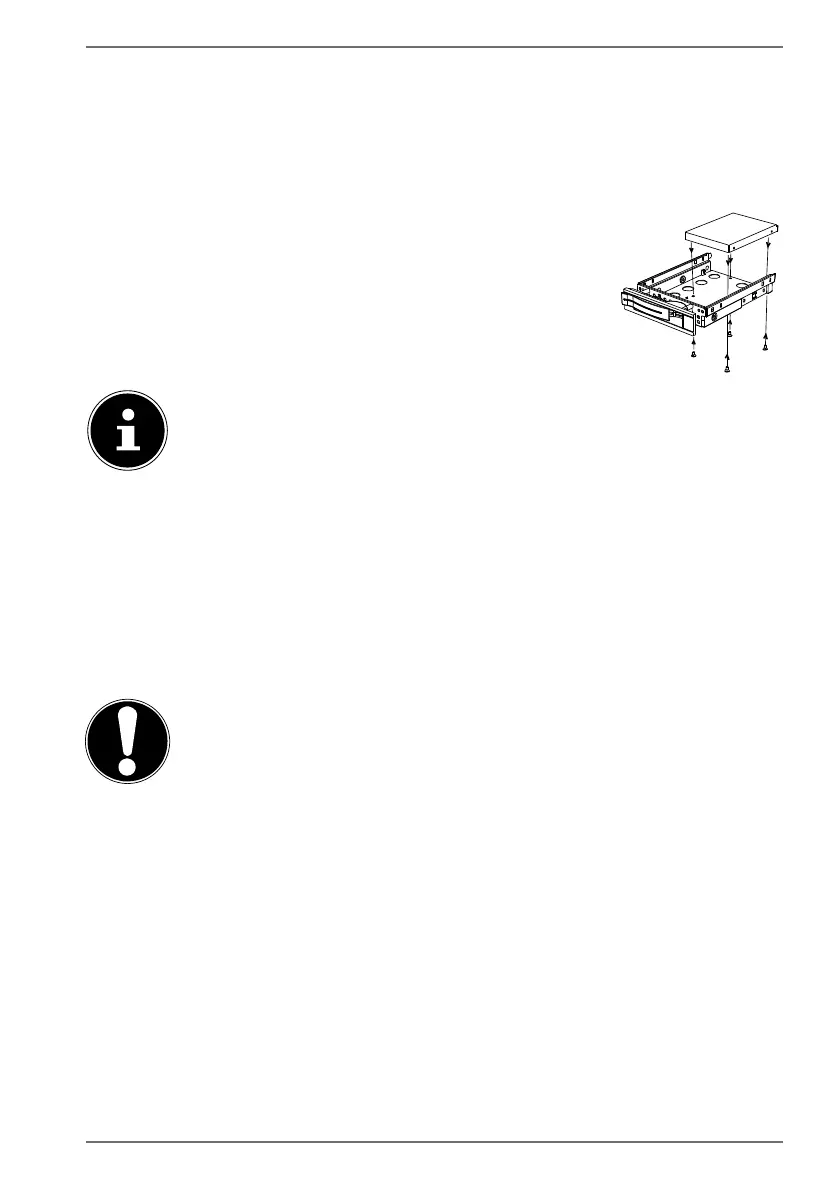
The upper side of the hard drive is face up and the contacts are to the bottom
right.
Now insert the right side of the hard drive into the mobile rack.
Tightly hold the hard drive and the mobile rack, turn it over
and use four M3 x 4 mm countersunk screws (not supplied)
to screw the hard drive in place using the corresponding
screw holes.
The hard drive decoupler does not need to be replaced because the
hard drive has been sufficiently secured in place by the screws.
Carefully slide the mobile rack into the slot until it clicks into place.
Lock the mobile rack in place by pressing on the handle until it audibly clicks
into place. The hard drive will be recognised and can now be used.
11. Optical drive*
11.1. Load disc
NOTICE!
Risk of damage!
The high speeds in the drive may break defective
media and damage your device. Damage resulting from
defective media is not covered under the warranty and
fees will be charged for the repairs.
Do not use scratched, broken, dirty or poor quality
discs or special types of discs.
Do not stick a protective film or any other stickers
on the discs, because the adhesive can damage the
surface of the disc and corrupt data.
Inspect discs carefully before inserting them. If
damage or dirt is apparent, you may not use this
disc.



 To Next Page