EasyManua.ls Logo

Medion ms-7501M1 - User Manual

Medion ms-7501M1
29 pages
Print Icon
To Next Page IconTo Next Page
Loading...
i
MS-7501M1 (V2.X) Mainboard
PDF created with pdfFactory Pro trial version www.pdffactory.com
Question and Answer IconNeed help?

Do you have a question about the Medion ms-7501M1 and is the answer not in the manual?

Summary

Safety Instructions

Chapter 1 Getting Started

Mainboard Specifications

Details processor, chipset, memory, LAN, IDE, SATA, and other technical specifications of the mainboard.

Chapter 2 Hardware Setup

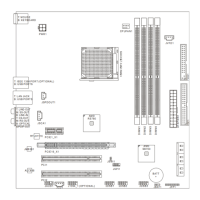
Mainboard Layout Diagram

Visual guide showing the placement of components, connectors, and slots on the mainboard.

CPU Installation and Cooling

Instructions for installing the CPU, heatsink, and fan, including important safety precautions.

Memory Module Installation

Steps for installing DDR2 memory modules and configuring Dual-Channel memory mode for enhanced performance.

Power Supply Connectors

Guide for correctly connecting the ATX 24-pin and ATX 12V power supply connectors to the mainboard.

Back Panel Ports

Description of external I/O ports on the back panel, including USB, LAN, audio jacks, and PS/2.

Jumper Configuration

Instructions for setting jumpers, specifically the Clear CMOS jumper (JBAT1) for system configuration.

Expansion Slots

Information on PCI Express and standard PCI slots for adding expansion cards and peripherals.

Summary

Safety Instructions

Chapter 1 Getting Started

Mainboard Specifications

Details processor, chipset, memory, LAN, IDE, SATA, and other technical specifications of the mainboard.

Chapter 2 Hardware Setup

Mainboard Layout Diagram

Visual guide showing the placement of components, connectors, and slots on the mainboard.

CPU Installation and Cooling

Instructions for installing the CPU, heatsink, and fan, including important safety precautions.

Memory Module Installation

Steps for installing DDR2 memory modules and configuring Dual-Channel memory mode for enhanced performance.

Power Supply Connectors

Guide for correctly connecting the ATX 24-pin and ATX 12V power supply connectors to the mainboard.

Back Panel Ports

Description of external I/O ports on the back panel, including USB, LAN, audio jacks, and PS/2.

Jumper Configuration

Instructions for setting jumpers, specifically the Clear CMOS jumper (JBAT1) for system configuration.

Expansion Slots

Information on PCI Express and standard PCI slots for adding expansion cards and peripherals.

Overview

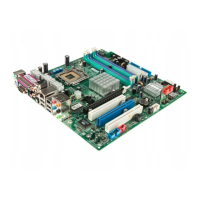
This document describes the MS-7501M1 (V2.X) Micro-ATX Mainboard, a high-performance and professional desktop platform solution based on AMD® RS780 & SB700 chipsets.

Function Description

The mainboard supports AMD® Phenom/ Athlon 64/ Sempron processors in Socket AM2/AM2+. It provides various connectors and slots for essential computer components and peripherals, including memory modules, storage devices, expansion cards, and front/back panel I/O. Key features include:

  • Processor Support: Designed for 95W AMD® Phenom/ Athlon 64/ Sempron processors in Socket AM2/AM2+.
  • Memory Support: Features four DDR2 DIMM slots, supporting up to 8GB of DDR2 533/667/800/1066 SDRAM (1.8V). It supports Dual-Channel mode for enhanced system performance.
  • Storage: Includes one IDE port by AMD® SB700, supporting Ultra DMA 33/66/100/133 mode, and six SATA II ports by AMD® SB700, supporting storage and data transfers up to 3.0Gb/s.
  • Expansion Slots: Provides one PCI Express x16 slot, one PCI Express x1 slot, one 32-bit/33MHz PCI white slot (single master), and one 32-bit/33MHz PCI blue slot (double master).
  • Audio: Integrated Realtek® ALC888S-VC chip offers flexible 8-channel audio with jack sensing, compliant with Azalia 1.0 Spec. It includes five audio jacks on the back panel (Line-Out, SS-Out, Line-In, CS-Out, RS-Out) and an optical S/PDIF-out jack. Front panel audio pinheaders are also available.
  • Networking: Features Gigabit Fast Ethernet by Realtek® RTL8111C.
  • USB: Four USB ports on the back panel and three on-board USB pinheaders for connecting various USB devices.
  • IEEE 1394: Chip integrated by JMicron® JMB381, with a transfer rate up to 400Mb/s. An optional IEEE 1394 port is available on the back panel, and an on-board pinheader is also provided.
  • Other Connectors: Includes a floppy port, PS/2 mouse and keyboard ports, serial port connector, chassis intrusion switch pinheader, S/PDIF-out pinheader (for HDMI Audio), VFD connector, and SMI switch.

Important Technical Specifications

  • Form Factor: Micro-ATX (24.4cm X 24.4 cm) with 6 mounting holes.
  • Chipset: North Bridge: AMD® RS780, South Bridge: AMD® SB700.
  • FSB (Front Side Bus): Hyper Transport supports up to 2.6GHz.
  • CPU Fan Pinheader: Supports 4-pin CPU fan pinheader with Fan Speed Control.
  • Power Connectors: ATX 24-Pin Power Connector (ATXPWR1) and ATX 12V Power Connector (PWR1).
  • Floppy Support: Supports 1 FDD with 360KB, 720KB, 1.2MB, 1.44MB, and 2.88MB.
  • PCI Express Transfer Rates: PCI Express x16 slot supports up to 4.0 GB/s, PCI Express x1 slot supports up to 250 MB/s.
  • Audio Jacks: Line-Out (Green), SS-Out (Gray), Line-In (Blue), CS-Out (Orange), RS-Out (Black).
  • LAN LED Indicators:
    • Left (Green): Off (LAN link not established), On (steady state - LAN link established), On (brighter & pulsing - communicating with another computer on the LAN).
    • Right: Green Off (10 Mbit/sec data rate selected), On (100 Mbit/sec data rate selected), Orange On (1000 Mbit/sec data rate selected).
  • CMOS: Onboard CMOS RAM with external battery power for system configuration data.

Usage Features

  • Easy CPU Installation: The Socket AM2/AM2+ is designed for straightforward CPU installation. Users must ensure the CPU is correctly oriented by aligning the gold arrow on the CPU with the socket.
  • CPU Cooling: Requires a heat sink and cooling fan to prevent overheating. Thermal paste or tape should be applied for optimal heat dissipation. The CPUFAN1 connector supports fan control, which can be activated via the BIOS Setup Utility to automatically adjust fan speed based on CPU temperature. Both 3-pin and 4-pin fans/heatsinks are compatible with CPUFAN1.
  • Memory Installation: Memory modules have a single notch for correct orientation. They should be inserted vertically until the plastic clips automatically close, indicating proper seating. For Dual-Channel mode, memory modules of the same type and density should be installed in different channel DIMM slots. DIMM1 should always be populated first for successful system boot-up. Due to chipset resource deployment, the system may detect up to 7+GB (not full 8GB) when each DIMM is installed with a 2GB memory module.
  • IDE Device Configuration: When installing two IDE devices on the same cable, they must be configured as master/slave using jumpers, as per the IDE device's documentation.
  • Serial ATA Cable Handling: Serial ATA cables should not be folded into a 90-degree angle to prevent data loss during transmission.
  • Front Panel Connectivity: The JFP1 connector is compliant with Intel® Front Panel I/O Connectivity Design Guide, allowing connection of front panel switches and LEDs.
  • SCART Output: The JSCA1 connector allows connection to SCART-compliant output devices like TVs, VCRs, and DVD players, adhering to the established European standard for home video equipment.
  • Front LCD Module: The JVFD1 connector is provided for connecting to Medion VFD LCD panels.
  • Overclocking Support: The mainboard is designed to support overclocking, but users are cautioned to ensure components can tolerate abnormal settings. Damages or risks from inadequate operation or exceeding product specifications are not guaranteed.

Maintenance Features

  • Safety Instructions: Emphasizes reading safety instructions, keeping the manual for future reference, avoiding humidity, placing the equipment on a flat surface, not covering air convection openings, ensuring correct power voltage (110/220V), positioning the power cord safely, unplugging the power cord before adding components, noting all cautions/warnings, and avoiding liquid spills.
  • Service Personnel: If issues like a damaged power cord/plug, liquid penetration, moisture exposure, equipment malfunction, drops, or obvious breakage occur, the equipment should be checked by service personnel.
  • Environmental Conditions: Avoid leaving the equipment in unconditioned environments or storage temperatures above 60°C (140°F) to prevent damage.
  • Battery Replacement: Caution against incorrect battery replacement, recommending replacement only with the same or equivalent type.
  • Waste Batteries: Waste batteries should be collected separately for recycling or special disposal for environmental protection.
  • CMOS Clearing: The JBAT1 jumper allows clearing CMOS data. To clear CMOS, short pins 2-3 while the system is off, then return to pins 1-2. Clearing CMOS while the system is on will damage the mainboard.
  • Expansion Card Installation: When adding or removing expansion cards, always unplug the power supply first. Refer to the expansion card's documentation for necessary hardware or software settings (jumpers, switches, BIOS configuration).
  • Power Supply Recommendation: A power supply of 350 watts (and above) is highly recommended for system stability. All power connectors must be properly connected.
  • USB Pin Connection: Ensure VCC and GND pins of USB connectors are connected correctly to avoid possible damage.

Medion ms-7501M1 Specifications

General IconGeneral
BrandMedion
Modelms-7501M1
CategoryMotherboard
LanguageEnglish

Related product manuals