EasyManua.ls Logo

Medistrom Pilot-12 Lite - User Manual

Medistrom Pilot-12 Lite
16 pages
Print Icon
To Next Page IconTo Next Page
Loading...
PRODUCT MANUAL
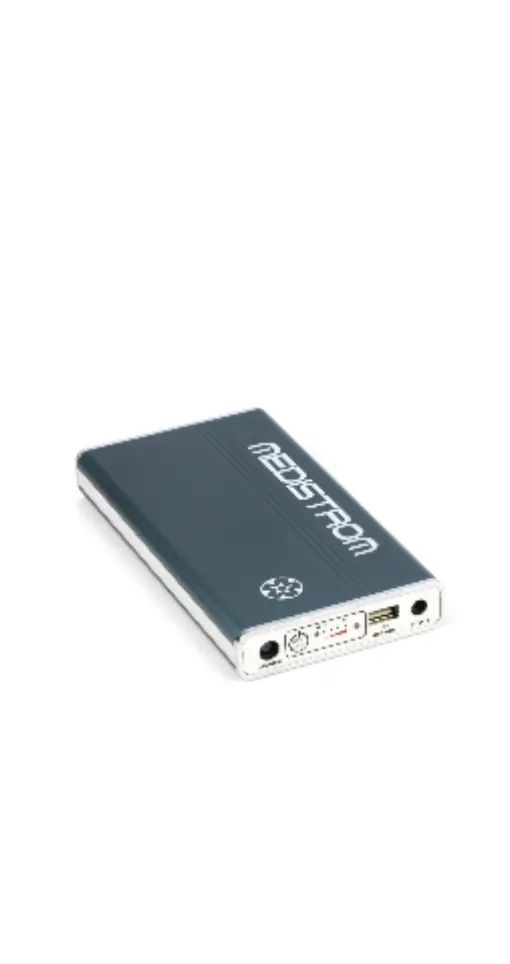
Medistrom Pilot-12 Lite
Medistrom Pilot-24 Lite
Battery and Backup Power Supply
Thank you for purchasing the Medistrom
CPAP Battery Portable Power Supply.
Please read this product manual carefully
before putting the equipment into
operation for the rst time.
Manual Version: EU 03-11-2020

Questions and Answers

  • H
    hawkinstrevorAug 18, 2025
    What to do if the Medistrom Power Supply battery capacity is below 5%?
    • B
      Brandon GarciaAug 18, 2025
      If the Medistrom Power Supply battery capacity is below 5%, it means the battery power level is critically low. You should charge the battery as soon as possible to avoid it entering an Over Discharge State. Not charging the battery for a prolonged period will cause it to go into Over Discharge State.
  • S
    stephanie52Aug 20, 2025
    What AC adapter should I use for Medistrom Pilot-12 Lite?
    • J
      Jennifer KnightAug 20, 2025
      For the Medistrom Pilot-12 Lite, use the AC adapter provided with your Respironics DreamStation or Respironics System One S60, or other compatible power adapters. For the Pilot-24 Lite, use the AC adapter provided with your ResMed S9 or ResMed AirSense 10, or the Medistrom AC adapter.
  • C
    Christopher GalvanAug 22, 2025
    Why is the blue LED flashing rapidly with short beeps on my Medistrom Power Supply?
    • C
      Carrie ValenzuelaAug 23, 2025
      If the blue LED on your Medistrom Power Supply is flashing rapidly and accompanied by a short (200ms) beeping pattern, it could be due to an incorrect AC adapter. For Pilot-12 Lite, use the AC adapter provided with your Respironics DreamStation or Respironics System One S60 or other compatible power adapters. For Pilot-24 Lite, use the AC adapter provided with your ResMed S9 or ResMed AirSense 10 or the Medistrom AC adapter.
  • M
    Maria ColeAug 26, 2025
    What to do if my Medistrom Power Supply is not providing power?
    • A
      amygonzalesAug 26, 2025
      To resolve this, press the Multi Function Button to wake the battery from Stand-by Mode. Disconnect all devices and cables. Plug your DC output cable into the DC Out port on the battery and press the Multi Function Button. For USB Devices: Disconnect all devices and cables. Plug your DC output cable into the DC Out port on the battery then plug in your USB device into the USB Out port and press the Multi Function Button.
  • N
    Nathan HarrisAug 28, 2025
    Why is the blue LED flashing every 0.5 seconds on my Medistrom Power Supply?
    • C
      Caroline HarrisAug 28, 2025
      If the blue LED is flashing every 0.5 seconds on your Medistrom Power Supply, it means the battery capacity is below 5%. You should charge the battery as soon as possible to avoid it entering an Over Discharge State.
  • S
    Stephanie HaynesAug 30, 2025
    Why is the blue LED flashing with long beeps on my Medistrom Power Supply?
    • J
      John FarmerAug 30, 2025
      If the blue LED on your Medistrom Power Supply is flashing accompanied by a long (1s) beeping pattern, it indicates that the environmental temperature is too high for the battery to operate safely. Ensure the battery is placed where there is no excess heat, away from radiators or electronic devices. Do not use the battery in temperatures exceeding 40° C / 104° F.
  • D
    David RodriguezSep 2, 2025
    What to do if the blue LED is flashing rapidly with short beeps on my Medistrom Power Supply?
    • H
      Haley RomeroSep 2, 2025
      If the blue LED on your Medistrom Power Supply is flashing rapidly and accompanied by a short (200ms) beeping pattern, the power source may be damaged. The power strip or outlet wiring may be damaged. Plug the AC adapter directly into a wall outlet or try using the battery with a different wall outlet.
  • T
    ttaylorSep 4, 2025
    Why is the blue LED flashing with alternating short and long beeps on my Medistrom Power Supply?
    • A
      Amber SchmidtSep 4, 2025
      If the blue LED on your Medistrom Power Supply is flashing accompanied by a short (500ms) and long (1s) alternate beeping pattern, it could be due to an incompatible PAP device. Ensure that the PAP device you are using is compatible with the Pilot-12 Lite or Pilot-24 Lite.
  • R
    Rebecca HuffSep 6, 2025
    Why is the blue LED flashing with a short short long beeping pattern on my Medistrom Power Supply?
    • N
      Nicole JohnsonSep 7, 2025
      If the blue LED on your Medistrom Power Supply is flashing accompanied by a short (500ms) short (500ms) long (1s) beeping pattern, it means that the PAP device connected to battery is incompatible. Ensure that the PAP device you are using is compatible with the Pilot-12 Lite or Pilot-24 Lite.
  • W
    wnguyenSep 9, 2025
    Why are four green LEDs flashing with a long beep on my Medistrom Power Supply?
    • J
      Jessica ThomasSep 9, 2025
      If the four green LEDs are flashing together and accompanied by a long (1s) beeping pattern on your Medistrom Power Supply, it indicates that an incorrect AC adapter is being used. For Pilot-12 Lite, use the AC adapter provided with your Respironics DreamStation or Respironics System One S60 or other compatible power adapters. For Pilot-24 Lite, use the AC adapter provided with your ResMed S9 or ResMed AirSense 10 or the Medistrom AC adapter. If the problem persists, contact Medistrom technical support at 1-888-407-4791 (North America), 1-300- 146-358 (Australia) or email support@ medistrom.com.

Summary

Pilot-12 Lite User Guide

Package Contents

Lists all items included in the Pilot-12 Lite package.

PAP Device Compatibility

Details which PAP devices are compatible with the Pilot-12 Lite.

Safety Usage Information

Crucial safety guidelines and precautions for operating the Pilot-12 Lite.

Intended Use and Compatibility

Explains the primary functions and device compatibility of the Pilot-12 Lite.

Control Panel Overview

Identifies and explains the functions of the Pilot-12 Lite's control panel components.

Setup Guide

Step-by-step instructions for setting up and connecting the Pilot-12 Lite.

Technical Specifications

Key technical details including capacity, output, and dimensions of the Pilot-12 Lite.

Pilot-24 Lite User Guide

Package Contents

Lists all items included in the Pilot-24 Lite package.

PAP Device Compatibility

Details which PAP devices are compatible with the Pilot-24 Lite.

Safety Usage Information

Crucial safety guidelines and precautions for operating the Pilot-24 Lite.

Intended Use and Compatibility

Explains the primary functions and device compatibility of the Pilot-24 Lite.

Control Panel Overview

Identifies and explains the functions of the Pilot-24 Lite's control panel components.

Setup Guide

Step-by-step instructions for setting up and connecting the Pilot-24 Lite.

Technical Specifications

Key technical details including capacity, output, and dimensions of the Pilot-24 Lite.

Battery Maintenance and Handling

Care Instructions

Guidance on maintaining and cleaning the Pilot Lite battery.

Travelling Tips

Advice for traveling with the Pilot-12/24 Lite battery backup.

Storage and Disposal

Proper procedures for storing and disposing of the battery unit.

Safety, Warranty, and Support

General Warnings and Safety Precautions

Essential warnings and safety measures for battery usage.

Warranty Information

Details on product warranty coverage and claim procedures.

Troubleshooting Guide

Solutions for common issues and error codes encountered with the battery.

Product Identification

Serial Number Format

Explanation of the serial number structure and its meaning.

Understanding Symbols

Definitions and meanings of symbols used in the manual.

Medistrom Pilot-12 Lite Specifications

General IconGeneral
BrandMedistrom
ModelPilot-12 Lite
CategoryPower Supply
LanguageEnglish

Related product manuals