**Not all media players support this functionality.
ADDITIONAL INFORMATION
WARNING
Using headphones at high to moderate volumes for extended periods of time will result in permanent
hearing damage. It is advised you keep volume levels moderate to low at all times for your safety. Do
not use while driving a car, cycling, operating machinery, or performing other activities that require
hearing surrounding sounds.
Keep the device and packaging out of reach of children.
WARRANTY
MEE audio products purchased from an authorized dealer are covered by a 1-year manufacturer
warranty. For more information, visit MEEaudio.com/Support.
FOR ADDITIONAL SUPPORT
• View FAQs and troubleshooting guides at MEEaudio.com/Support
• Contact us at support@MEEaudio.com
HAVE A QUESTION?
Email support@MEEaudio.com
MEE audio and its logo are registered trademarks of S2E, Inc. All rights reserved.
iPhone®, iPad®, iPod®, and Siri® are registered trademarks of Apple Inc. Android™ is a registered
trademark of Google Inc.
QUESTIONS?
WE’RE HERE TO HELP!
Phone Support: 626-965-1008 x31
Monday ~ Friday 9am to 5:30pm PST
Email Support: support@MEEaudio.com
All emails are responded to within 2 business days
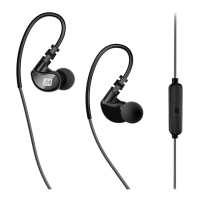
MEE audio X1 In-Ear Sports Headphones With Microphone And Remote User Manual – Download
[optimized]
MEE audio X1 In-Ear Sports Headphones With Microphone And Remote User Manual – Download
Related Manuals:
1. MEE audio M7P Sports In-Ear Headphones User Manual M7P SPORTS IN-EAR HEADPHONES with
mic, remote, and universal volume...
2. MEE audio X6 Plus Wireless Sports In-Ear Headphones User Manual USER MANUAL NEVER
LOSE FOCUS WIRELESS SPORTS IN-EAR HEADPHONES Model:...
3. MEE audio X7 Bluetooth Wireless Sports In-Ear Headphones User Manual USER MANUAL
NEVER LOSE FOCUS BLUETOOTH® WIRELESS SPORTS IN-EAR HEADPHONES...
4. MEE audio M6 In-Ear Sports Headphones With Memory Wire User Manual M6 IN-EAR SPORTS
HEADPHONES WITH MEMORY WIRE WWW.MEEaudio.com/M6 HOW TO...
5. MEE audio X7 Plus Bluetooth Wireless Sports In-Ear Headphones User Manual


 To Next Page