EN
75
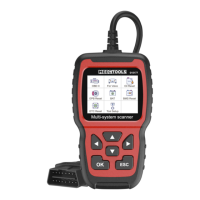
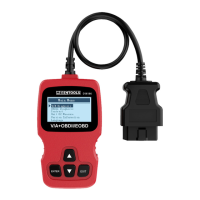
3. 16-pin diagnostics connector (OBD)
– for connection to vehicle computer.
4. Button I/M Readiness
– quick check of emissions related system and verication of
drive cycle.
5. Quick select button for reading of fault codes.
6. USB connector.
7. Button OK
– to acknowledge selection or steps in menus.
8. Arrow buttons
– to navigate (browse to left/right/up/down) in menus and
submenus and to go to the next display image or return to
previous display image.
FIG. 1
Explanation of symbols when using button 4, I/M Readiness:
• Fault status light (MIL) yellow = fault status light on
dashboard ON.
• Fault status light (MIL) grey = fault status light on dashboard
OFF.
Not supported
Completed
Not completed
FIG. 2


 To Next Page