The MegaChef MC-1000 is an immersion circulation precision cooker designed for sous-vide cooking, bringing professional culinary techniques into the home kitchen. This device offers precise control over the cooking process, ensuring consistent results with perfect texture and tenderness from edge to edge.
Function Description:
The sous-vide cooker operates by circulating water at a precisely controlled temperature around vacuum-sealed food. This method allows for even cooking and prevents overcooking, as the food cannot exceed the set water temperature. The device features a digital touchscreen panel for easy temperature and time adjustments. It is designed for household use and is suitable for cooking a variety of foods, including meats, seafood, poultry, vegetables, and desserts.
Important Technical Specifications:
- Model No.: MC-1000
- Thermal Power: 800W
- Minimum Temperature: 41°F (5°C)
- Maximum Temperature: 212°F (100°C)
- Temperature Stability: ±1%
- Minimum Water Depth: 4.25" (11 cm)
- Minimum Bath Size: 2.6 Gallons (10L)
- Maximum Bath Size: 4 Gallons (15L)
- Pump Volume: 2.25 Gallons/Min (8.5 L/Min)
- Input Power: 110~120 V AC, 60 Hz
Usage Features:
The MC-1000 is equipped with a touchscreen control panel and a scroll wheel for intuitive operation.
- Temperature Unit Changing: Users can toggle between Fahrenheit (F) and Celsius (C) temperature units by pressing and holding a dedicated button until the desired letter appears on the digital screen.
- Temperature Calibration: The cooker's temperature sensor is factory-calibrated for accuracy. However, it can be recalibrated to match an external thermometer. This involves determining the difference between the cooker's reading and the thermometer's reading, then pressing and holding a button for about 5 seconds. The display will show "0.0°", and the scroll wheel can be used to add or subtract up to 49.8°F (9.9°C) to adjust the reading. A final button press saves the set value.
- Timer Setting: The timer can be set for precise cooking durations. Pressing the timer button makes the hours value blink, allowing adjustment from 0 to 99 hours using the scroll wheel. Pressing the timer button again saves the hours and makes the minutes value blink, allowing adjustment from 0 to 59 minutes. A final press of the play/pause button confirms the timer setting, indicated by blinking icons and a beep. The timer begins counting down once the target temperature is reached.
- Flow Direction Adjustment: The cooker can circulate water in either a clockwise or counterclockwise direction. The pump cap can be twisted clockwise to unlock it, then positioned to direct the water jet as desired, for example, towards the side of the container to protect delicate foods or prevent blockages. After positioning, turning the cap counterclockwise locks it in place.
- Setup and Operation:
- Ensure the cooker is unplugged.
- Install the adjustable ring clip on the side of a pot or container and secure it with the tightening screw.
- Insert the cooker into the adjustable ring clip.
- Fill the pot with water to a level between the MIN and MAX lines on the pump housing.
- Place the pot/container near a grounded AC power outlet, avoiding stoves or other heat sources.
- Plug in the cooker.
- Press the power button on the control panel, then use the scroll wheel to set the target temperature.
- The bottom display shows the set temperature, while the top display shows the actual water temperature.
- Set the timer if desired.
- Press the play/pause button to start cooking. A beep indicates the process has begun.
- Once the target temperature is reached, gently place vacuum-sealed food into the water.
- To stop cooking, press the play/pause button and carefully remove the food bag using tongs or a long utensil.
- Safety Precautions:
- Do not allow children to operate the device. Close supervision is mandatory when used near children.
- Do not touch hot surfaces.
- Do not fill the pot over the MAX mark.
- If the cooker falls into water, unplug immediately and allow it to dry completely.
- Unplug when not in use and before cleaning.
- Do not touch the device or power cord with wet hands.
- Do not use power extension cords; plug directly into a grounded AC outlet.
- Ensure the power source has a proper ground connection. Do not modify the plug or use a grounding adapter.
- Check for physical damage before operation.
- Do not expose the cooker to excessively high temperatures or direct sunlight.
- Use only sealed zip bags or vacuum bags; do not use plastic wrap.
- The cooker requires a 4.25" (11cm) deep pot with a minimum capacity of 2.64 gallons (10 liters).
- The cooking container, stainless steel pump housing, and food bags become hot. Allow them to cool before emptying water.
- The control panel and scroll wheel lights blinking during operation are normal.
- Setting and operating the cooker is unavailable if the water level is below the MIN mark.
Maintenance Features:
Regular cleaning is essential for maintaining the cooker's performance.
- Disassembly for Cleaning:
- Turn the pump housing counter-clockwise to unlock it from the cooker body, then pull down to remove it.
- Turn the pump cap clockwise to unlock it from the pump housing, then pull down to remove it.
- Cleaning Components:
- The pump housing and pump cap are dishwasher safe or can be cleaned in a sink.
- To clean the heating coil, pump shaft, and sensor (non-removable parts), use dish soap and a soft toothbrush, then rinse under running water. Ensure only the metal parts are exposed to water; do not expose the upper part of the cooker to water.
- Reassembly:
- Allow all parts to fully dry before reassembling.
- To reattach the pump housing to the cooker body, align the dimple above the MAX line with the right side of the cooker body (FIG. 2).
- Turn the pump housing clockwise so that the dimple above the MAX line aligns with the arrow on the cooker body (FIG. 3).
Troubleshooting:
- Cooker Whistles: This is normal and caused by the motor, propeller, and cooling fan.
- Cooker Makes a Grinding Noise: The stainless steel pump housing may be loose. Turn off the cooker, let it cool, then secure the pump housing. If the sound persists, the pump shaft might be bent; remove the pump cap and push the propeller to the center.
- Cooker Hisses/Makes Bubbling/Swishing Noise: Check that the water level is between the MIN and MAX marks and refill as necessary.
- Water Circulation Breaking Food (Fish Fillets or Eggs): Reposition the pump cap to direct the water jet away from the food.
For warranty and support, customers can contact MegaChef at 424-543-1628.

 Need help?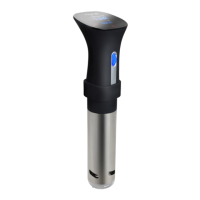

 To Next Page
 General