ICLAMP calibration (DET3TC, DET4TC2 and DET4TCR2)
The ICLAMP should be calibrated once at each test site to take into account the effects of transportation,
temperature and humidity on the ICLAMP.
1. Ensure the rotary selector switch is in the OFF position.
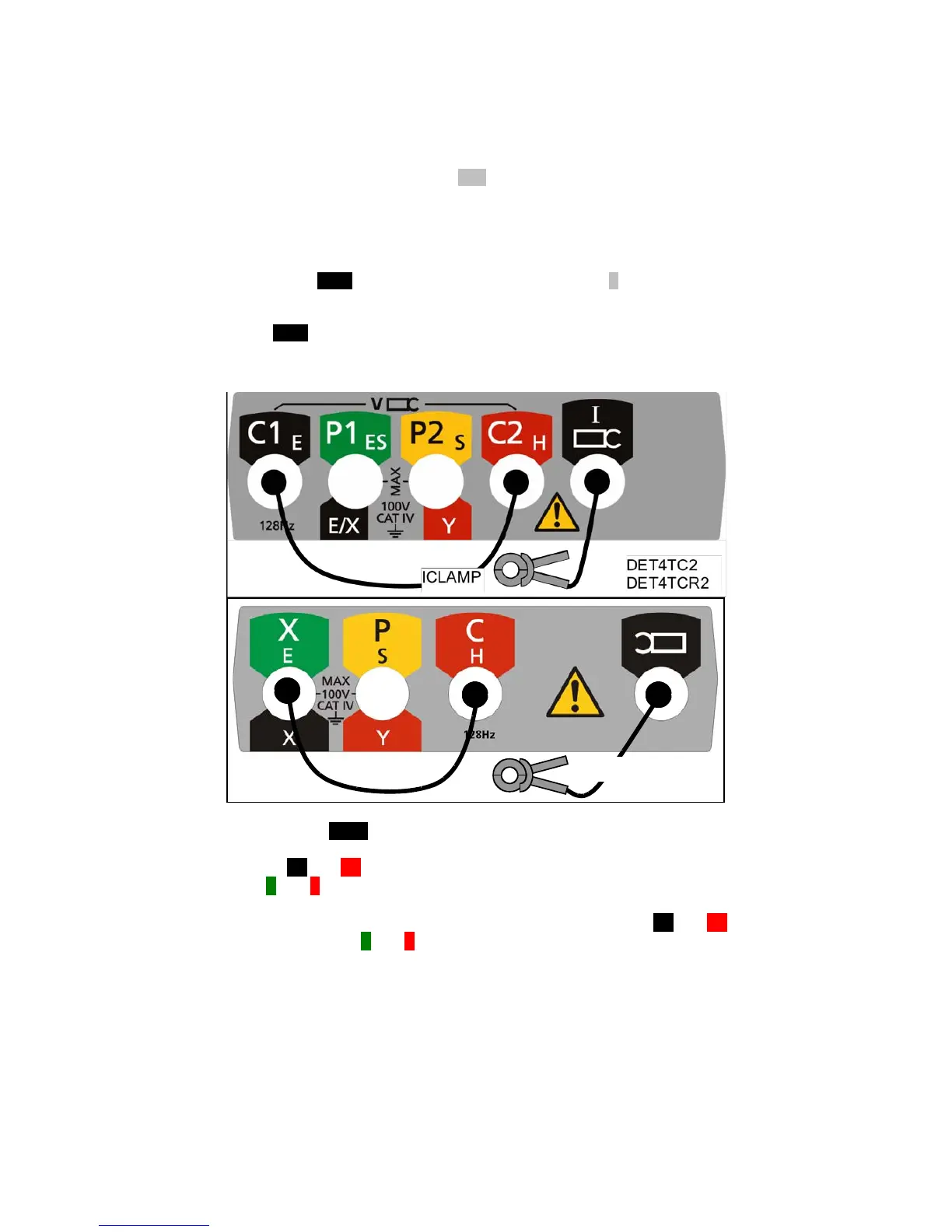
2. Connect the instrument as shown in Figure 37.
3. Ensure that the ICLAMP is not clamped around a conductor.
4. Press and hold the TEST button and switch instrument ON to the A setting using the selector
switch.
5. Release the TEST button.
Figure 37: ICLAMP zero calibration
6. Press and hold the TEST button until a “0” reading is obtained on the display.
7. Connect the C1 and C2 terminals together using the calibration lead supplied with the
ICLAMP. [X and C terminals for DET3TC]
8. Close the ICLAMP around the calibration lead, which connects the C1 and C2 terminals
as shown in Figure 38. [X and C terminals for DET3TC]



 To Next Page