EasyManua.ls Logo

Megger OTS80PB - User Manual

Megger OTS80PB
42 pages
Print Icon
To Next Page IconTo Next Page
Loading...
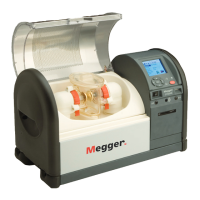
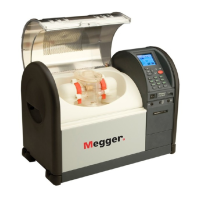
OTS80PB and OTS60PB
OTS100AF, OTS80AF and OTS60AF
Oil test set
User Guide

Other manuals for Megger OTS80PB

Question and Answer IconNeed help?

Do you have a question about the Megger OTS80PB and is the answer not in the manual?

Summary

Safety Warnings

Safety Warnings

Safety warnings and precautions must be read and understood before the OTS is used.

Symbols used on this instrument

Symbols used on this instrument

Explains the meaning of various icons and symbols used on the instrument.

General description

General description

Describes the OTS80PB, OTS60PB, OTS100AF, OTS80AF, and OTS60AF oil test sets.

OTS PB models

Details the features and portability of the OTS60PB and OTS80PB models.

OTS AF models

Details the features and laboratory use of the OTS60AF, OTS80AF, and OTS100AF models.

Features and benefits

Features and benefits

Lists the main features and benefits of the oil test sets.

Applications

Applications

Explains the use of oil test sets for determining dielectric strength and lists supported standards.

Instrument controls and indicators

Keypad and internal printer panel

Details the keypad, display, and printer panel controls for both PB and AF models.

Rear panel

Details the rear panel connections for PB and AF models, including ground, power, and USB ports.

Preparations for use

Getting started

Provides initial guidance for operating the Oil Test Sets for the first time.

Supply voltage

Details the supply voltage requirements and battery charging for PB models.

Assembly

Outlines the steps for unpacking, setting up, and connecting the instrument.

Test vessel preparation

Explains the key elements of preparing the test vessel for accurate testing.

Setting the electrode gap

Provides instructions on accurately setting the electrode gap using gauges.

Rinsing and then immediately filling the test vessel with the insulating fluid sample

Details the critical steps for rinsing and filling the test vessel with the oil sample.

Excluding air from circulating oil when using an impeller to stir the insulating fluid sample.

Explains how to use the baffle plate with an impeller to exclude air from the oil sample.

Selecting the optimum stirring option for the insulating oil sample to minimise air;moisture contamination

Compares stirring options (magnetic bead vs. impeller) for IEC 60156 and ASTM standards.

When testing to ASTM D1816:

Details stirring requirements for testing to ASTM D1816.

When testing to ASTM D877:

Notes that ASTM D877 does not specify oil sample stirring.

Calibration

States that instruments are factory calibrated and a certificate is supplied.

Stirrer options

Details the range of impellers and magnetic beads supplied by Megger.

Ordering Information

Directs users to the datasheet for ordering information and related literature.

Operating instructions

Top level tabs

Explains the six top-level tabbed windows for instrument control.

Navigation and character entry

Describes keypad navigation and methods for alphanumeric and numeric character entry.

Pinyin entry:

Explains how to use Pinyin entry for Chinese language input in specific fields.

Pinyin entry:

Provides further steps and examples for entering Chinese characters using Pinyin.

Pinyin entry:

Details Pinyin entry for PB models, including shortcuts and editing.

Pinyin entry:

Illustrates editing and saving test IDs with mixed alphanumeric and Chinese characters.

Setting favourite test standards

Guides users on setting favourite test standards from the library for easier access.

Performing a breakdown or withstand test

Explains how to select a standard and set up parameters for a test.

Test in progress

Describes the display indicators and safety measures during a test.

Test results

Explains how test results are displayed, analyzed, and printed.

Manage test standards

Custom tests

Details the three pre-programmed custom test types available.

Withstand tests

Lists the defined withstand tests that can be modified.

Editing test parameters

Guides users on navigating to and editing custom and withstand test parameters.

Editing test parameters

Explains how to set parameters for custom breakdown and withstand tests.

Basic memory functions

Covers saving, recalling, and deleting test records from internal or USB memory.

Transfer results to USB flash drive

Outlines the procedure for backing up test results to a USB memory device.

Print quality and changing paper

Provides instructions on changing paper and ribbon for the internal printer.

Vessel and electrodes

Advises on maintenance, cleaning, and replacement of test vessels and electrodes.

VCM100 D;VCM80 D

Mentions periodic cleaning of VCM100D/VCM80D voltage check meters.

Test vessel motorised stirrer

States that the motorised stirrer is integrated and not user serviceable.

Preventive maintenance

General

Notes that the OTS is not user serviceable and emphasizes lid integrity.

Cleaning

Provides instructions for cleaning outer surfaces and the test chamber.

Care for OTS electrodes

Mentions that brass electrodes may show deposits and oxidize.

New electrodes

Details what is included in new electrode kits and cleaning advice.

Electrode storage

Advises on storing electrodes in containers or insulating oil.

Cleaning oxidised;dirty electrodes

Provides guidance on cleaning dirty or oxidized electrodes and when to discard them.

Technical specifications

Test voltage:

Lists the test voltage ranges for PB and AF models.

Voltage rise time

Details the voltage rise time specifications for the instruments.

Voltage resolution and accuracy

Provides voltage resolution and accuracy specifications for the instruments.

Vessels:

Details the test vessel capacities and design features.

Temperature measuring range

States the temperature measuring range and oil requirements for standards.

Temperature sensor resolution:

Provides the temperature sensor resolution.

Power supply:

Details the line voltage and frequency requirements.

Fuses:

Lists the type and rating of fuses used in the instruments.

Batteries (PB model only):

Details the NiMH battery pack specifications for PB models.

DC power supply (PB model only):

Specifies the DC power supply used for battery charging in PB models.

Power source:

Describes the available power sources for the instrument.

Battery life:

Provides information on battery life and charge retention.

Battery charging:

Details the battery charging procedures and times.

Interface

Lists the available interface ports (USB).

Internal printer:

Details the type of internal printer and paper size.

External printer:

Mentions support for external printer languages.

Protection:

Describes the dual safety micro-switches on the chamber cover.

Display:

Specifies the display size and resolution.

Dimensions (W x H x D):

Lists the dimensions for each OTS model.

Weight:

Provides the weight specifications for each OTS model and test vessel.

Operating temperature:

Specifies the acceptable operating temperature range.

Storage temperature:

Specifies the acceptable storage temperature range.

Humidity non-condensing conditions:

Details the humidity limits for operation and storage.

Altitude:

Specifies the maximum operating altitude.

IP rating:

States the IP rating of the instrument.

Safety:

Mentions safety compliance with IEC61010.

EMC

Details EMC compliance standards.

VCM100 D;VCM80 D voltage check meters technical specification

Details technical specifications for VCM100D/VCM80D voltage check meters.

Storage and transportation

Provides guidance on careful transportation and storage of the oil test sets.

PowerDB software

PowerDB software

Explains how to download and install the PowerDB software from the Megger website.

Accessories and Equipment

Factory fitted accessories

Lists accessories included as factory-fitted for OTS PB and AF models.

Optional Accessories

Lists optional accessories available for the OTS range with order numbers.

Repair and warranty

Instrument repair and spare parts

Provides contact information for instrument repair and spare parts.

Approved repair companies

Advises consulting distributors for approved repair companies and parts.

Returning a test set for repair

Details the procedure for returning a test set for repair, including shipping.

End of life disposal

WEEE

Explains WEEE disposal reminders for products and batteries.

Batteries

Mentions battery disposal reminders and the registration number for batteries.

OTS60 PB; OTS80 PB

Details battery types and replacement procedures for OTS60PB/OTS80PB.

Declarations of conformity

Refers to EU declarations of conformity for radio and other equipment.

Summary

Safety Warnings

Safety Warnings

Safety warnings and precautions must be read and understood before the OTS is used.

Symbols used on this instrument

Symbols used on this instrument

Explains the meaning of various icons and symbols used on the instrument.

General description

General description

Describes the OTS80PB, OTS60PB, OTS100AF, OTS80AF, and OTS60AF oil test sets.

OTS PB models

Details the features and portability of the OTS60PB and OTS80PB models.

OTS AF models

Details the features and laboratory use of the OTS60AF, OTS80AF, and OTS100AF models.

Features and benefits

Features and benefits

Lists the main features and benefits of the oil test sets.

Applications

Applications

Explains the use of oil test sets for determining dielectric strength and lists supported standards.

Instrument controls and indicators

Keypad and internal printer panel

Details the keypad, display, and printer panel controls for both PB and AF models.

Rear panel

Details the rear panel connections for PB and AF models, including ground, power, and USB ports.

Preparations for use

Getting started

Provides initial guidance for operating the Oil Test Sets for the first time.

Supply voltage

Details the supply voltage requirements and battery charging for PB models.

Assembly

Outlines the steps for unpacking, setting up, and connecting the instrument.

Test vessel preparation

Explains the key elements of preparing the test vessel for accurate testing.

Setting the electrode gap

Provides instructions on accurately setting the electrode gap using gauges.

Rinsing and then immediately filling the test vessel with the insulating fluid sample

Details the critical steps for rinsing and filling the test vessel with the oil sample.

Excluding air from circulating oil when using an impeller to stir the insulating fluid sample.

Explains how to use the baffle plate with an impeller to exclude air from the oil sample.

Selecting the optimum stirring option for the insulating oil sample to minimise air;moisture contamination

Compares stirring options (magnetic bead vs. impeller) for IEC 60156 and ASTM standards.

When testing to ASTM D1816:

Details stirring requirements for testing to ASTM D1816.

When testing to ASTM D877:

Notes that ASTM D877 does not specify oil sample stirring.

Calibration

States that instruments are factory calibrated and a certificate is supplied.

Stirrer options

Details the range of impellers and magnetic beads supplied by Megger.

Ordering Information

Directs users to the datasheet for ordering information and related literature.

Operating instructions

Top level tabs

Explains the six top-level tabbed windows for instrument control.

Navigation and character entry

Describes keypad navigation and methods for alphanumeric and numeric character entry.

Pinyin entry:

Explains how to use Pinyin entry for Chinese language input in specific fields.

Pinyin entry:

Provides further steps and examples for entering Chinese characters using Pinyin.

Pinyin entry:

Details Pinyin entry for PB models, including shortcuts and editing.

Pinyin entry:

Illustrates editing and saving test IDs with mixed alphanumeric and Chinese characters.

Setting favourite test standards

Guides users on setting favourite test standards from the library for easier access.

Performing a breakdown or withstand test

Explains how to select a standard and set up parameters for a test.

Test in progress

Describes the display indicators and safety measures during a test.

Test results

Explains how test results are displayed, analyzed, and printed.

Manage test standards

Custom tests

Details the three pre-programmed custom test types available.

Withstand tests

Lists the defined withstand tests that can be modified.

Editing test parameters

Guides users on navigating to and editing custom and withstand test parameters.

Editing test parameters

Explains how to set parameters for custom breakdown and withstand tests.

Basic memory functions

Covers saving, recalling, and deleting test records from internal or USB memory.

Transfer results to USB flash drive

Outlines the procedure for backing up test results to a USB memory device.

Print quality and changing paper

Provides instructions on changing paper and ribbon for the internal printer.

Vessel and electrodes

Advises on maintenance, cleaning, and replacement of test vessels and electrodes.

VCM100 D;VCM80 D

Mentions periodic cleaning of VCM100D/VCM80D voltage check meters.

Test vessel motorised stirrer

States that the motorised stirrer is integrated and not user serviceable.

Preventive maintenance

General

Notes that the OTS is not user serviceable and emphasizes lid integrity.

Cleaning

Provides instructions for cleaning outer surfaces and the test chamber.

Care for OTS electrodes

Mentions that brass electrodes may show deposits and oxidize.

New electrodes

Details what is included in new electrode kits and cleaning advice.

Electrode storage

Advises on storing electrodes in containers or insulating oil.

Cleaning oxidised;dirty electrodes

Provides guidance on cleaning dirty or oxidized electrodes and when to discard them.

Technical specifications

Test voltage:

Lists the test voltage ranges for PB and AF models.

Voltage rise time

Details the voltage rise time specifications for the instruments.

Voltage resolution and accuracy

Provides voltage resolution and accuracy specifications for the instruments.

Vessels:

Details the test vessel capacities and design features.

Temperature measuring range

States the temperature measuring range and oil requirements for standards.

Temperature sensor resolution:

Provides the temperature sensor resolution.

Power supply:

Details the line voltage and frequency requirements.

Fuses:

Lists the type and rating of fuses used in the instruments.

Batteries (PB model only):

Details the NiMH battery pack specifications for PB models.

DC power supply (PB model only):

Specifies the DC power supply used for battery charging in PB models.

Power source:

Describes the available power sources for the instrument.

Battery life:

Provides information on battery life and charge retention.

Battery charging:

Details the battery charging procedures and times.

Interface

Lists the available interface ports (USB).

Internal printer:

Details the type of internal printer and paper size.

External printer:

Mentions support for external printer languages.

Protection:

Describes the dual safety micro-switches on the chamber cover.

Display:

Specifies the display size and resolution.

Dimensions (W x H x D):

Lists the dimensions for each OTS model.

Weight:

Provides the weight specifications for each OTS model and test vessel.

Operating temperature:

Specifies the acceptable operating temperature range.

Storage temperature:

Specifies the acceptable storage temperature range.

Humidity non-condensing conditions:

Details the humidity limits for operation and storage.

Altitude:

Specifies the maximum operating altitude.

IP rating:

States the IP rating of the instrument.

Safety:

Mentions safety compliance with IEC61010.

EMC

Details EMC compliance standards.

VCM100 D;VCM80 D voltage check meters technical specification

Details technical specifications for VCM100D/VCM80D voltage check meters.

Storage and transportation

Provides guidance on careful transportation and storage of the oil test sets.

PowerDB software

PowerDB software

Explains how to download and install the PowerDB software from the Megger website.

Accessories and Equipment

Factory fitted accessories

Lists accessories included as factory-fitted for OTS PB and AF models.

Optional Accessories

Lists optional accessories available for the OTS range with order numbers.

Repair and warranty

Instrument repair and spare parts

Provides contact information for instrument repair and spare parts.

Approved repair companies

Advises consulting distributors for approved repair companies and parts.

Returning a test set for repair

Details the procedure for returning a test set for repair, including shipping.

End of life disposal

WEEE

Explains WEEE disposal reminders for products and batteries.

Batteries

Mentions battery disposal reminders and the registration number for batteries.

OTS60 PB; OTS80 PB

Details battery types and replacement procedures for OTS60PB/OTS80PB.

Declarations of conformity

Refers to EU declarations of conformity for radio and other equipment.

Megger OTS80PB Specifications

General IconGeneral
Voltage Range0 - 80 kV
Voltage Resolution0.1 kV
InterfaceUSB
Power Supply100-240 V AC, 50/60 Hz
Safety StandardsIEC 61010-1
Oil TypeMineral, ester, and silicone
Test StandardsIEC 60156, ASTM D877, ASTM D1816
DisplayLCD
Operating Temperature0 to 50°C
Humidity80% RH non-condensing
PrinterIntegrated thermal printer

Related product manuals