How to Perform a Test
AVTMST16 Rev 1 May 2016
23
Step Description
3
Select to start the fault location.
4
Adjust the surge voltage and select to confirm the value (not required in automatic
mode).
5
Press the green illuminated “HV ON” button .
6
Select to charge the surge capacitor (only if measurement start option is set to
manual. See page 18).
Result: The capacitor is charged up to the selected voltage.
7
Select to discharge capacitor (only if measurement start option is set to manual (not
required in automatic mode). See page 18.
Result: A capacitor discharge (shot) is initiated.
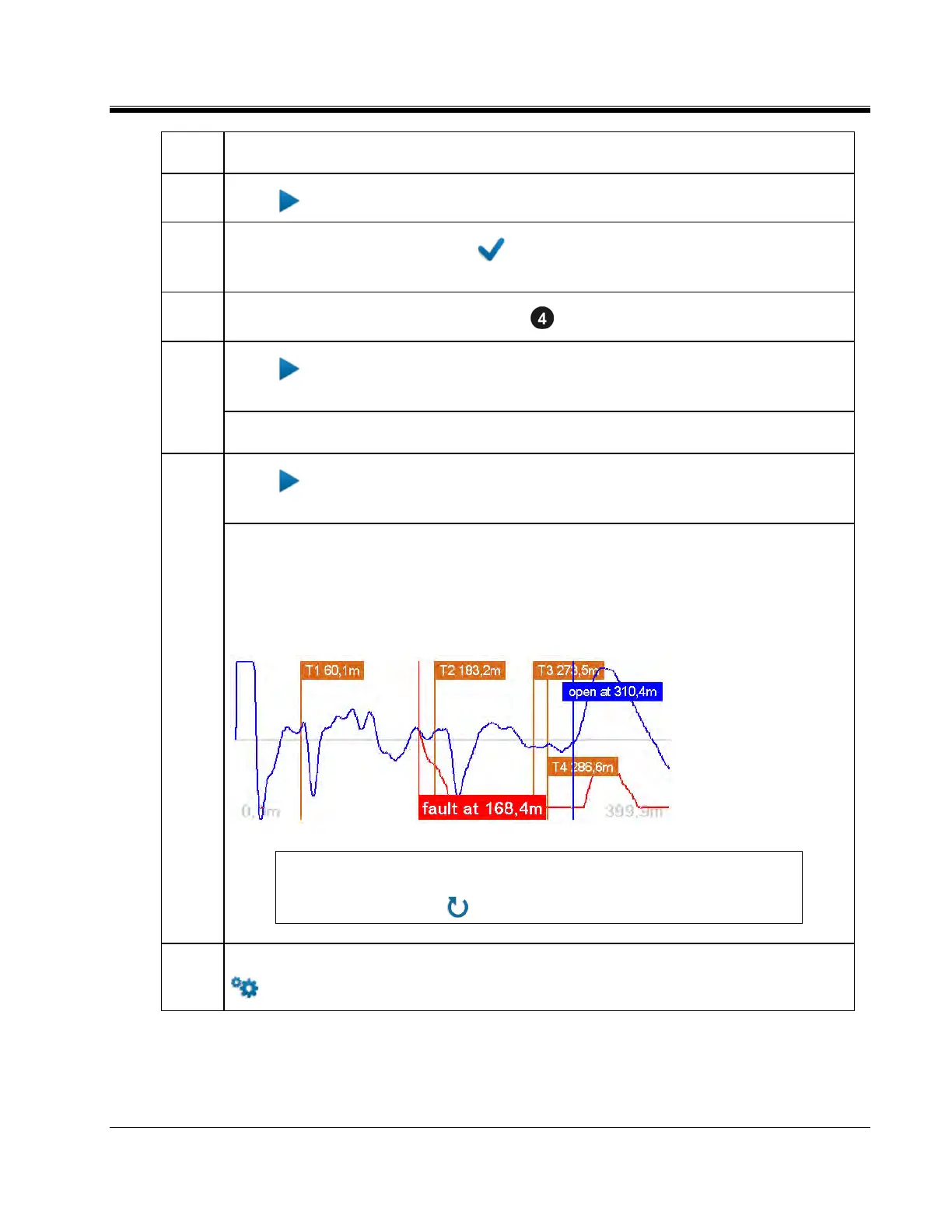
If a voltage breakdown takes place, the red fault trace is shown in the display. The red
fault marker is automatically set to the position where both traces diverge from each other.
The fault is referenced to the 2 closest transformers, which identify the cable section
containing the fault.
NOTE: If no trigger is received and, thus, no fault trace is shown, you may
try to repeat the procedure with a higher surge voltage (if possible) by
selecting the menu item.
8
If necessary, adjust the display settings, TDR settings and marker position through the
menu in order to uniquely identify the affected section. See page 38).


 To Next Page