
 Need help?
Do you have a question about the meibes MeiFlow MFR3 and is the answer not in the manual?
Process for activating the MeiFlow MFR3 controller.
Procedure for selecting between heating and cooling modes.
Choosing the appropriate hydraulic diagram for system setup.
Setting the correct direction of valve rotation for operation.
Setting minimum, maximum, and target temperatures for heating.
Setting minimum, maximum, and target temperatures for cooling.
Critical safety advice regarding controller handling and installation.
Guidelines for correct valve adjustment and temperature settings.
Identification of buttons, display, and connectors on the controller.
Steps for safely replacing the power cord and associated precautions.
Instructions for assembly and electrical connection of the controller.
Understanding the controller's main display interface.
Quick method to adjust the valve rotation direction.
How to set and confirm target temperatures.
Instructions for operating the mixing valve manually.
Interpreting and resolving error indicators on the controller.
Detailed technical data including torque, voltage, and dimensions.
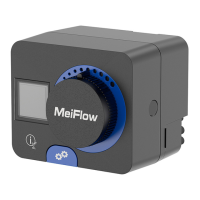
This document describes the MeiFlow MFR3 Fixed Value Controller, a device designed for controlling a mixer in heating and cooling systems. It provides detailed instructions for commissioning, operation, and maintenance.
The MeiFlow MFR3 controller is a fixed value controller specifically designed to manage the operation of a mixer. Its primary function is to maintain a desired target temperature by adjusting the mixer's position, thereby regulating the flow of heating or cooling medium. The controller uses a 3-point PID control strategy to achieve precise temperature regulation. It is equipped with a pre-wired temperature sensor (Pt1000) to measure the actual temperature in the system.
The controller offers various settings for both heating and cooling modes, allowing users to define minimum and maximum target temperatures for each. It also supports different hydraulic schemes, such as return flow control and flow control, which can be selected based on the specific system setup. The device features a graphic display that shows the current operational status, actual temperature, target temperature, and any error messages.
A key safety feature highlighted is the necessity for independent system protection against excessively high or low temperatures, as the controller itself does not perform these protection functions. Incorrect settings for valve direction, minimum/maximum temperatures, or hydraulic schemes can lead to system damage or undesirable operation.
The MeiFlow MFR3 controller is designed for intuitive operation through a set of buttons and a rotary knob.
Commissioning: Upon activation, the controller guides the user through initial setup steps. This includes selecting the heating or cooling mode, choosing the appropriate hydraulic diagram, and setting the valve rotation direction. Users then define the minimum and maximum target temperatures for the selected mode. The basic screen displays the actual and target temperatures, along with symbols indicating the current operational status (heating, cooling, valve direction, etc.).
Basic Operation: The controller's basic screen provides a quick overview of the system's status, including the type of operation (heating/cooling), actual temperature, and target temperature. Various symbols are displayed to indicate the valve's rotation direction, return flow temperature, flow temperature, and any transmission deactivation or errors.
Settings Adjustment: Settings are adjusted using the left and right arrow buttons to navigate and change values, and a confirm button to save selections. This applies to setting the target temperature, selecting heating/cooling modes, and configuring valve direction.
Target Temperature Setting: Users can easily set the desired target temperature. The process involves navigating to the target temperature setting, adjusting the value using the arrow buttons, and confirming the selection.
Valve Direction Setting (Shortcut): A shortcut allows for quick adjustment of the valve rotation direction, which is crucial for correct mixer operation. Incorrect direction can lead to significant temperature deviations.
Manual Operation: The controller includes a manual operation mode. By pressing the clutch button, the mixing valve can be manually adjusted using the rotary knob. This feature is useful for troubleshooting or specific operational needs. When manual operation is active, the automatic control of the mixing valve is temporarily switched off.
Error Handling: In case of an error, the display will show an "Error" message. The manual emphasizes checking the controller and its packaging for visible damage before installation, as a damaged product can be life-threatening.
Environmental Conditions: The controller is designed to be installed and operated in a dry, non-explosive, enclosed environment with temperatures between 0 °C and +55 °C.
Power Cord Replacement: The power cord of the MeiFlow MFR3 controller is designed to be replaceable if damaged. The cable is equipped with a mains plug and connector. To replace it, the cable protection cover must first be removed. It is crucial to use only the original power cord for replacement.
Safety during Maintenance: A critical safety warning is issued for any installation or maintenance work: always ensure that the device is completely disconnected from the mains and secured against accidental re-connection to prevent the fatal risk of electric shock.
General Maintenance: Regular checks of the controller and its packaging are recommended. Any visible damage should prevent installation and use. The manual does not specify routine cleaning or calibration procedures but implies that proper installation and correct settings are key to the device's longevity and accurate operation.
 General
| Connection | Screw terminals |
|---|---|
| Housing material | Plastic |
| Application | Heating systems |
| Sensors | Temperature sensor |
| Display | LCD display |
| Operating pressure | 10 bar |
| Operating temperature | 0 to 60 °C |
| Voltage | 24 V AC/DC |

 To Next Page