4
MELBOURNE INSTRUMENTS – NINA V1.1
5
MELBOURNE INSTRUMENTS – NINA V1.1
Overview
Motorized Control Panel
Nina’s unique motorized control panel dierentiates it
from all other synthesizers. This new technology allows
all the control surface knobs to automatically move to
where they are supposed to be. During Patch editing,
they show how the oscillators, VCF, VCA etc are set.
In Modulation Mode, they show you how much each
MOD destination is assigned. In multi-timbral, they jump
between the dierent presets as you change the current
layer, and in MORPH mode the entire control panel
updates on the y, according to the Morph amount.
This User Manual will explain all these dierent modes of
operation.
An important aspect of the knobs is that they are
very high resolution. They are as higher resolution
than traditional potentiometers, and are based on
a contactless optical analog position sensor. The
resolution of the sensor is extremely high, around
15000 steps. This resolution is what actually controls
the audio circuitry and what is stored in the Preset. The
LCD display will show a rounded down version of this eg
0 to 100 in steps of 1, but that does not mean that the
position is only dened by 100 steps.
The DATA Knob is used to interact with the LCD screen,
and the 3 Keys under the LCD are soft-keys, with their
functions labelled on the LCD. The remainder of the
knobs have dedicated functions printed under them. The
main output volume is the only standard potentiometer
in the unit.
Nina’s red keys each have an LED to indicate status.
These are summarized in the table on page 8.
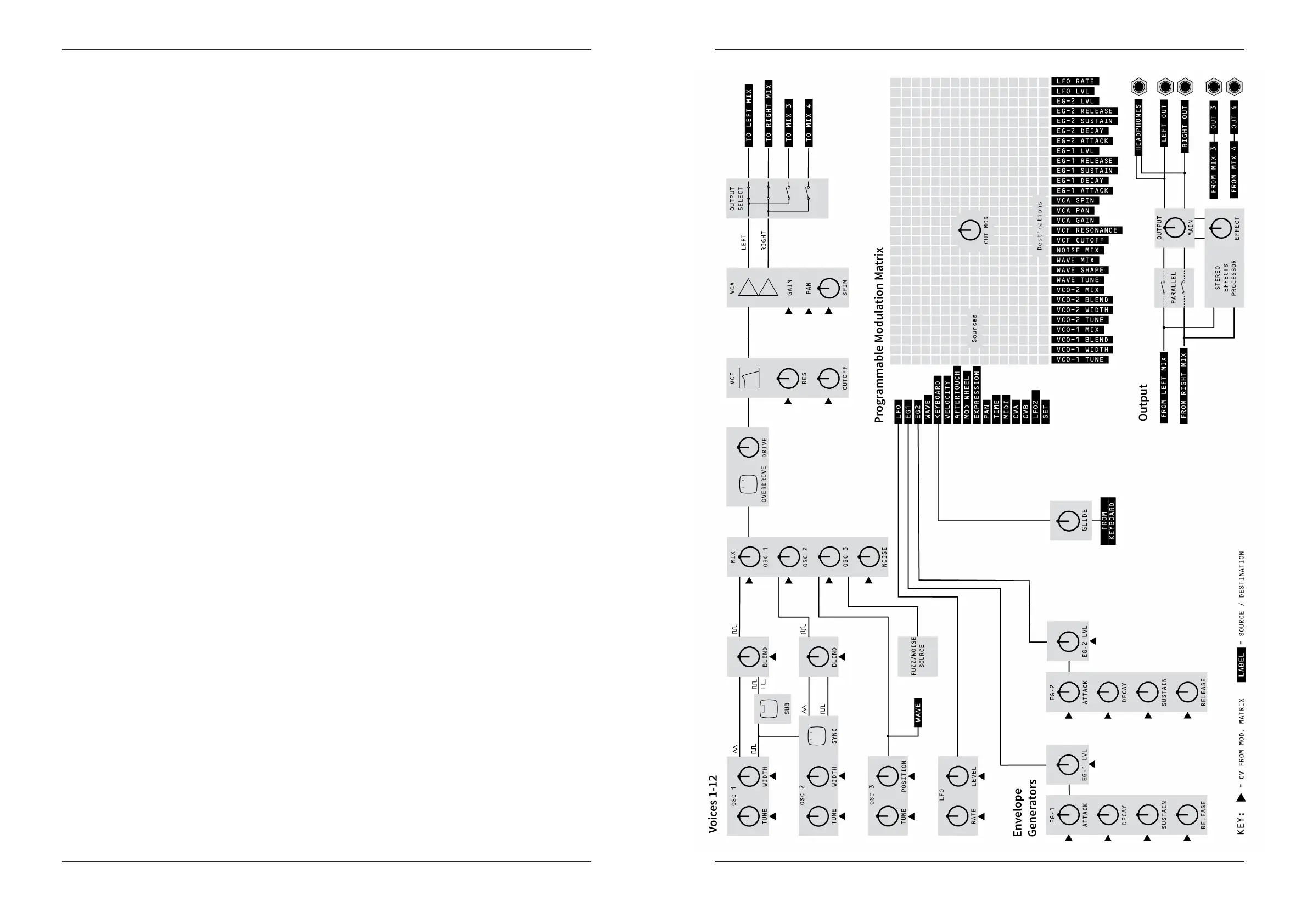
Voice Architecture
The main stereo output analog signal is sampled by an
internal 96kHz, 24bit ADC, and passed through stereo
digital eects which are mixed back into the main analog
outputs. The 2 Aux outputs are always sent out without
eects.
See Block Diagram on page 5 for more information.



 To Next Page