10
MELBOURNE INSTRUMENTS – NINA V1.1
11
MELBOURNE INSTRUMENTS – NINA V1.1
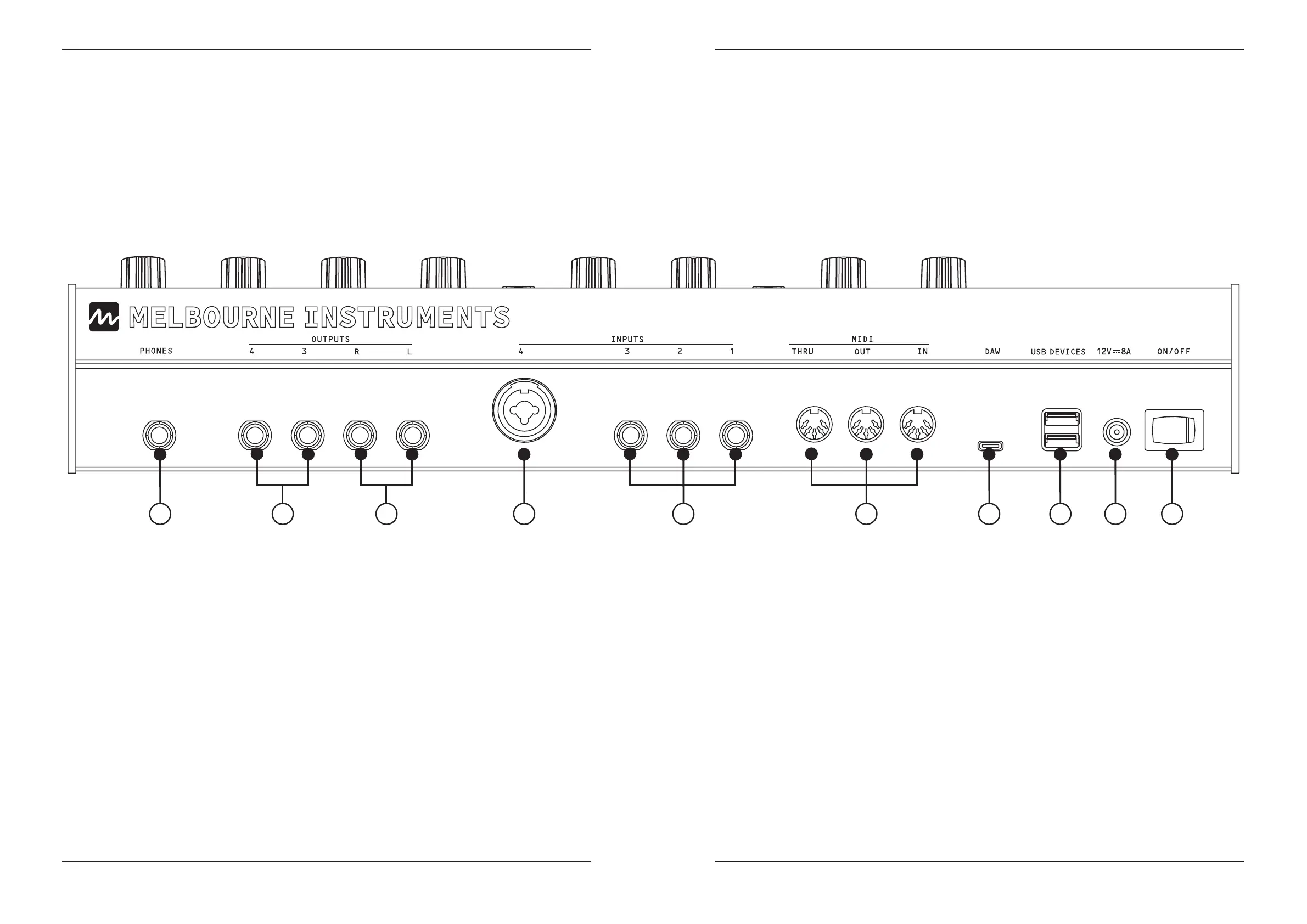
Rear Panel & Connections
1. PHONES:
1/4” Headphone jack.
2. OUTPUTS:
Main Audio Left & Right: Line Out.
For best results use a TRS Balanced cable.
3. AUX AUDIO LEFT & RIGHT:
Auxiliary Audio Out. No eects and xed level.
4. INPUTS:
Inputs 1/2/3: Line level Audio or CV.
5. INPUT 4:
Line or Mic Level Audio or CV.
6. MIDI:
Standard DIN MIDI.
7. DAW (USB HOST):
USB-C connection for Mac/PC.
NINA appears as a MIDI device.
8. USB DEVICES:
USB MIDI Keyboards and controllers,
USB thumb drives.
9. POWER INPUT:
Use supplied power accessories only.
12V 8A.
10. POWER SWITCH:
On/O.
1 3 2 5 4 6 7 8 9 10



 To Next Page