Introduction
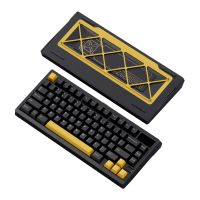
This guide provides step-by-step instructions for assembling the Meletrix Zoom75 TIGA keyboard. For
best results, we recommend using this guide alongside the official build video. If this is your first time
building a mechanical keyboard, carefully review both the guide and video before beginning to ensure a
smooth assembly process.
If you experience any issues or require assistance, please contact Meletrix at service@meletrix.com or
join our Discord server.
Kit Contents
Upon receiving your kit, inspect all components to ensure they are present and undamaged.
Standard kit contents:
● Case Components:
○ Top case (preinstalled with LCD screen and roller knob)
○ Bottom case (preinstalled with batteries, internal weight, dual wing accents, soul grill,
external weight, and silicone feet)
● Dampening Foam Kit (varies by selection): PET case foam, PET acoustic pad, case foam, switch
foam, plate foam. See this video for a display of the kit.
● PCB (preinstalled with magnetic strip and ribbon cables for LCD screen and roller knob)
● 2.4 GHz Receiver
● Plate (varies by selection)
● Stabilizers
● Mounting Options:
○ Top mount
○ Split O-Ring
○ Elastic Bar Silicone
○ Silica Gel Particle
● Additional Components:
○ Screwdriver
○ Magnetic rear badge
○ Spare ribbon cables
○ LCD screen and roller knob spacers
○ Stabilizer pads
○ USB cable
○ Manual
○ After-sales service card


 To Next Page