EasyManua.ls Logo

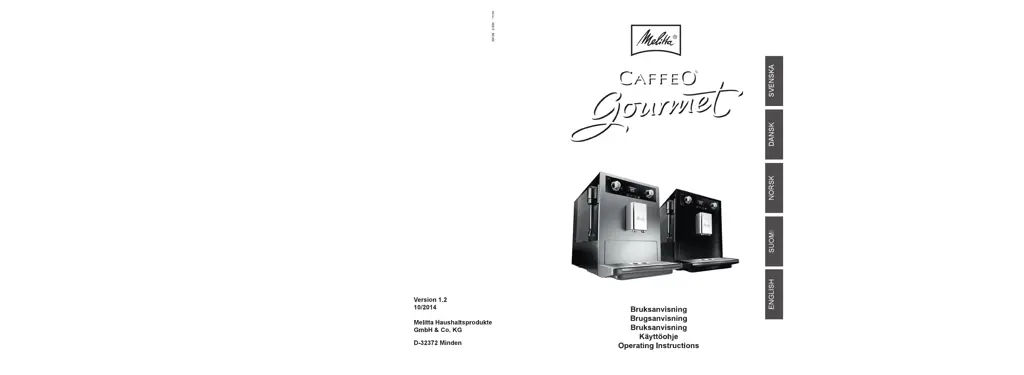
Melitta Gourmet - User Manual

Melitta Gourmet
42 pages
Print Icon
To Next Page IconTo Next Page
Loading...

Questions and Answers

  • J
    James BakerJul 27, 2025
    How to fix Melitta Gourmet when coffee only flows drop by drop?
    • E
      ebonywilliamsJul 27, 2025
      If your Melitta Coffee Maker is dispensing coffee drop by drop, the grinding fineness might be too fine. Try setting it to a coarser setting. Additionally, clean the brewing unit and descale the appliance if needed. You may also need to run the integrated cleaning program.
  • U
    ugordonAug 1, 2025
    Why is coffee not flowing from my Melitta Gourmet?
    • J
      John BrownAug 1, 2025
      If coffee isn't flowing from your Melitta Coffee Maker, first ensure the water tank is filled and correctly inserted. Also, the brewing unit may be obstructed, so try cleaning it.
  • R
    robinsonemilyAug 8, 2025
    What to do if brewing unit can't be reinserted in Melitta Gourmet?
    • E
      emily10Aug 8, 2025
      If you can't reinsert the brewing unit into your Melitta Coffee Maker after removing it, ensure that the handle for locking the brewing unit is correctly engaged. If that doesn't work, the drive might not be in the proper position. Insert the drip tray, close the cover, turn on the appliance, and simultaneously press the button for steam dispensing, coffee strength, and the ON/OFF button to run the initialization process.
  • R
    Randy TrevinoAug 14, 2025
    Why is Melitta Gourmet grinder not grinding the coffee beans?
    • B
      burtonpennyAug 14, 2025
      If the grinder in your Melitta Coffee Maker isn't grinding beans, try these steps: First, tap lightly on the bean container to help the beans drop into the grinder, especially if they seem oily. Also, ensure the tilt lever is moved to the right or left, and not vertical.
  • M
    marshalltimothyAug 20, 2025
    Why does Melitta Gourmet say 'Fill beans' when full?
    • A
      Abigail ObrienAug 21, 2025
      If the 'Fill beans' display appears on your Melitta Coffee Maker even when the bean container is full, it may be due to an insufficient quantity of ground beans in the brewing chamber. Try dispensing a coffee.

Summary

Information about these operating instructions

Symbols in the text of these operating instructions

Explains hazard and tip symbols used throughout the manual.

Intended use

Defines the proper and exclusive use of the Melitta CAFFEO Gourmet appliance.

Non-intended use

Defines and warns against improper uses of the appliance, potential hazards.

General safety instructions

Appliance description

Legend for Figure A

Identifies and explains components labeled in Figure A of the appliance.

Legend for Figure B

Identifies and explains components labeled in Figure B of the appliance.

Accessories

Lists the accessories included with the coffee machine.

Overview of buttons

Explains the meaning and function of each button on the appliance.

Graphic display

Illustrates and explains the elements shown on the appliance's graphic display.

Starting up

Placement

Provides instructions on how and where to place the coffee machine.

Connection

Details the procedure for connecting the appliance to a power source.

Switching on for the first time

Guides the user through the initial power-on and setup process.

Filling the bean container

Instructions on how to fill the bean container with coffee beans.

Filling the water tank

Instructions on how to fill the water tank with fresh tap water.

Switching on and off

Switching on the appliance

Explains the procedure to turn on the coffee machine.

Switching off the appliance

Explains the procedure to turn off the coffee machine.

Preparing beverages

AromaAdjust function

Describes how to adjust coffee strength before and during grinding.

Preparing espresso or café crème

Provides steps for preparing espresso and café crème drinks.

Preparing espresso or café crème with ground coffee

Instructions for preparing beverages using ground coffee.

Preparing milk froth

Preparing hot water

Overview and operation of menus

Accessing the main menu

Explains how to enter and navigate the main menu system.

Overview of sub-menus

Lists and briefly describes all available sub-menus and their functions.

Espresso or Café crème sub-menus

Details personal coffee settings for espresso and café crème.

Care sub-menu

Explains access to rinsing, cleaning, descaling, and filter management.

Energy-saving mode sub-menu

How to configure the appliance's energy-saving features.

Clock sub-menu

Instructions for setting or deactivating the time display.

Auto-OFF sub-menu

How to set automatic switch-off times for the appliance.

Water hardness sub-menu

How to set the water hardness level for optimal appliance performance.

Language sub-menu

Instructions for changing the language displayed on the appliance.

Statistics sub-menu

How to view statistics on prepared beverages.

System sub-menu

How to reset settings and vent the appliance.

Care and maintenance

General cleaning

Instructions for routine cleaning of the appliance exterior and removable parts.

Cleaning the Perfect Cappuccino

Steps for cleaning the milk frothing system.

Cleaning the brewing unit

Detailed instructions for cleaning the removable brewing unit.

Rinsing the coffee unit

How to perform a manual rinse of the coffee unit.

Integrated cleaning programme

Steps for running the automated cleaning cycle for the appliance.

Integrated descaling programme

Guides the user through the automated descaling process.

Adjusting grinding fineness

How to adjust the grind setting for coffee beans.

Water filter management

Inserting the water filter

Step-by-step guide to installing a new water filter.

Changing the water filter

Instructions for replacing the water filter when prompted.

Removing the water filter

Procedure for taking out the water filter and setting water hardness.

Transport and disposal

Transport

Guidelines for safely moving or transporting the appliance.

Disposal

Instructions for environmentally responsible disposal of the appliance.

Troubleshooting

Melitta Gourmet Specifications

General IconGeneral
BrandMelitta
ModelGourmet
CategoryCoffee Maker
Filter TypePaper Filter
Capacity10 cups
Aroma ControlYes
Timer FunctionYes
Keep Warm FunctionYes
Automatic Shut-OffYes
Water Level IndicatorYes
Water FilterNo
Pause and ServeYes
Featurestimer function
TypeDrip coffee maker
Water Tank Capacity1.25 L
Filter Size4
ColorBlack

Related product manuals